 Astrolinks


Short answer
An EOD report template for virtual assistants is a reusable format for the short update a VA sends each client at the end of a shift. The base version has four headings: Completed, In progress, Blocked or need from you, and Tomorrow, plus optional hours. Send one report per client, in the channel they prefer.
Astrolinks writes each client’s end-of-day update from your actual work, so 6 pm isn’t report time. Get it free →
Every client wants to know what you did today, but each one wants it a bit differently. This EOD report template for virtual assistants gives you one solid base and five variations: general admin, inbox and calendar, social media, customer support, and hourly billing. Copy the one that fits, tweak the headings, and save it somewhere you can reach in two clicks. Or paste your notes into the free EOD report generator and it lays them out for you.
The base EOD report template for virtual assistants
Start here. It works for almost any VA client.
Daily update for [Client], [Day, date]
Completed
- [Outcome 1, with a number if you can]
- [Outcome 2]
- [Outcome 3]
In progress
- [Task, and where it stands]
Blocked / need from you
- [What you need, from whom, by when]
Tomorrow
- [Top 1 to 3 priorities]
Hours today: [optional]
Thanks, [Your name]
Why these headings? Completed shows value. In progress stops the client wondering about half-done work. Blocked / need from you is the line clients act on, so it gets its own heading. Tomorrow shows you're planning ahead.
What should a VA ask a client before the first EOD report?
Ask where they want the report, when they want it, and whether they want hours in it. A template only works if it fits the person reading it. Before your first report, ask each new client:
- Where do you want it? Slack, email, a shared doc, or the agency's tool.
- When do you want it? End of your shift, or a set time in their day.
- Do you want hours in it? Hourly clients usually say yes. Retainer clients often don't care.
Write the answers in your notes for that client. Then pick the variation below that matches their work, and change the headings to their words. If they call it a "daily recap", call it that too.
Variation 1: General admin VA
For clients who hand you a bit of everything.
Daily update for Northwind Realty, Wednesday, October 14
Completed
- Updated 6 listings in Airtable with new photos and prices
- Booked 3 showings for Saturday and sent confirmations
- Filed September receipts into the shared drive
In progress
- Listing copy for 1420 Alder St, first draft done
Need from you
- Final asking price for Alder St
Tomorrow
- Finish Alder St copy, then the open house flyer
Variation 2: Inbox and calendar VA
For executive assistant style work. Counts help here.
Inbox and calendar, Wednesday, October 14
Inbox
- 48 emails handled: 31 archived, 12 replied, 5 flagged for you
- Flagged: the two contract questions from Acme, and the conference invite
Calendar
- Moved Thursday's 1:1 with Sam to 3:00 PM
- Declined the vendor demo, as you asked
Need from you
- Yes or no on the conference by Friday
Tomorrow
- Prep notes for Monday's board call
Variation 3: Social media VA
For content and community work. Link to the drafts.
Social update for Brightline Co., Wednesday, October 14
Published
- Instagram carousel "5 cold brew mistakes" (scheduled 10:00 AM, posted)
- 3 stories from the shop visit
Drafted for approval
- October launch reel script (link)
Community
- Replied to 19 comments and 7 DMs; 2 complaints passed to Jen
Tomorrow
- Edit the launch reel once the script is approved
Variation 4: Customer support VA
For VAs who answer tickets, chats or a shared support inbox. The client wants to know the queue is under control and what keeps coming up.
Support update for Fernway Goods, Wednesday, October 14
Queue
- 37 tickets closed, 4 waiting on the customer, 2 passed to you
- Oldest open ticket: 6 hours (a refund waiting on your OK)
Patterns
- 9 people asked about the late Chicago shipment; I used the delay reply we agreed
Need from you
- OK on the refund for order 10482
Tomorrow
- Update the shipping FAQ if the delay goes past Friday
The Patterns line is the one support clients value most. It turns a pile of tickets into something they can fix.
Variation 5: Hourly client with time breakdown
For clients who pay by the hour and want to see where it went.
Update for Halcyon Dental, Wednesday, October 14
Worked 3h 15m, 6:00 to 9:30 PM Pacific Time (with a 15m break)
- October invoices (Google Sheets): 1h 20m
- Reconciling in QuickBooks: 55m
- Patient scheduling (Calendly): 40m
- Slack and email with Dr. Patel: 20m
Blocked
- New hourly rates needed to finish payroll
Tomorrow
- Send the remaining 4 invoices
Check that the time lines add up to the total. A client who spots 3h 15m at the top and 3h 05m in the list will start checking every report. Our guide on tracking time across multiple clients covers how to keep each client's minutes clean.

One evening, three clients: an example
Most VAs don't send one report. They send three or four, one after another, at the end of a shift. Here is how Maya, a VA with a dental office, a coffee brand and a realtor, splits one evening.
| Client | Variation | Channel | Sent at (client's time) |
|---|---|---|---|
| Halcyon Dental | Hourly with time | Slack DM to Dr. Patel | 9:35 PM Pacific |
| Brightline Co. | Social media | #brightline-content in Slack | 12:40 AM Eastern, read in the morning |
| Northwind Realty | General admin | 11:40 PM Central, read in the morning |
Three things make this work. She keeps a separate scratch note per client, so nothing crosses over. She writes the strictest client's report first, while she's freshest. And she never copies a line from one report into another without checking the client name. If you work US hours from overseas, our guide on how night shift VAs keep US clients updated has more on timing.
How can a virtual assistant write an EOD report in five minutes?
Keep notes as you go, use the client's time zone and channel, and save each client's version of the report.
Keep notes as you go
The report takes forever when you write it from memory. Keep a scratch note per client and add one line each time you finish something. At the end of the day the report is half written.
Use numbers where they're honest
"Handled 48 emails" means more than "handled the inbox". But don't inflate. If you aren't sure of a number, leave it out.
Put times in the client's time zone
If you work from Chicago for a client in San Diego, write the client's time. "3:00 to 6:30 PM Pacific" saves them doing the math. If a client asks for the report "by EOD", our guide to EOD meaning and what time EOD is shows whose end of day counts.
Match the client's channel
Some clients live in Slack. Some only read email. Some want a shared Google Doc. Ask once, then always use that.
Write the blocker as a question
"Waiting on rates" can sit unanswered for days. "Can you send the new rates by Thursday?" gets a reply, because it asks for one clear thing. Busy clients answer questions faster than they read statements.
Save each client's version
Once a client says "this is perfect", save that report. Use it as the model for every report after.
What should a VA leave out of an EOD report?
Leave out small tasks listed one by one, long apologies, other people's personal details, passwords and empty headings. A template can tempt you to fill every heading. Don't. A few things rarely belong in a VA's daily report:
- Every small task. Group them. "Answered 48 emails" is enough.
- Apologies. If something slipped, say what happened and what's next. Skip the long sorry.
- Personal details about other people. If you handle patients, customers or staff, refer to them by role or ticket number, not full names, unless your client asks otherwise.
- Passwords and logins. Never put them in a report, even in Slack. Use the client's password manager.
- Empty headings. If nothing is blocked, write "Nothing blocked" or remove the heading. Both are fine. A blank heading looks like you forgot.
The shorter and clearer the report, the more likely the client reads it every day. That's the whole point.
Adjust the template as the work changes
A template is a starting point, not a contract. Clients change what they hand you, and the report should follow. A few common shifts, and what to change:
| What changed | What to change in the report |
|---|---|
| A new project starts | Add a short Project heading with one status line, so it doesn't get lost among daily tasks |
| The client starts billing you hourly | Move to Variation 5 and add the total hours at the top |
| A launch or busy season | Put Need from you first, and add the date each answer is needed by |
| The client hires a second VA | Say who did what, and add a Handed over line for shared work |
| Work goes quiet | Keep the report, but make it three lines. Skipping days makes clients wonder |
Once a month, send a one-line question at the end of a report: "Is this format still useful, or would you like anything added or removed?" Most clients will say it's fine. The ones who want a change will tell you, and you'll fix it before it becomes a complaint.
What should you check before sending an EOD report?
Check the client name, the blocker, your numbers, the time zone and tomorrow's first task. Run this 30-second check on every report:
- Right client name in the title, and only their work below it
- The blocker, if any, near the top, with a date you need it by
- Numbers you can stand behind
- Times in the client's time zone
- Tomorrow's first task named
If the report passes, send it. If a client asks for more detail, add it to their saved version, not to everyone's.
Let your day fill in the template
Templates fix the format. They don't fix the remembering. Astrolinks does that part. It's a desktop app for Mac and Windows that keeps a private log of your day on your own computer, files each piece of work under the right client, and at clock-out drafts each client's report in the sections you set. Quick notes that start with "blocked" or "tomorrow" go under those headings by themselves.
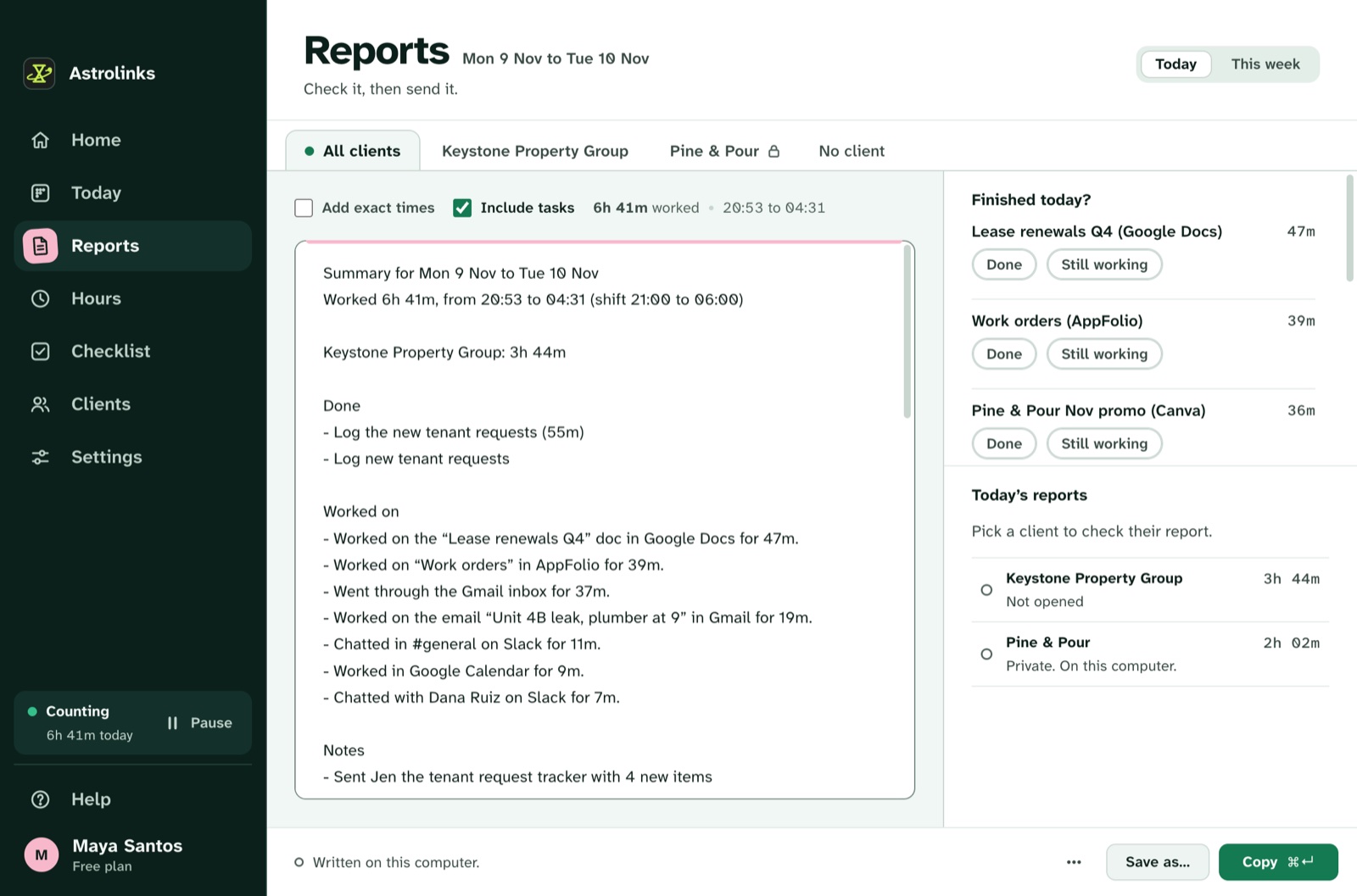
Each client keeps their own sections and time zone, and with Pro, their own report language. When a client loves one report, Write like this one (Pro) keeps its shape for next time. You read it, fix it and send it. See the end-of-day reports feature, or read about Astrolinks for virtual assistants.
Related guides
- How to write an end-of-day report, the method behind these templates
- How VAs on US night shifts keep clients updated
- How to track time across multiple clients
- How to manage multiple clients as a VA
- Weekly client recap templates for the Friday version