 Astrolinks

Short answer
To track a US remote team's work without monitoring, let each person keep a private log on their own computer and send a short daily report they have checked. Astrolinks does this: the company's Team inbox gets only the reports people send, never screenshots, keystrokes, apps or websites, with hours included only when each person chooses.
A US remote team rarely shares a clock. Your designer starts at 8 AM in Brooklyn while your developer in Seattle is still asleep, and your support lead in Honolulu signs off after the East Coast has gone to dinner. Standups get hard to schedule, Slack threads get long, and someone in leadership starts asking about monitoring software.
There is a better answer than bossware. Astrolinks helps each person write a clear end-of-day report in a minute, from a private log on their own computer, and send it to one Team inbox. This page covers what's specific to teams in the US. The general picture is on the Astrolinks page for remote teams.
The problems, and how Astrolinks fixes them
| What goes wrong | How Astrolinks fixes it |
|---|---|
| Eastern to Hawaii is a 5 or 6 hour spread, so live standups don't fit | Each person sends a written report at the end of their own day |
| Leadership wants visibility and looks at screenshot trackers | Daily reports in one inbox; no screenshots or keystroke logging, ever |
| State notice laws make monitoring a paperwork question | The company sees only what people send, and a worker notice template says so |
| Updates come in as "all good" | Done, Blockers and Tomorrow, written from the person's own day |
How do you see a remote team's work without monitoring it?
Ask for outcomes, in writing, from the person who did the work. That's the whole idea.
Each person runs Astrolinks on their own computer. It notes which app and window are in front every 5 seconds, and the web address in supported browsers. It never records keystrokes, screenshots or the clipboard. That log stays on their computer. The company never receives it, and neither do we.
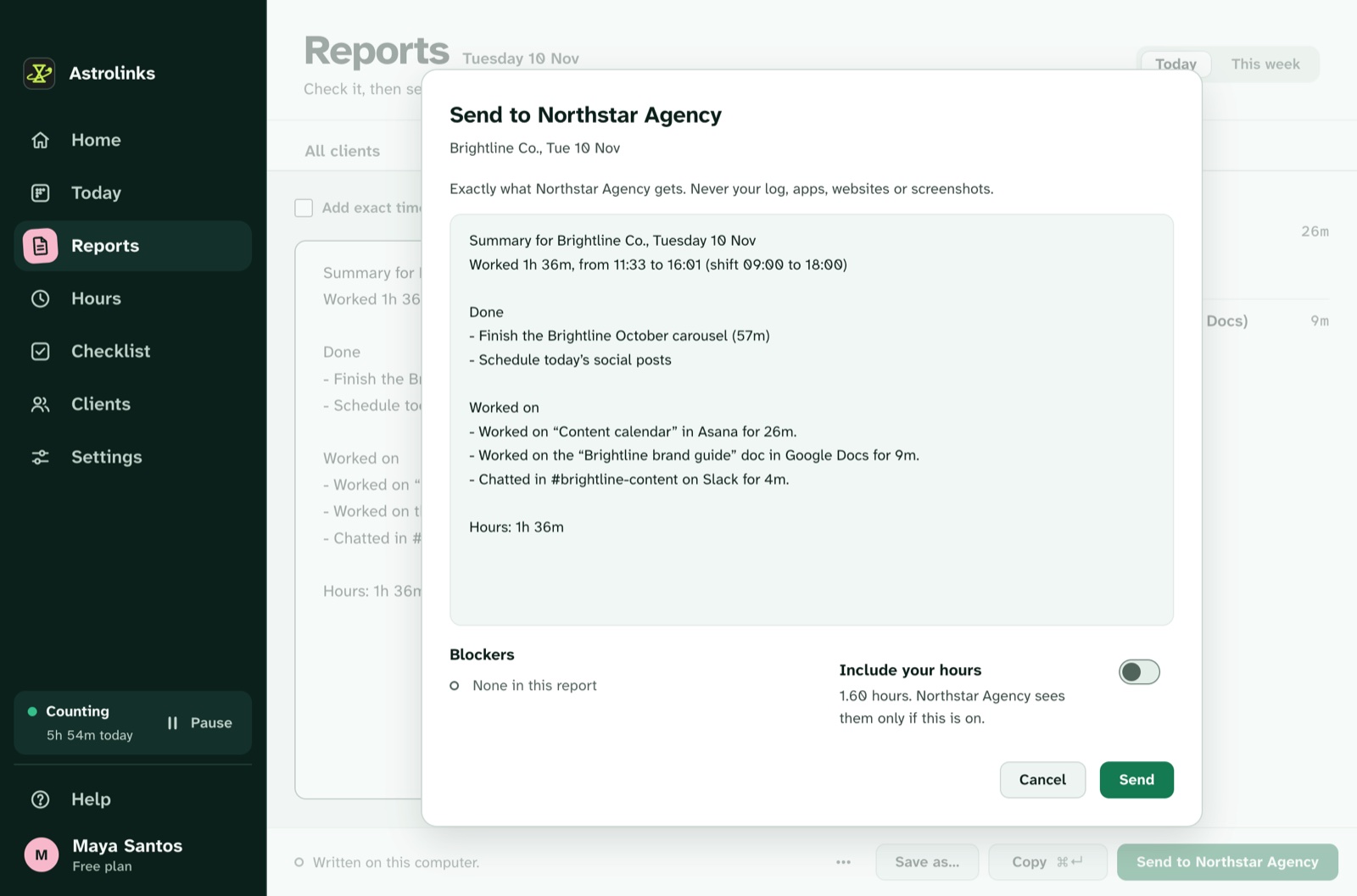
At the end of the day, Write my report drafts a report from that log and their quick notes, with Done, Blockers and Tomorrow. They read it, fix it, and press Send to your team. Before anything goes, a sheet shows exactly what the company gets: the client or project and day, the report's text and any blockers. Hours go only if they switch on Include your hours, which is off every time the sheet opens. They can take a report back later.
Managers start from an Overview of who has sent today and what's blocked, and can give tasks and goals with a note and a due day. When someone marks a task done, the manager sees that and their note, not how long it took. The Team inbox page explains every part of it.
Which US states require notice of employee monitoring?
A few states have specific laws about telling employees when their electronic activity is monitored. The best known:
- New York. Since May 7, 2022, Civil Rights Law section 52-c requires private employers with a place of business in New York that monitor employees' phone, email or internet use to give written notice on hiring, get a written or electronic acknowledgment, and post the notice where employees can see it.
- Connecticut. Connecticut has long required employers to give prior written notice of electronic monitoring. It replaced that law with an expanded version that took effect October 1, 2026.
- Delaware. Employers must give notice before monitoring phone, email or internet use, either each day the employee uses those systems or once, with the employee's written or electronic acknowledgment.
Other states have their own rules, and they change. Astrolinks is built so the company never sees anyone's activity, apps or websites, only reports people choose to send. Whether a given law applies to your setup is a question for your employment lawyer, not for us. Either way, telling people plainly what the company sees is good practice. Our worker notice template does that in one page, and many teams share it before anyone installs the app.
Doesn't trust work better than bossware?
Monitoring tools promise certainty: screenshots, activity percentages, idle alerts. What they often deliver is people who feel watched, managers buried in data nobody reads, and a quiet arms race of mouse jigglers and "looking busy". Our guide to bossware and employee monitoring goes into what those tools see and what they miss.
A written daily report answers the questions a manager actually has. What got done. What's stuck. What happens tomorrow. It costs the person a minute, and it shows their judgment, which no screenshot can. For a simple format, see remote team updates without micromanaging.
How do you run a team across US time zones?
The continental US spans four main time zones, Eastern to Pacific, three hours apart. Add Alaska and Hawaii and the spread grows. Hawaii doesn't use daylight saving time, and neither does most of Arizona, so the gap to them changes in March and November while everyone else's stays the same.
Live meetings for everyone end up squeezed into a few shared hours. Written reports don't care. Each person sends theirs at the end of their own shift, and the inbox is full when the manager starts the next morning. Each person can also set a time zone for a project, so a report from Honolulu can say "from 07:58 to 16:30 Eastern Time" for a manager in New York. With Pro, which Team includes, reports can be written in English, Spanish, Portuguese (Brazil), Chinese (Simplified) or Filipino. Read more about async check-ins for remote teams.

An example US team
This is an illustrative example, not a real customer.
A software company with an office manager in Chicago has eight remote people: two in New York, one in Atlanta, two in Austin, one in Phoenix, one in Portland and one in Honolulu. Last year the founders looked at a screenshot tracker. Instead, they shared the worker notice template, bought Team seats and sent each person an invite code.
On a Tuesday in December, Priya in New York sends her report at 5:30 PM Eastern, with "blocked: waiting on the Stripe test keys" under Blockers. Marcus in Phoenix sends his at 5 PM Mountain, with his hours included because he's paid by the hour and his manager asked him to. Leilani in Honolulu sends hers at 4 PM Hawaii time, which is 9 PM in New York.
At 8:30 AM Central on Wednesday, the manager opens the Overview. Seven reports are in. One person hasn't sent, and the Overview shows that plainly. She sorts the two blockers, gives a task to the developer who can fix the test keys, and skips the standup. Nobody's screen was captured. Nobody's tabs were counted.
What about hours and the FLSA?
Under the federal Fair Labor Standards Act, employers must keep records of the hours non-exempt employees work each workday and each workweek. That's the employer's responsibility, kept in the employer's own timekeeping or payroll system.
Astrolinks isn't built to be that system. Hours in Astrolinks are each person's own notes of their day. They reach the company only when the person includes them in a report, and the person can edit the report first. Use them as context, not as your record of hours worked. Your payroll provider or employment lawyer can tell you what your records need.
Plans for US teams
Team gives each person Pro, a company inbox for the reports they choose to send, tasks and goals, and reports kept up to 90 days. Business adds reports kept up to 2 years, CSV export of reports and the activity log, required two-step sign-in for every manager, and priority support. Both are per seat, from 2 seats. Astrolinks runs on Mac and Windows. See plans and pricing, or write to us for a free 30-day pilot.
Keep reading
- Astrolinks for remote teams and Astrolinks for companies
- Daily standup vs. EOD report
- Comparing tools? Read the Time Doctor alternative and the ActivTrak alternative