 Astrolinks


Short answer
A weekly client recap template is a reusable structure for a one-screen update you send at the end of each week, usually Friday. It covers the week's dates, a one-line headline, what got done grouped by kind of work, what's open or blocked, and next week's plan. Hourly clients also get hours by task and by day.
Want your EOD report written for you? Astrolinks writes it from your actual workday when you clock out. Get it free →
A weekly recap is the update clients actually read. Daily reports are useful, but on a busy week they pile up unread. A Friday recap answers the bigger questions in one screen: what moved, what's stuck, and what's coming next week. Below are five weekly client recap templates, one for each kind of client relationship, a worked example that turns five daily reports into one recap, and notes on when and where to send them.
Why send a weekly client recap?
A weekly recap shows progress across days, prepares the invoice, and lets the client change priorities before next week starts. It takes about ten minutes.
- It shows progress across days. A daily list of tasks can hide the fact that a project moved a lot. A weekly view shows it.
- It prepares the invoice. Hourly clients see the hours before the bill, so there are no surprises.
- It opens the right conversation. Next week's plan invites the client to change priorities before you start, not after.
- It's a record. When someone asks "when did we do that?" months later, you have an answer.
What should a weekly client recap include?
Every weekly client recap needs five parts: the dates, a headline, what got done, what's open, and next week's plan. Whatever the template, keep them:
- The week's dates, so it's clear what period it covers
- The headline: one or two sentences on how the week went
- What got done, grouped, not every single task
- What's open or blocked
- Next week's plan
Weekly client recap template 1: Retainer client
For ongoing monthly work where the client cares about steady progress.
Week recap for Brightline Co., Mon, Oct 5 to Fri, Oct 9
This week in one line: launch content is ready; DMs are under control.
Done
- Launch carousel and 3 stories, approved and scheduled
- Content calendar for November, first draft
- 74 comments and 31 DMs answered; 3 complaints passed to Jen
Open
- Launch reel waiting on the script approval
Next week
- Edit and publish the launch reel
- Finalize the November calendar
Have a good weekend, Maya
Template 2: Hourly client with time
For clients billed by the hour. Show the time by work item and by day.
Week recap for Halcyon Dental, Mon, Oct 5 to Sat, Oct 10
Worked 11h 58m over 6 days
What I worked on
- October invoices (Google Sheets): 6h 18m
- Reconciling in QuickBooks: 2h 07m
- Patient scheduling (Calendly): 1h 10m
- Payroll sheet: 26m
Email and chat: 1h 57m
By day: Mon 2h 02m, Tue 1h 48m, Wed 2h 10m, Thu 1h 43m, Fri 2h 01m, Sat 2h 14m
Open: new hourly rates still needed for payroll
Next week: send the remaining invoices; start November scheduling
Before you send it, add up the lines yourself. The work items and the days should both come to the same total as the top line.
Template 3: Project client
For fixed-scope projects with milestones. Focus on where the project stands.
Project update: website refresh, week 3 of 6
Status: on track
Milestones
- Home page design: done, approved Wednesday
- Product pages: in progress, 3 of 5 drafted
- Copy for About page: waiting on client notes
Decisions needed
- Pick one of the two footer options by Tuesday
Next week
- Finish product pages, start mobile layouts
Use one of three status words and stick to them: on track, at risk or late. If it's at risk, say why in the same line and what you need to get it back.
Template 4: Quick recap for a busy client
For clients who just want to know it's handled. Five lines.
This week: 48 listings updated, 9 showings booked, September receipts filed.
Waiting on you: final price for 1420 Alder St.
Next week: open house flyer and the new listing photos.
Thanks, Maya
Use it when a client has told you they don't want detail, or when the week was routine. If they start replying with questions, that's your sign to switch to Template 1 and show more.
Template 5: Agency recap for one client, from several people
For agencies and team leads who send one recap that covers work by two or more people. Group by outcome, and name who did what only where the client needs to know.
Week recap for Fernway Goods, Mon, Oct 5 to Fri, Oct 9
Headline: support queue back under 24 hours; holiday campaign drafts ready for review.
Support (Ana)
- 182 tickets closed; oldest open ticket now 9 hours
- Shipping FAQ updated for the Chicago delay
Marketing (Leo)
- 3 holiday emails drafted (links below)
- Product photos resized for the new store theme
Need from you
- Comments on the holiday emails by Wednesday
Next week
- Send the first holiday email; start the gift guide page
If you run a team of VAs, our Astrolinks for agencies page shows how each person's reports can land in one place.

Worked example: five daily reports into one recap
If you already send daily reports, the recap is mostly copy, group and trim. Here is how that looks for one client.
Monday to Friday, the daily "Done" lines said:
- Mon: drafted 2 listing descriptions; booked 2 showings
- Tue: updated 14 listings in Airtable; booked 3 showings
- Wed: updated 20 listings; filed August receipts
- Thu: updated 14 listings; booked 4 showings; filed September receipts
- Fri: open house flyer first draft; asked for the Alder St price again
Step 1: group by kind of work. Listings: 48 updated, 2 descriptions drafted. Showings: 9 booked. Receipts: August and September filed. Flyer: first draft.
Step 2: find the headline. The listings backlog is cleared. That is the thing the client will care about.
Step 3: carry over anything still open. The Alder St price was asked for twice. It goes in Waiting on you, near the top.
The result:
Week recap for Northwind Realty, Mon, Oct 5 to Fri, Oct 9
This week in one line: the listings backlog is cleared.
Waiting on you: final price for 1420 Alder St (needed for the flyer).
Done: 48 listings updated, 2 new descriptions, 9 showings booked, August and September receipts filed.
Next week: finish the open house flyer; new listing photos.
Five reports became five lines. Nothing the client needs was lost.
How do you write a weekly recap after a hard week?
Send it anyway, keep it short and honest, and give a new date for anything late. Some weeks go sideways: a sick day, a client emergency, a tool that broke. A short, honest recap keeps trust better than silence.
Week recap for Halcyon Dental, Mon, Oct 12 to Fri, Oct 16
This week in one line: the billing software outage cost two days, so invoices are late.
Done
- Payroll sent on time with the new rates
- Patient scheduling kept up to date all week
Late, and the new plan
- October invoices: 9 of 23 sent. The rest go out Tuesday.
Need from you
- OK to send a short note to patients about the delay?
Next week
- Finish invoices by Tuesday, then back to the normal routine
Three rules for this kind of recap. Say what happened in one line, without blame. Give a new date for anything late. And ask for the one decision you need, so the client can help instead of worry.
How can you write a weekly recap faster?
Build it from your daily reports, group small tasks, and lead with the headline.
Write from your daily reports
The worked example above is the fastest method. Our guide on how to write an end-of-day report sets up daily reports that make this easy.
Group small tasks
"Answered 74 comments" beats seventy-four bullets.
Lead with the headline
Clients skim. The first line should tell them if they need to read the rest.
Send it at the same time
Same day, same time, every week. Clients learn to expect it, and stop asking.
Cut what the client won't miss
A weekly recap is not five daily reports glued together. Leave out:
- tasks that were started and finished inside the week with nothing to show
- blockers that were already solved (unless the fix changes something for the client)
- routine work the client assumes you do, like checking the inbox
- anything about another client, even in passing
If a line wouldn't change what the client does or feels, it can go.
Match it to the invoice
For hourly clients, make sure the recap's hours agree with what you'll bill. Our guide on how to invoice hourly clients covers the billing side.
Where should you send a weekly client recap?
Send it where the client already works: email, Slack or a shared doc. Match the recap to how each client works:
- Email suits clients who forward updates to others, like a business owner who shares it with an accountant.
- Slack suits clients who live in it. Post in a dedicated channel so it doesn't scroll away.
- A shared doc suits project work. Add each week at the top, newest first, so the history builds up in one place.
Whatever the channel, keep the subject or first line the same each week, such as "Week recap, Oct 5 to 9". Clients can then search for them later. If you juggle several clients, our guide on managing multiple clients as a VA has a simple Friday routine for sending each one.
How Astrolinks writes the weekly recap
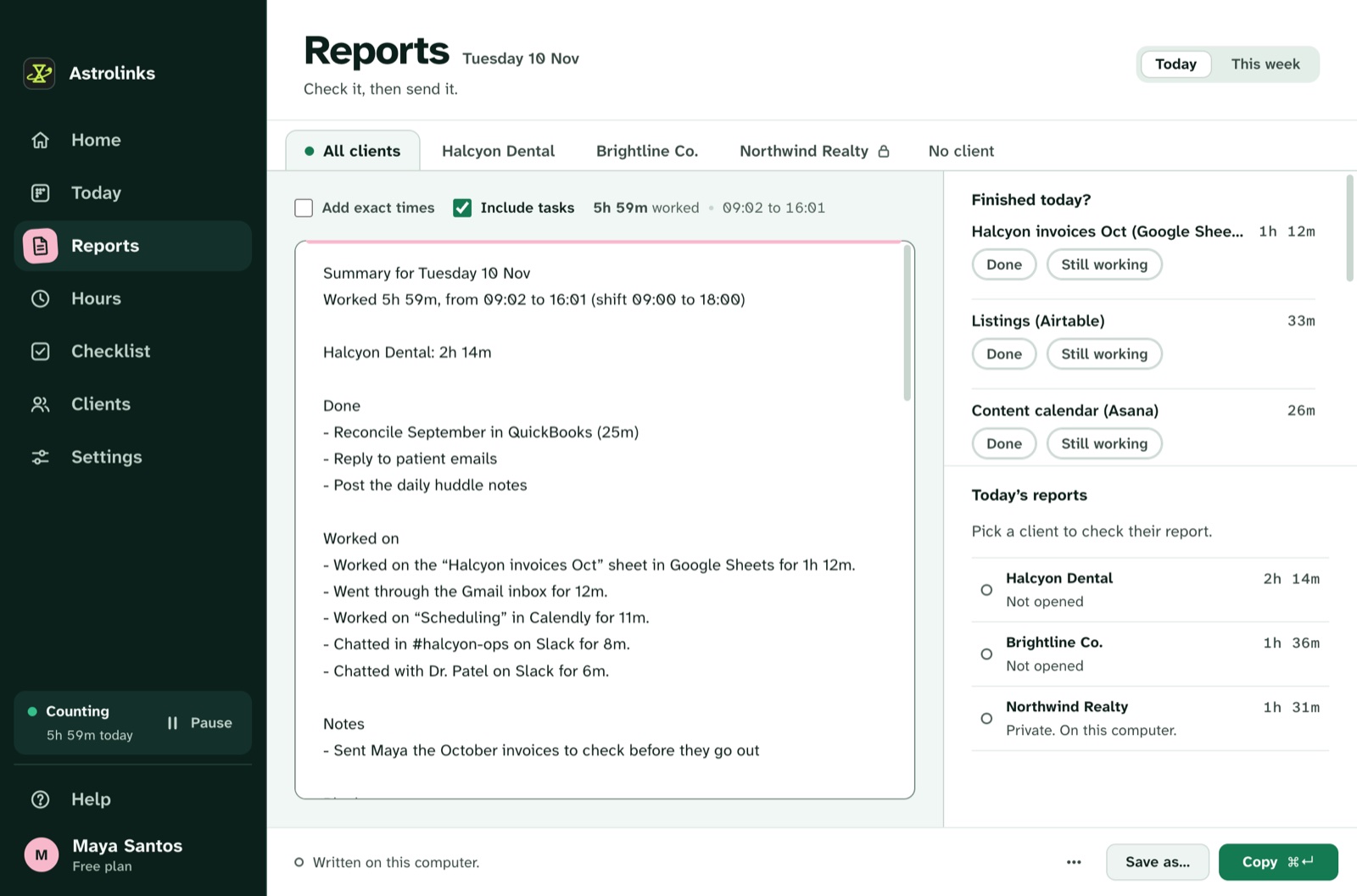
Astrolinks is a desktop app for Mac and Windows that keeps a private log of your workday on your own computer and drafts each client's end-of-day report. It also does the weekly recap.
Press This week at the top of Reports and each client gets a recap of their week so far, from the days you kept: what you worked on, email and chat time, hours by day, and your notes. It uses the same client tabs, Copy and Email draft as the daily report, and you can save it as a file. The recap is written on your computer, with no AI. With your own Anthropic key, you can also have AI polish it. On the last workday of your week (Friday, unless you change it), today's report offers the recap, and the clock-out reminder says the week is ready.
See the end-of-day reports feature. Designers can see how it fits project work on the Astrolinks for designers page.