 Astrolinks


Short answer
A night shift VA keeps US clients updated by sending a short start-of-shift message, keeping notes during the shift, and sending a handover before logging off. Write every time and date in the client's time zone, put decisions the client must make at the top, and ask questions with options they can answer in one reply.
Astrolinks writes each client’s end-of-day update from your actual work, so 6 pm isn’t report time. Get it free →
If you work as a night shift VA for US clients, you know the odd rhythm. You start as their morning begins. You finish in their afternoon, while you should be asleep. Much of your shift happens while nobody can answer a question. That makes your updates matter more than they would for someone in the same office. Your report is the only conversation you'll have with some clients all day.
This guide covers a routine that works across time zones, what to put in your handover, message templates you can copy, and how to keep your own sleep intact.
Why do updates matter more on a night shift?
Updates matter more because nobody can answer your questions while you work. When a client and VA share hours, small questions get answered in Slack within minutes. On a night shift, a question asked at 23:00 your time might wait eight hours. A good update does three things a quick chat would normally do:
- confirms the work got done, so the client doesn't have to check
- flags what's stuck, so they can unblock it first thing
- tells them what you'll do next, so there are no surprises
Know exactly where your clients' clocks are
Before you can write useful updates, you need the time gap for each client, and you need to know when it changes. Here is the gap for a VA in Manila, which stays on UTC+8 all year (the Philippines does not use daylight saving time):
| Client's zone | Behind Manila (Nov to Mar) | Behind Manila (Mar to Nov) | Your 21:00 is their |
|---|---|---|---|
| Eastern (New York) | 13 hours | 12 hours | 08:00 or 09:00 |
| Central (Chicago) | 14 hours | 13 hours | 07:00 or 08:00 |
| Mountain (Denver) | 15 hours | 14 hours | 06:00 or 07:00 |
| Pacific (Los Angeles) | 16 hours | 15 hours | 05:00 or 06:00 |
US clocks move forward on the second Sunday in March and back on the first Sunday in November. On those weekends, the gap to every US client changes by one hour, so either your shift moves or their hours with you do. Agree which, ahead of time. Most of Arizona does not change its clocks at all, so a Phoenix client keeps the same gap all year.
If you live somewhere else, build the same table for your own zone. Pin it next to your client sheet.
What does a good shift routine look like for a night shift VA?
A good routine has five steps: read the day, say you're on, do urgent items first, take notes as you go, and send your update before you log off.
Before your shift: read the day
Your client's working day happened while you slept. Start by catching up:
- Read Slack, email and any task boards for each client.
- Note anything they asked for during their day.
- Check for replies to yesterday's blockers.
Ten minutes of reading saves an hour of redoing.
First message: say you're on
A short hello at the start of your shift tells each client you're online and what you'll do first. It also catches anything they forgot to tell you before they log off.
Good morning, Jen. I'm on until 2:30 PM your time.
Plan for today: payroll prep, the patient recall emails, then the inbox.
Anything I should do first?
First hour: urgent items only
US clients often leave a few urgent tasks at the end of their day. Do those first. If something can't be done tonight, say so in a message now, not in tomorrow's report.
During the shift: notes as you go
Keep a running note for each client. One line when you finish something. One line when you hit a blocker. You'll be tired by the end, and memory is the first thing to go at 05:30.
Last 30 minutes: write and send
Write each client's update while the night is still fresh. Send it before you log off, so it's waiting the next time they check in.
What should a night shift VA put in a handover?
Put what you finished, what needs the client this morning, what's waiting on others, and your next priorities. A handover is an end-of-day report with one extra job: it has to stand on its own for hours. Use this structure:
Overnight update for [Client], [their date]
Worked [hours], [start] to [end] [their time zone]
Done overnight
- [Outcome with numbers]
Needs you this morning
- [Decision or input, and by when]
Waiting on others
- [Who, and what]
Next shift
- [Top priorities]
The Needs you this morning heading is the key. Put it near the top. It's the first thing a client should read with their coffee.
Ask questions that can be answered in one reply
The worst thing a night shift VA can do is ask an open question at the end of a shift. "How do you want me to handle the refund?" gets a reply eight hours later, then needs a follow-up, and a day is gone. Give options instead:
Needs you: the refund for order 4471 ($89).
A) Full refund today
B) Store credit instead
C) Wait, you'll call the customer
Reply with A, B or C and I'll do it at the start of my next shift.
One letter back, and the task is unblocked.
For more report formats, see our EOD report template for virtual assistants and the general guide on how to write an end-of-day report.

When something urgent happens overnight
Sometimes a problem can't wait for the morning report. A payment page breaks. An angry customer threatens a chargeback. A calendar double-books the client's 8:00 meeting.
Agree a plan with each client before it happens:
- What counts as urgent. Write two or three examples together.
- How to reach them. A phone call, a text, or a specific Slack channel with notifications on.
- What you can do without asking. Refund under a set amount? Move a meeting? Pause an ad?
When it happens, act within those limits, send a short message straight away, and include the full story in your end-of-shift report. Keep the first message short enough to read on a phone screen:
URGENT, handled: the checkout page shows a payment error.
I paused the Facebook ad at 02:14 Pacific so we stop paying for clicks.
Nothing else changed. Full details in tonight's report.
That is exactly what a client wants to read at 7:00.
Which time zone should a night shift VA use in reports?
Always write times in your client's time zone. "Worked 18:02 to 00:53 Pacific Time" is useful to a client in Los Angeles. "Worked 09:02 to 15:53" in Manila time makes them do math.
Some tips:
- Name the zone. "Pacific", "Eastern" or "Central" avoids mix-ups.
- Use their clock format. Many US clients read "2:30 PM" faster than "14:30". Ask once and stick to it.
- Date by their day. A shift from 21:00 Thursday to 06:00 Friday Manila time is all Thursday for a client in California.
- Give deadlines in their time too. "I'll have it by 9 AM your time" beats "in four hours".
Plan around US holidays and weekends
US federal holidays like Thanksgiving, the Fourth of July and Labor Day can leave you online while nobody is at your client's office. And a shift you start on Saturday night in Manila is Saturday morning in the US, a day most offices are closed. Agree with each client:
- Which holidays you take off, and which you work.
- Whether weekend shifts count, and how they're billed.
- Who you contact if the client is away and something breaks.
Put the answers on your client sheet, and remind the client a week ahead. If you serve several clients, our guide on how to manage multiple clients as a virtual assistant shows how to keep these details per client.
Protecting your own sleep
Night shift work takes a toll, and your clients are better served by a rested VA. A few practical habits:
- Set clear hours. Put them in your Slack status and email signature.
- Don't check messages in bed. If something's truly urgent, your client will call.
- Take real breaks. Get up every 90 minutes or so. Set a reminder if you forget.
- Keep your shift in one block. Splitting a night shift into pieces makes reporting and sleep harder.
- Keep the same sleep time on days off, as far as you can. Flipping back and forth every weekend makes every Monday night harder.
Example: one night, three clients
This is an illustrative example.
Maya works 21:00 to 06:00 Manila time for three US clients. At 05:30 she has three updates to write.
For Halcyon Dental in San Diego, her report says "Worked 3h 15m, 06:00 to 10:30 Pacific Time" (her evening is their morning, on the same date), lists the invoices sent, and puts "Need your new hourly rates to finish payroll" right at the top.
For Northwind Realty in Chicago, the report lists six listings updated and one showing booked.
For Brightline Co., a Spanish-speaking owner in Miami, the report goes out in Spanish.
She sends all three by 05:55 and closes her laptop.
How Astrolinks helps a night shift VA
Astrolinks is a desktop app for Mac and Windows, made with night shifts in mind. A workday starts four hours before your shift, so a 21:00 to 06:00 shift stays one day in your log, not two halves split at midnight.
Each client can have their own time zone. Where their clock reads differently from yours, today's log says "01:01 for Dr. Patel", and their report gives its times, shift and date in their zone. With Pro, each client can also have a report language: English, Filipino, Spanish, Portuguese (Brazil) or Chinese (Simplified) are written on your computer. The languages page covers which languages work with and without AI.
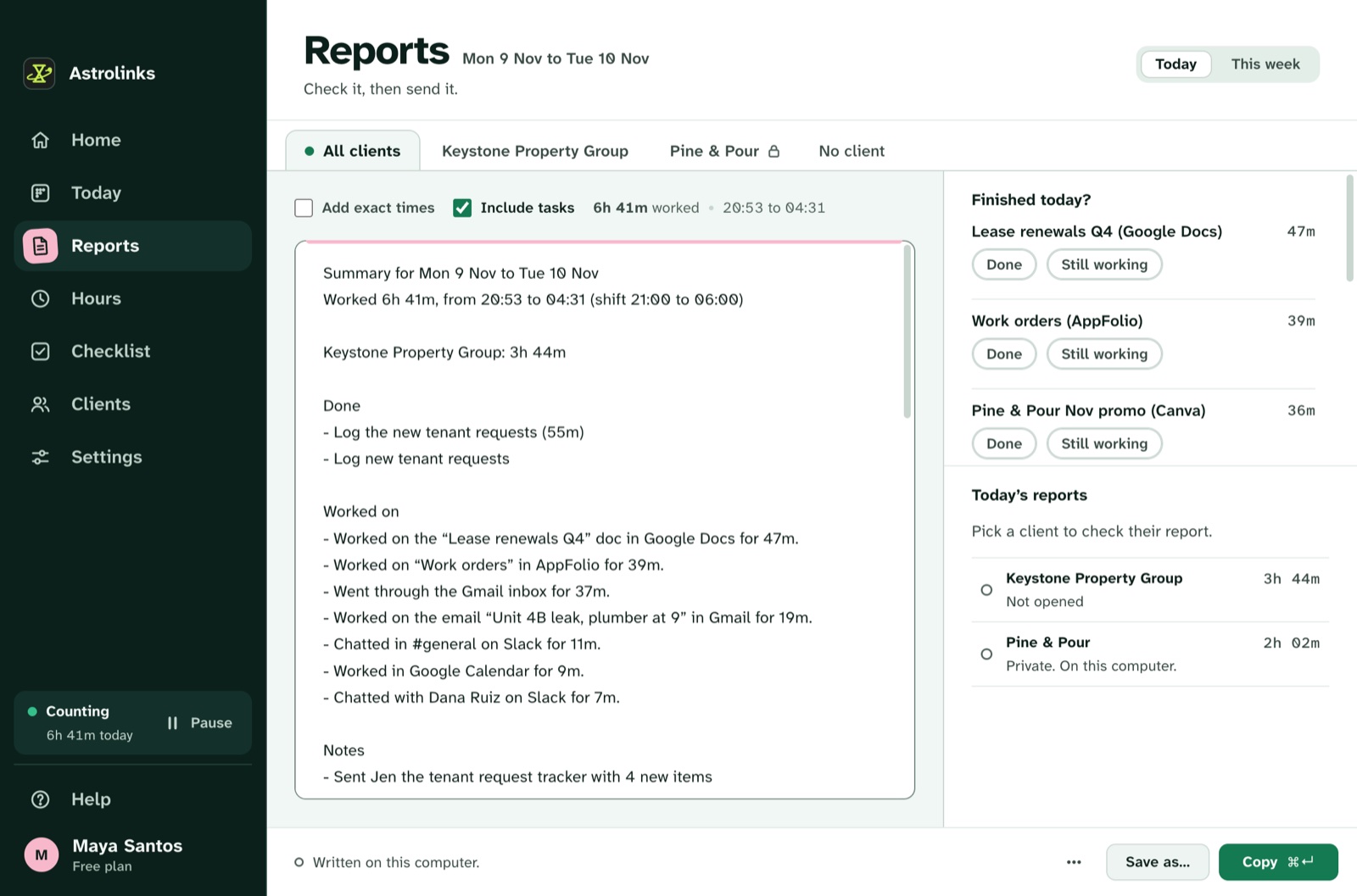
At the end of your shift, Write my report drafts each client's report. You read it, fix it and send it. If your connection drops at 05:58, a report you pressed Send for waits on your computer and goes once you're back online. There's also an optional break reminder after 90 minutes of steady work, and a morning plan on the Checklist if you like to start the shift with a list. Read more on the Astrolinks for virtual assistants page.
Related guides
- EOD report template for virtual assistants
- How to write an end-of-day report
- Weekly client recap templates for Friday wrap-ups
- Async check-ins for remote teams, if your client runs a team across time zones