 Astrolinks


Short answer
An EOD report template has four parts: Done (what you finished), In progress (what moved but isn't finished), Blocked (what you need, from whom) and Next (tomorrow's top one to three tasks). Lead with outcomes, not activity, put any blocker near the top, keep it to five to ten lines, and send it at the same time every day.
Want your EOD report written for you? Astrolinks writes it from your actual workday when you clock out. Get it free →
An EOD report (end-of-day report) is the short note you send at the end of your workday: what you finished, what's stuck and what's next. The standard EOD report format has four parts: Done, In progress, Blocked and Next. It sounds trivial until you're staring at an empty Slack message at the end of a long shift. Below is a template you can copy right now (or fill in the free EOD report generator), the standard EOD format, filled-in examples for four different roles, and a simple method that makes the job take minutes.
EOD report template (copy and paste)
Copy this into Slack, Teams or an email, fill in the brackets and delete any line you don't need.
EOD report, [Day, date]

Done
- [Outcome, with a number if you can]
- [Outcome]

In progress
- [Task]: [how far along]

Blocked / need from you
- [What you need, from whom, by when] (or "Nothing today")

Next
- [Top 1 to 3 priorities for tomorrow]

Hours: [optional, only if the client bills by the hour]
Prefer to fill in a few boxes instead? Our free EOD report generator turns your notes into a report in this format, ready to paste.
What is an end-of-day report?
An end-of-day report, or EOD report, is a short written note at the end of your workday. It tells a client or manager what you did, what's stuck, and what's next.
It does three jobs at once:
- It saves meetings. A clear note answers the "where are we?" question without a call.
- It surfaces problems early. A blocker in Tuesday's report is cheap. The same blocker found on Friday is not.
- It builds trust. Steady, specific reports make people relax. They stop wondering what you're doing because you've already told them.
It is not a timesheet and it isn't a diary. Nobody needs every email you sent.
EOD report format: the standard four parts
The standard EOD format has four parts: done, in progress, blocked and next. The headings can change, but the jobs don't.
| Part | What it answers | Example line |
|---|---|---|
| Done | What moved forward today? | Sent October invoices to 14 clients |
| In progress | What's half done, and how far along? | Q3 report: data in, charts left |
| Blocked | What do I need from someone else? | Need new hourly rates to finish payroll |
| Next | What will I do first tomorrow? | Follow up on 3 unpaid invoices |
Leave out anything that doesn't help the reader act or relax. That usually means routine tasks they'd assume you did, long explanations, apologies, and anything private: passwords, other clients' names, or customers' personal details.
How do you write an end-of-day report?
Collect your day, lead with outcomes, name blockers, say what's next, and keep it skimmable. Here are the five steps.
1. Collect your day before you write
The hardest part is remembering. Before you write a word, gather the raw material:
- your task list or tickets you moved
- your sent emails and Slack messages
- calendar events and calls
- any notes you jotted during the day
If you do this every day, keep a scratch note open and add a line each time you finish something. It takes seconds and saves you ten minutes at the end.
2. Lead with outcomes, not activity
"Worked on the invoices" is activity. "Sent 14 October invoices; 2 are waiting on new rates" is an outcome. Readers care about the second one.
A quick test: could your reader act on this line, or reply to it? If not, make it more specific.
3. Name blockers clearly
A blocker is anything that stops you that someone else can fix. Write who or what you're waiting on, and what you need.
Blocked: need Dr. Patel's new hourly rates to finish the payroll sheet.
That line is a gift to a busy manager. They know exactly what to do. If you need an answer by a certain time, say so: "by Thursday noon, or payroll goes out on the old rates."
4. Say what's next
One to three items for tomorrow. This shows you're ahead of the work, and it lets your reader correct course before you start. If a priority changed today, say that too, so nobody is surprised when the old plan doesn't happen.
5. Keep it skimmable, then send it
Use the same headings every day. Bullets beat paragraphs. Put the most important line first. Then read it once, as if you were the client, and send it at the same time every day.
EOD report example 1: admin VA, from scratch notes to a finished report
Here is what a real day's notes often look like at 5:00 PM. This is Maya, an admin virtual assistant (a made-up example), writing for a dental office.
invoices oct, 14 sent. payroll stuck, no new rates yet, asked patel on slack, no reply. calendly moved 6 pts. onboarding doc notion updated. call w/ front desk 20 min re new phone script. newsletter not started.
It's all there, but no client could read it. Turn it into a report in three passes.
Pass 1: sort each line into a part. Invoices, appointments and the onboarding doc are Done. The rates are Blocked. The phone script call is a note. The newsletter is Next.
Pass 2: rewrite each line as an outcome. "Invoices oct" becomes "Sent October invoices to 14 patients' insurers." "Calendly moved 6 pts" becomes "Rescheduled 6 appointments after Dr. Lee's day off."
Pass 3: put the most important line first. Here, that's the blocker, because it has a deadline.
EOD report, Tuesday, October 13
Need from you: new hourly rates by Thursday noon, so payroll goes out right.
Done today
- Sent October invoices to 14 insurers
- Rescheduled 6 appointments after Dr. Lee's day off
- Updated the onboarding checklist in Notion
- Agreed a new phone greeting with the front desk (20 min call)
Tomorrow
- Finish payroll once the rates arrive
- Draft the November newsletter
Thanks, Maya
The finished version took about four minutes. The notes took about thirty seconds, spread across the day. That trade is the whole method.

Weak lines and strong lines
Small changes in wording make a big difference to how a report reads. Some before-and-after examples:
| Weak | Strong |
|---|---|
| Worked on emails | Cleared the support inbox: 31 replied, 4 passed to Sam |
| Did some invoices | Sent 14 October invoices; 2 waiting on new rates |
| Had a meeting | Call with Jen: launch moved to October 22 |
| Still working on the report | Q3 report: data done, charts left for tomorrow |
| Some issues with the site | Checkout fails on Safari; logged as ticket 482 |
The strong versions have a number, a result or a next step. Each one gives the reader something to act on or reply to.
EOD report example 2: social media VA, with hours
For clients who pay by the hour or want to see where time went.
Update for Brightline Co., Tuesday, October 13
Worked 3h 40m, 9:00 AM to 1:10 PM Eastern (with a 30m break)
Done
- Instagram carousel for the October launch (Canva): 1h 35m. Jen approved it; scheduled for Thursday 10:00 AM.
- Replied to 27 customer DMs, 3 passed to Jen: 50m
- Weekly content calendar (Google Sheets): 45m
- Call with Jen about the launch: 30m
Next
- Stories for the launch week
Write the times in the client's time zone, not yours. If you work evenings from Manila for a client in Denver, they want to read Mountain Time.
End of day report email sample (support agent to a manager)
Support leads want volume, anything escalated and anything that will come back tomorrow.
Subject: EOD report, Thursday, October 15 (Sam, support)
Done
- Closed 38 tickets; queue down from 61 to 23
- Escalated 2 billing errors to finance (tickets 1184, 1191)
- Updated the refund macro with the new 14-day wording
In progress
- 5 shipping complaints waiting on the carrier's reply
Blocked
- Need a yes or no on refunding order 7740 (outside policy) by noon tomorrow
Next
- Clear the overnight queue first, then the 5 shipping tickets
Employee end of day activity report example (developer)
For in-house teams that read many updates a day. Short, with ticket numbers.
EOD, Thursday, October 15 (Priya)
Done: shipped the refund email fix (PR 412, merged); reviewed 2 PRs.
In progress: tests for the refund flow, about half written.
Blocked: staging DB is down, asked in #infra at 3 PM.
Next: finish the tests, then start ticket 488 (CSV export).
If your team posts updates in the morning instead, our guide to async check-ins for remote teams covers that format. For more client-facing versions, see the EOD report template for virtual assistants.
What do you write in an EOD report on a hard day?
Keep the usual shape and add one honest line on why the plan slipped. Some days nothing goes to plan. The report still matters, maybe more.
EOD report, Wednesday, October 14
Today in one line: most of the day went to the payroll error, so the newsletter slipped.
Done
- Found and fixed the payroll error (wrong rate on 3 staff); corrected sheet sent to you
Moved
- Newsletter draft moves to Friday
Tomorrow
- Invoices first, then start the newsletter
Notice what's missing: no long apology, no list of every dead end. The reader learns what happened, what changed and what's next. That is all they need.
What mistakes should you avoid in an EOD report?
The biggest are writing the same report every day, hiding blockers, listing every tiny task and sending it late.
- Writing the same report every day. If Monday and Thursday read the same, nobody reads Friday.
- Hiding the blocker at the bottom. Put problems where they'll be seen.
- Listing every tiny task. Group small things: "Answered 22 support emails" is better than 22 bullets.
- Sending it late. A report that arrives tomorrow morning isn't an end-of-day report.
- Over-explaining a slow day. One honest sentence is enough.
- Mixing clients. If you work for several clients, each gets their own report. Our guide on managing multiple clients as a VA shows how to keep them apart.
Build a ten-minute end-of-day routine
The report is easier when it's part of a fixed close to your day. Try this order:
- 15 minutes before your shift ends: stop starting new tasks.
- Scan your sources: task list, sent mail, chat, calendar. Add anything missing to your scratch note.
- Write the report from the note, using your saved template.
- Read it once as the client. Cut any line they wouldn't miss.
- Send it, then write tomorrow's first task on a sticky note or in your task list.
On Fridays, add one step: turn the week's daily reports into a short recap. Our weekly client recap templates make that a ten-minute job.
Make the report write itself
The collecting step is the slow one. For a one-off report, the free EOD report generator formats your notes. If you write one every day, a tool that remembers the day for you helps most.
Astrolinks is a desktop app for Mac and Windows that keeps a private log of what you worked on, on your own computer, with no screenshots and no keystroke logging. At the end of your shift it drafts each client's report and asks What happened with each? One tap marks an item Finished, Sent, Drafted, Replied or In progress, and you can add a short note. You read it, fix it and send it. The Free plan covers up to 4 hours a day for 2 clients, and every copy starts with a 7-day Pro trial, no card.
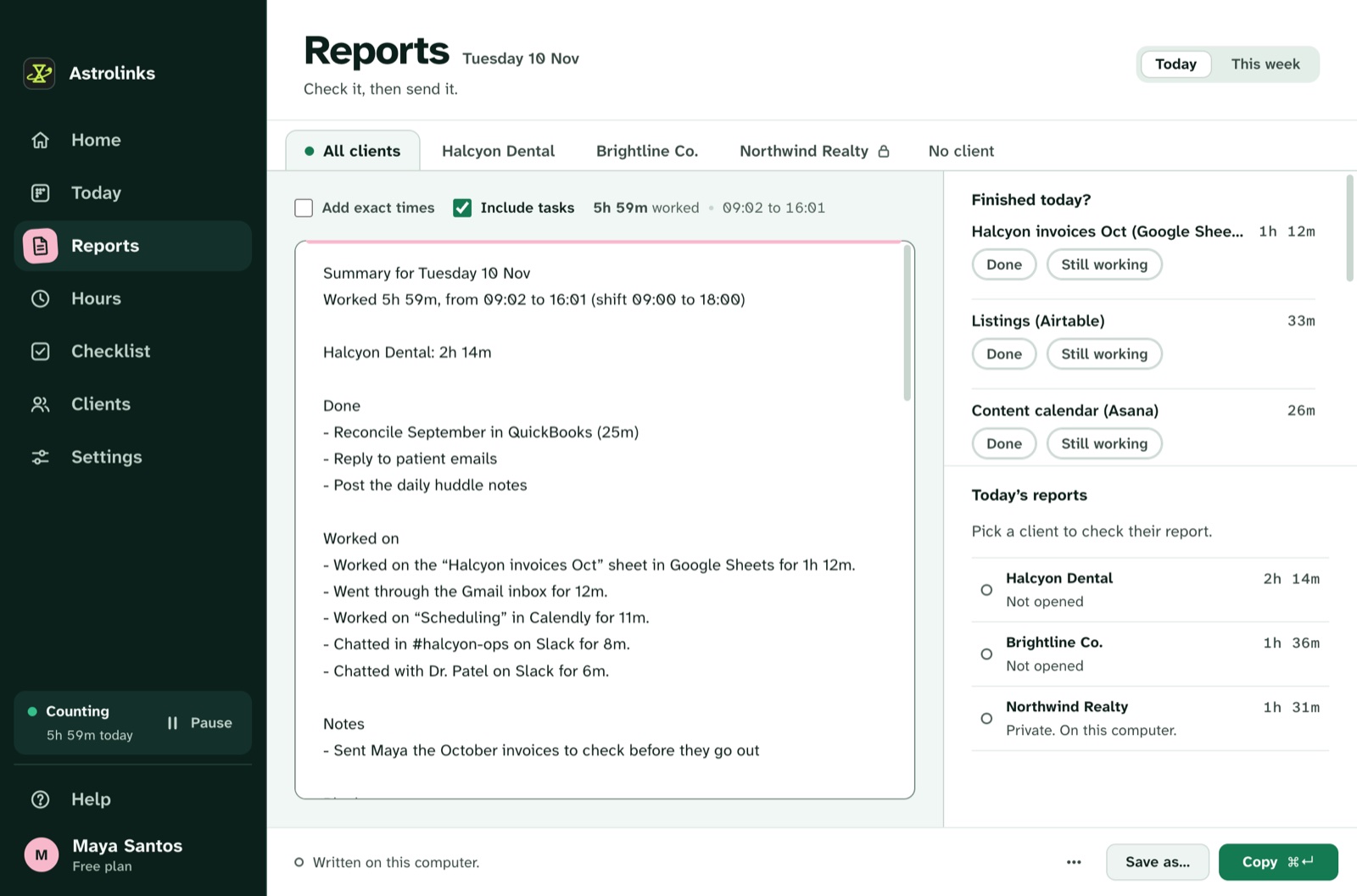
See how the end-of-day reports feature works.
Whatever you use, the method stays the same: outcomes first, blockers clearly, next steps short.
Related guides
- An EOD report template for virtual assistants, with versions for each kind of client
- Daily standup vs. EOD report: which one your team needs
- EOD meaning: what "by EOD" means and whose time zone counts
- A daily status report template for project updates with a status colour
- Weekly client recap templates for Friday updates
- Leading a distributed team? See daily updates for remote teams