 Astrolinks

Short answer
Astrolinks is time tracking for independent contractors who work on a computer. It keeps a private log of your workday on your own computer, sorts the hours by client, writes each client's end-of-day report, and turns the hours into an invoice, free on every plan. Clients get a report, never your screen.
As an independent contractor, you sell results. You pick your clients, set your rates, choose your tools and decide how to get the work done. The paperwork around it is yours too: remembering where the hours went, keeping each client up to date, and sending invoices that add up.
Astrolinks is a desktop app for Mac and Windows that takes care of that part, without turning your computer into a client's monitoring station. It keeps a private log of your workday on your own computer, sorts it by client, writes each client's end-of-day report, and turns the hours into an invoice you can fully edit.
A quick note on the word: "contractor" also means builders and trades. This page is for independent contractors who work on a computer, such as developers, designers, writers, bookkeepers, marketers and virtual assistants.
How do independent contractors track time without a timer?
Most contractors try a timer first. It works until a busy day, when you forget to start it for a quick fix, or forget to stop it over lunch. Then Friday turns into guesswork.
Astrolinks has no timer to forget. While it runs, it notes which app and window are in front every 5 seconds, and the web address in supported browsers. It never records keystrokes, screenshots or your clipboard, and it skips private windows in Chrome, Edge, Brave and Firefox. Give each client a rule, like a word in a window title, a website or an app, and every entry shows whose time it was. When one lands in the wrong place, click the name and move it. Pick Always and the rule learns.
Short breaks are taken back as time away, so the day isn't padded with coffee. If you'd rather keep a sheet by hand, our guide to independent contractor time tracking has a free template you can copy.
Your log belongs to your business
A contractor's records are business records, and they belong to the business. That's you.
The log stays on your computer. Nothing from it is sent to us, to a client, or to an AI company. When you clock out, Astrolinks writes each client's report from your log: what got done, what's in progress, and the hours. You read it, change anything you like, and send it with Send to Slack, Email draft, Copy, or Save as PDF, Word or text. The client gets a report, not a feed of your screen.
That matters for more than comfort. In the US, whether a business controls how the work is done is one of the factors used to decide if someone is a contractor or an employee. Clients who ask for screenshot trackers sometimes haven't thought about that. A daily written report gives them confidence in the hours and leaves the how with you. This is general information, not legal advice. The privacy-first page lists exactly what is and isn't recorded.
Hours per client become invoices, free
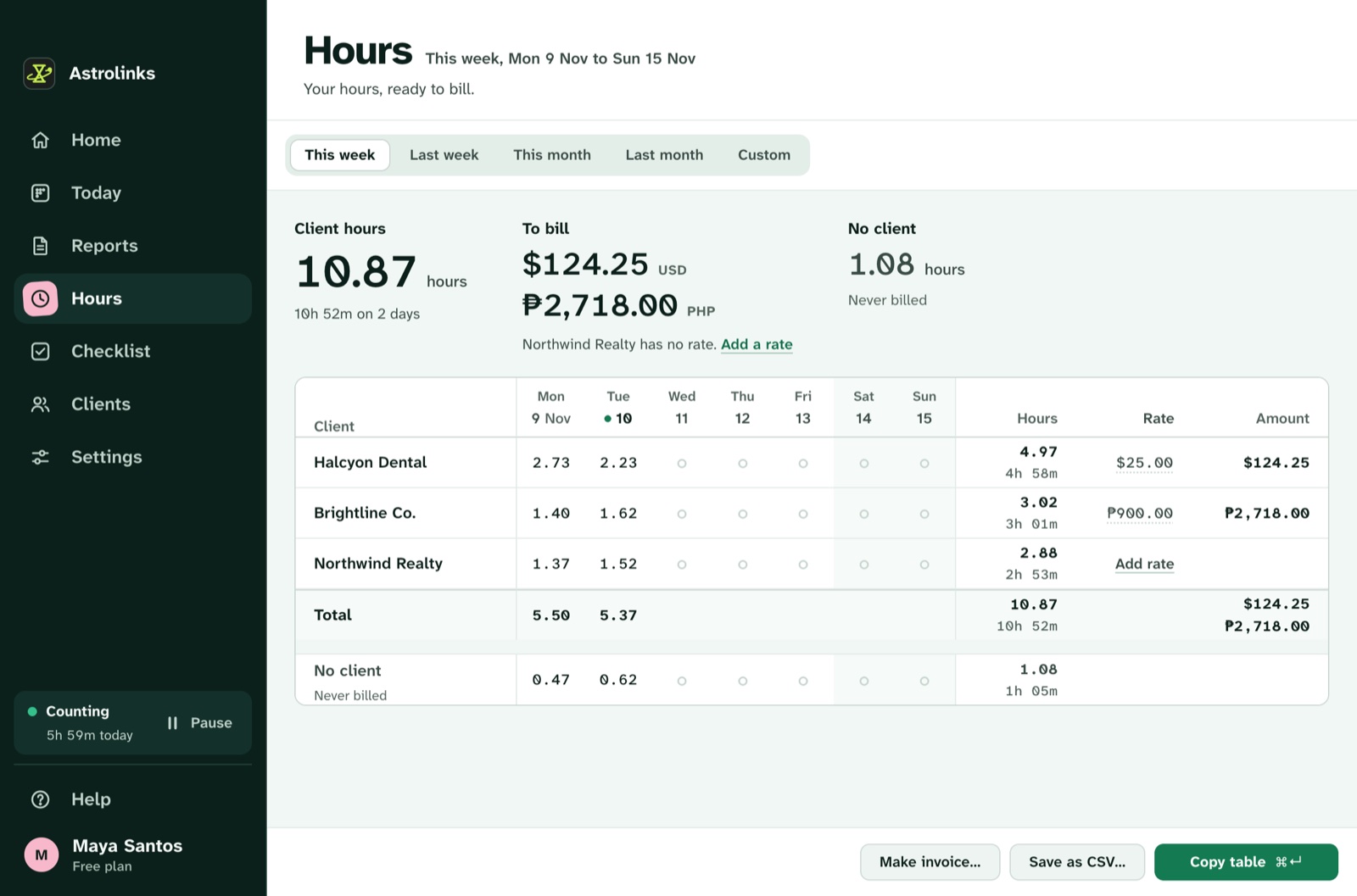
Give each client one optional hourly rate in any currency: 45 USD, 60 AUD or 35 EUR. Hours shows each client's time in decimals, the amount to bill, and a table by day.
On every plan, Free included, Make invoice builds a client's invoice from the hours on screen:
- numbered lines with "work done" text, so the client sees what the hours bought
- your logo, their billing address and your payment details
- tax or a discount, if you need them
- a Pay now link to the way you get paid
- due on receipt, or in 7, 14 or 30 days, on Letter or A4 paper
Everything on it is editable. Save it as a PDF, a CSV or both. Astrolinks never sends an invoice for you, and it keeps track of which invoices are paid. The hours and invoices page shows each part. If you'd like to check the numbers by hand, read how to calculate hours worked.
Time tracking for 1099 contractors, and contractors abroad
If you're a 1099 contractor in the US, nobody withholds tax from what you're paid, and you keep your own records. Astrolinks gives you a clean list of what you billed: every invoice, numbered in order, plus the hours behind each line. With Pro, Save as CSV in Hours gives you every date, client, hour and amount for any range, ready for your accountant. It is not tax software, so ask a tax professional what you owe and when. The page for US freelancers goes into quarterly taxes.
Many independent contractors work for US clients from somewhere else: the Philippines, India, Pakistan, Latin America. Each client in Astrolinks can have their own time zone, so a report says "from 09:02 to 12:40 Eastern Time" instead of making the client do the math. A workday starts four hours before your shift, so a night shift for a New York client doesn't split at midnight. Bill in USD and keep your own notes in pesos or rupees; Hours never adds different currencies together.
An example week
This is an illustrative example, not a real customer.
Rafael is an independent contractor in Manila who builds websites. He has three clients: a law office in Chicago at 30 USD an hour, a marketing agency in Austin at 28 USD an hour, and a shop in Sydney at 40 AUD an hour.
He sets one rule per client: the law office's project name in his code editor, the agency's Slack workspace, and the shop's admin website. The agency asks him to install a screenshot tracker. He offers a daily report instead, and they agree to try it for a month.
Each evening, Rafael presses Write my report, reads it, and sends the agency its update on Slack. The law office gets a weekly recap by email draft on Friday, on Central Time. On the first of the month he opens Hours, picks Last month, and makes three invoices with his logo and a Pay now link. The Sydney invoice is in AUD, the other two in USD, and none of them add up across currencies.
Good to know before you start
- Astrolinks runs on macOS and on Windows 10 (version 2004 or later) and Windows 11.
- The free plan counts up to 4 hours a workday for up to 2 clients, with Hours for this week. Every new copy starts with a 7-day Pro trial, no card.
- No AI is needed. Reports are written on your computer. On Pro, a built-in writing helper runs on your computer too, so nothing about your day goes to an AI company.
- Your hours are your own notes of your day. Read them and fix anything before you send a report or an invoice.
Keep reading
- Independent contractor time tracking, with a free template
- How to calculate hours worked, in Excel, Google Sheets and by hand
- How to invoice hourly clients, step by step
- Asked to install a tracker? Read the Hubstaff alternative and the Time Doctor alternative