 Astrolinks

Short answer
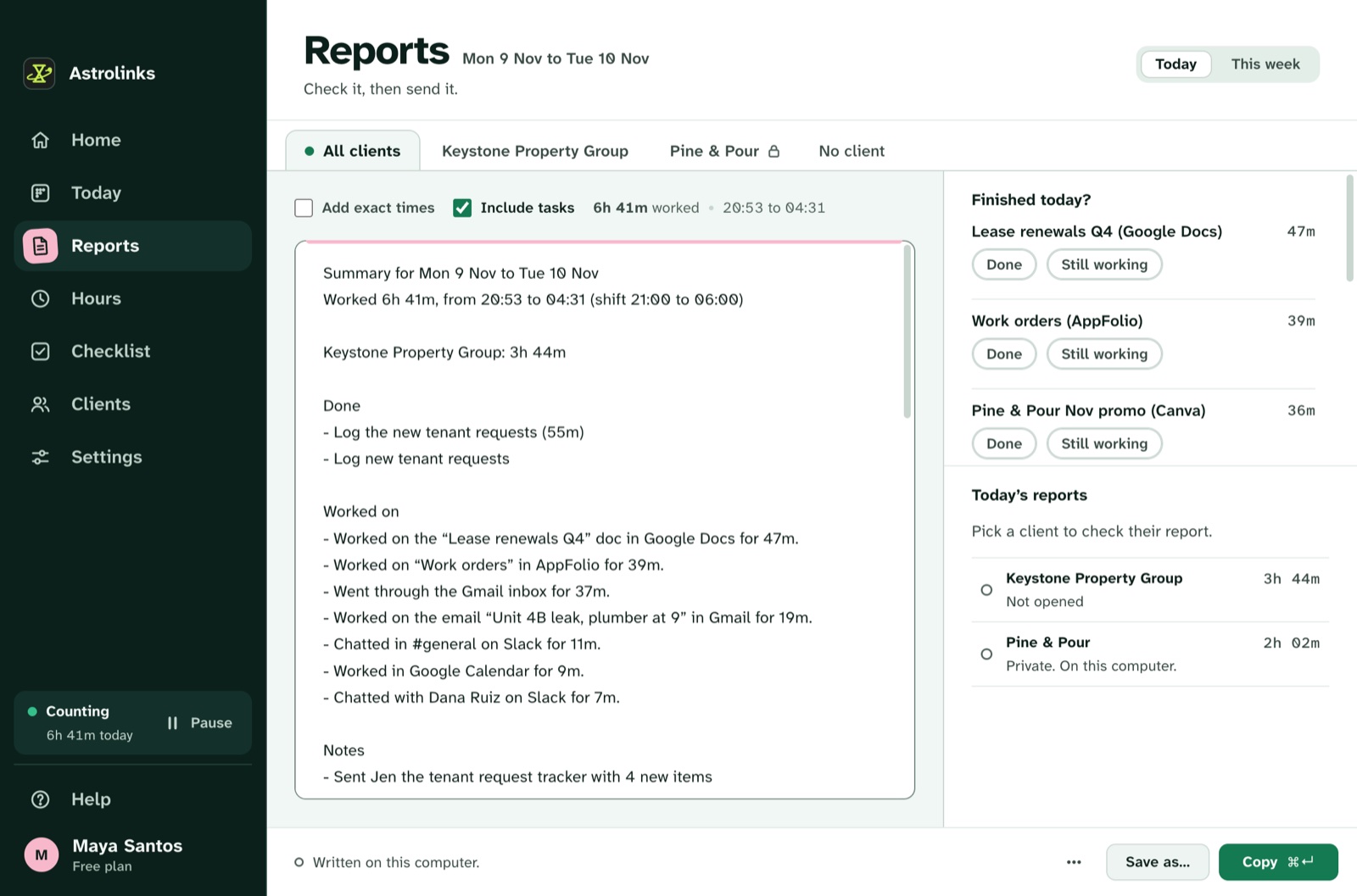
Freelance developers in Pakistan can track time without screenshots by keeping a private log on their own computer, sorted by client. Astrolinks notes the app and window in front, files each stretch under a client, and at clock-out writes each client's daily update with times in that client's time zone, ready to check and send.
If you build software from Karachi, Lahore or Islamabad for clients abroad, your working day has a shape most time trackers ignore. Your afternoon is a UK client's morning. Your evening is a US client's morning. And at some point in that long stretch, the power or the internet may drop. Time tracking for freelance developers in Pakistan has to fit that day, not a 9 to 5 in one city.
Astrolinks is a small desktop app for Mac and Windows that keeps a private log of your workday on your own computer. It sorts the time by client and, at clock-out, writes each client's update for you. You read it, fix anything, and send it. It never takes screenshots and never records keystrokes.
What time is it for my clients when I work from Pakistan?
Pakistan Standard Time is UTC+5 all year. Pakistan doesn't use daylight saving time, so your clock never moves. Your clients' clocks do.
| Client's 9 AM | In Pakistan, northern winter | In Pakistan, northern summer |
|---|---|---|
| New York (US Eastern) | 7 PM | 6 PM |
| San Francisco (US Pacific) | 10 PM | 9 PM |
| London | 2 PM | 1 PM |
| Berlin, Paris, Amsterdam | 1 PM | 12 PM |
So a US client's standup lands in your evening, and their end of day is well after your midnight. When the US and Europe change their clocks in spring and autumn, every one of these meetings shifts an hour for you, on dates you didn't choose.
Astrolinks handles the part that matters for reports. Give each client their time zone, and their report shows times on their clock: "worked from 10:02 to 15:40 Eastern Time", not a Pakistan time they have to convert. And if you work past midnight, the day doesn't split in two. A workday starts four hours before your shift, so a 2 PM to 2 AM shift stays one workday.
Do I need Upwork-style screenshots to prove my work to clients?
Many Pakistani developers find clients on Upwork, Fiverr and similar sites, and get used to a tracker that takes screenshots. Then a direct client, or a client who moved off the platform, asks: "Can you install something like that?"
First, be accurate about Upwork itself. On an Upwork hourly contract, Upwork's hourly payment protection depends on time tracked in Upwork's own desktop app, which uploads screenshots to the Work Diary. Astrolinks doesn't replace that and doesn't connect to Upwork. For those contracts, keep using Upwork's tracker.
For everyone else, there's another way to build trust: a clear written update every day. A good developer update looks a lot like a commit log and a ticket board, in plain words:
- Done: "Merged the refund webhook fix (PR #214)."
- Worked on: "Checkout tests, 1 h 40 m. Code review for Bilal, 35 m."
- Blockers: "Staging DB is down, waiting on your DevOps."
- Tomorrow: "Write tests for partial refunds."
That is what Astrolinks writes for you. Your editor's window title usually holds the project folder, your terminal does too, and your browser shows the GitHub repo or the Jira ticket. Give each client a rule based on that, like a repo name or a domain such as acme.atlassian.net, and today's log files each stretch under the right client. Press Write my report at the end and each client gets a tab with what you worked on, for how long, and your notes. It reads window titles, never your code. For more on why this works better than surveillance, read time tracking without screenshots.
What happens to my time log during load-shedding or an internet outage?
Power cuts and internet slowdowns still hit many parts of Pakistan, and evening load-shedding tends to arrive right when US clients start their day. Astrolinks was built so an outage doesn't cost you a report.
- The log lives on your computer. Counting and writing the report happen on your machine, without the internet. On a laptop running on battery, the day keeps counting.
- Sending waits for you. If the connection drops as you press Send to Slack, the report waits on your computer and goes by itself once you are back online. It keeps trying for up to a day, and Settings, You, Waiting to send shows what is waiting.
- Gaps are honest. If the computer was off, nothing was counted. You can add a quick note to explain it: press ⌃⌥N (Ctrl+Alt+N on Windows), type "power cut 8 to 9 PM, back on the PR now", and press Return.
No AI is needed, so the report doesn't depend on any online service either. On Pro, the built-in AI writing helper runs on your computer too. It's written on your computer from your own log.
How Astrolinks fits a freelance developer's day
Nothing to start, nothing to switch
While it runs, Astrolinks notes which app and window are in front every 5 seconds, and the web address in supported browsers, without anything after "?" or "#". Time away from the keyboard is taken back, so tea with the family doesn't count as work. Calls keep counting if you leave that setting on.
If an entry lands under the wrong client, click the name and pick the right one. Choose Always and the next ones go there by themselves. The Astrolinks for developers page covers the developer side in more depth, including the optional detailed breakdown of focus blocks.
Notes for what a window title can't show
Press ⌃⌥N (Ctrl+Alt+N on Windows) in any app, type a line and press Return. Start it with "blocked" and it lands under Blockers. Start it with "tomorrow" and it lands under Tomorrow.
Send it the way each client likes
Send to Slack, Email draft, or Copy for Jira, Trello or a shared doc. Each client has their own sections and time zone. See the end-of-day reports feature for every option, and how to write an end-of-day report if you want to tune the format.

An example day in Lahore
This is an illustrative example, not a real customer.
Hamza is a freelance full-stack developer in Lahore. It's November, so the US and UK are on winter time. He has two clients: a London agency that sends him Laravel work, and a SaaS startup in New York building a React dashboard. He also has an Upwork hourly contract, which he tracks in Upwork's own app as usual.
At 2 PM, 9 AM in London, he opens the agency's Slack and their Laravel repo. Astrolinks files it under the agency, because "brightline-api" is in his editor's title. At 6:30 PM he switches to the New York repo before their 9:30 AM standup, which is 7:30 PM for him.
At 9 PM the power goes. His laptop keeps running on battery, but the router doesn't. He keeps coding offline, and presses ⌃⌥N (Ctrl+Alt+N on Windows): "blocked: can't pull latest main, internet down". The connection is back by 10.
At 1:15 AM he presses Write my report. The New York report says "from 08:30 to 15:15 Eastern Time", lists two tickets and a pull request, and shows the blocker he noted. He presses Send to Slack just as the internet blinks out again. The report waits, and goes ten minutes later. The London report he copies into an email for the agency's morning.
Your log stays in Pakistan, on your computer
The log is a set of plain files on your own computer. We never receive it. There's no analytics in the app and no account that holds your day. Days are kept 14 days by default, and you can delete everything any time.
If you add your own Anthropic key, Write with AI sends Claude a masked summary of one client's day, never the log. Mark a client Private and nothing about it goes to AI. Without a key, everything works the same.
Hours and invoices in any currency
Give each client an hourly rate in their currency, like 25 USD or 20 GBP. Hours adds up each client's time and what to bill, and different currencies are never added together. On every plan, Make invoice turns one client's hours into an invoice you can fully edit, saved as a PDF or CSV on your computer. Read how to track time across multiple clients for a simple weekly routine.
Keep reading
- Astrolinks for developers, wherever you work from
- Daily standup vs. EOD report
- Working for the same clients from India? See Astrolinks for developers in India