 Astrolinks
Short answer
Astrolinks is time tracking for accountants and bookkeepers who work on a computer. It keeps a private log of your day on your own computer, sorts the hours by client without a timer, writes each client's short update, and turns the hours into an invoice. Client files never leave your computer through it.
Accounting and bookkeeping work is billed by the client, but it happens in small pieces: ten minutes reconciling one client's bank feed, a call about another client's payroll, an hour on a third client's quarterly return. By the end of the day it's hard to say where the hours went, and in busy season nobody writes them down.
Astrolinks is a desktop app for Mac and Windows that keeps that record for you, privately. It notes which app and window are in front, sorts the time by client, and at the end of the day writes each client's short update from it. The hours become invoices.
Hours by client, without a timer
You don't start or stop anything. Give each client a rule: their name in a QuickBooks or Xero company file, a word in a spreadsheet's title, a client portal's website, or a folder name. Every stretch of work then shows whose it was. When something lands in the wrong place, click it and move it, and pick Always so the rule learns.
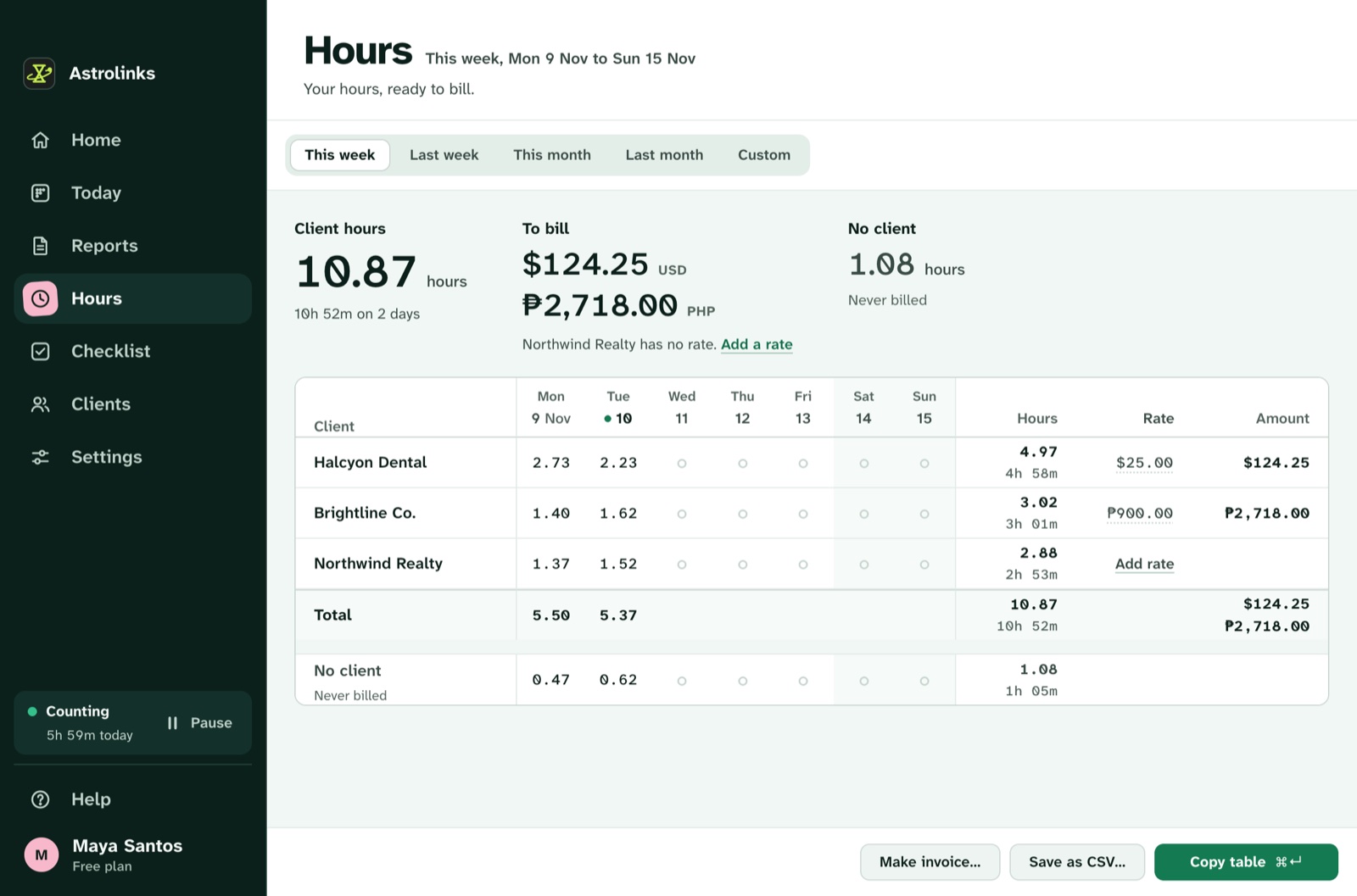
At the end of the week, Hours shows each client's time in decimals, ready to bill, with a table by day. On Pro, Save as CSV gives you every date, client and hour for any range. Read how to track billable hours for the method, or tracking time across multiple clients if you juggle many.
Client files stay private
Accountants hold some of the most sensitive data there is, so a time tracker shouldn't add another copy of it anywhere. Astrolinks never reads the documents you open, never records keystrokes, screenshots or your clipboard, and skips private browser windows. What it keeps is a list of app and window names with times, on your own computer. Nothing from it is sent to us or to an AI company. The privacy page lists exactly what is and isn't recorded.
A short update for each client
When you clock out, Astrolinks writes each client's update from the day: what was done, what's waiting on them (a missing statement, a signature), and the hours if you bill by the hour. You read it, change anything, and send it by email draft or Slack, or save it as a PDF. Clients who get a short note when their work moves forward ask "where are we?" a lot less.
Invoices from the hours
Make invoice turns a client's hours into an invoice you can fully edit: numbered lines with the work done, your logo, their address, tax, a Pay now link, and due on receipt or in 7, 14 or 30 days. Save it as a PDF or CSV. Astrolinks keeps track of which invoices are paid and can remind you about overdue ones. Fixed-fee clients work too: leave the rate empty and still see the real hours behind each engagement.
An example busy season
This is an illustrative example, not a real customer.
Dana is a bookkeeper with 14 small-business clients. She names each client's rule after their company file, so time in QuickBooks sorts itself. Each evening in March she clocks out and sends the three clients she touched that day a two-line update. On April 1 she opens Hours, picks Last month, and invoices her hourly clients in a few minutes. For her fixed-fee clients she checks the hours too, and raises the fee for the two that took twice as long as she thought.
Good to know before you start
- Astrolinks runs on macOS and on Windows 10 (version 2004 or later) and Windows 11.
- No AI is needed. Reports are written on your computer. On Pro, a built-in writing helper runs on your computer too.
- It is not accounting or tax software, and it doesn't connect to your ledger. It keeps your time and writes your updates and invoices.
- Your hours are your own notes of your day. Read them and fix anything before you send an update or an invoice.
Keep reading
- How to track billable hours
- How to invoice hourly clients
- Hours and invoices in Astrolinks
- Using Harvest or Toggl now? Read the Harvest alternative and the Toggl Track alternative