 Astrolinks
Plans, the trial, and what never costs a thing
Each computer starts with 7 days of Pro, once, with no card. After that Astrolinks keeps working on Free, or you choose a plan from inside the app.
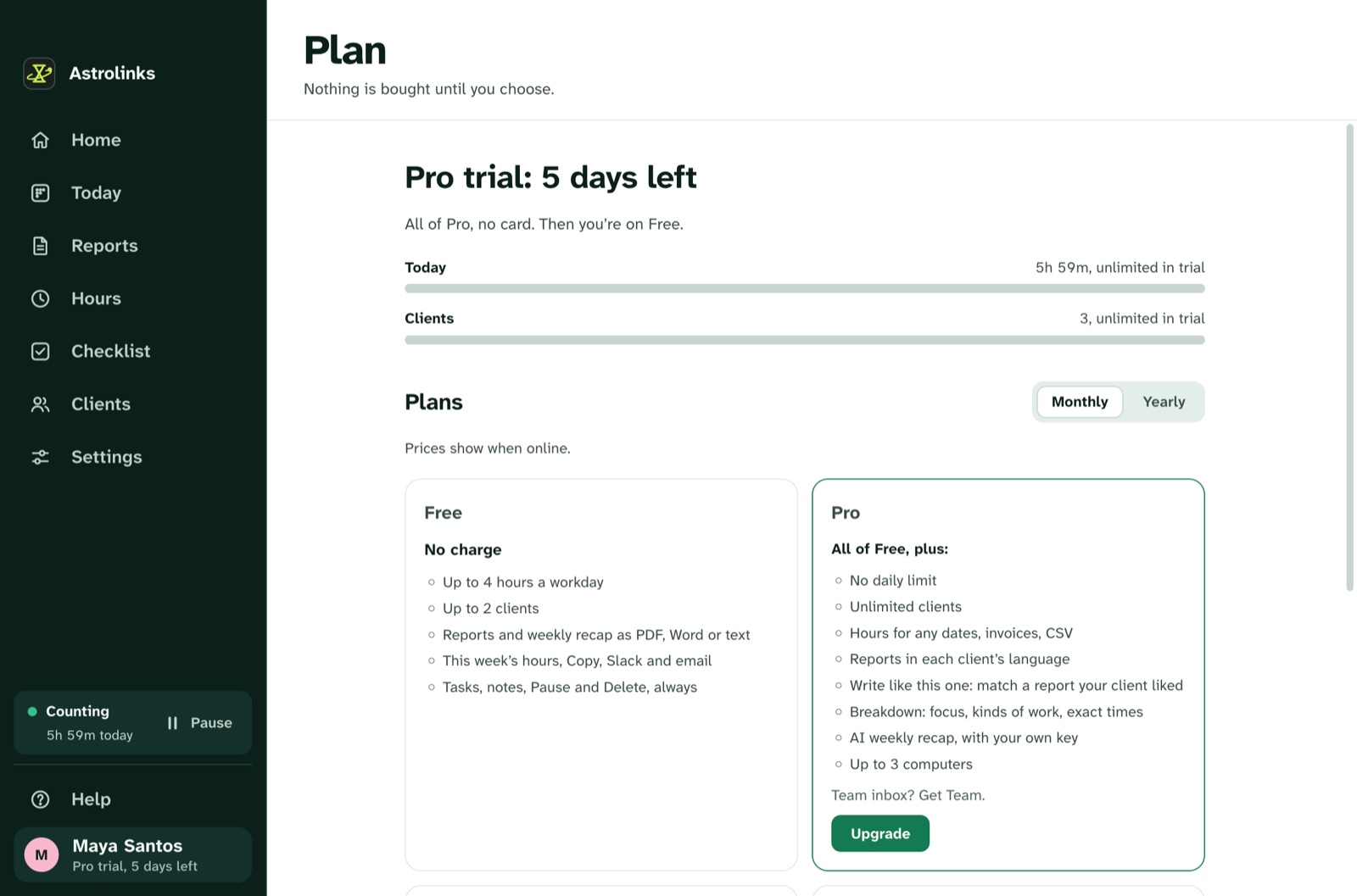
The trial
From the moment you accept the welcome, you have 7 days of everything Pro has. No card, nothing to cancel. Two days before it ends, and on its last day, Astrolinks tells you. Then it moves to Free by itself.
What Free keeps
- Up to 4 hours counted a workday, for up to 2 clients. Your other clients stay as they are.
- The full daily report, written on your computer: Done, Worked on, Meetings and calls, Blockers, Tomorrow and hours.
- The weekly recap, Hours for this week, Copy, Slack and email, and Save as PDF, Word or Text.
- Invoices, with your logo, a Pay now link, and paid or unpaid tracking with overdue reminders. On Free, an invoice always carries a small “Made with Astrolinks” line and has no timesheet page.
- Never limited, on any plan: privacy, Pause, Delete, Never record, the app’s language, Tasks, notes, summaries on your computer and sending.
What Pro adds
- No daily limit, and as many clients as you need.
- Hours for any dates and CSV export.
- Invoices without the “Made with Astrolinks” line, and with a timesheet page if you want one.
- The built-in writing helper, a small AI model that runs on your computer.
- Write like this one, report languages and the detailed breakdown.
Team and Business give each person Pro, plus a company Team inbox, from 2 seats.
The Plan page in the app
The sidebar’s Plan page shows your plan and what you have used: time counted today and clients, each as a bar. The plan cards show the prices for your country when you are online.
Upgrade opens checkout in your browser. When you finish, your license comes back to the app by itself, with nothing to copy. Manage plan opens Paddle’s page to change your card, switch plans or cancel, in two clicks.
If the app doesn’t pick up a purchase by itself, open Plan and press Have a license key? to paste the key from the thank-you page.
AI and your plan
Every plan works fully without AI. Pro and the trial include a built-in writing helper: Granite 4.2 3B, a small open AI model by IBM that runs on your own computer, so nothing about your day leaves it when it writes. It downloads once, about 2.2 GB, the first time the app opens on Pro or the trial. Free has no built-in helper.
On any plan, you can add your own Anthropic key in Settings, AI, for Write with AI and Change it by chat with Claude. Anthropic bills you directly for what you use. No plan includes cloud AI.
See prices for your country on the pricing page.
Questions about plans and the trial
Do I need a card for the trial?
No. The trial needs no card, and nothing is charged when it ends.
What happens when the trial ends?
Astrolinks moves to Free by itself. Your days, clients and tasks stay as they are.
How do I cancel?
In the app, open Plan and press Manage plan. Paddle’s page opens, and canceling there is one more click. Your plan works until the end of the period you paid for.
Clock out with the report already written
7 days of Pro to start. No card. Your log stays on your computer.