 Astrolinks

Short answer
Digital nomads can track time with a private log that lives on their own laptop. Astrolinks notes what you work on, sorts it by client, and writes each client's end-of-day report at clock-out, with times in that client's time zone. The log needs no internet, and a report you send while offline goes once you are back online.
You start the month in Lisbon, spend two weeks in Mexico City and finish it in Bangkok. Your clients stay where they are: one in New York, one in London, one in Sydney. Each one still wants to know what you did today, and each one reads your update on their own clock.
Time tracking for digital nomads has to cope with that. Timers get forgotten on travel days. Cloud trackers want a steady connection. Screenshot tools show your screen, and anything on it, to someone else. Astrolinks is a small desktop app for Mac and Windows that takes a different route. It keeps a private log of your workday on your own laptop, sorts the time by client, and writes each client's end-of-day report when you clock out. You read it, fix anything, and send it. It never takes screenshots and never records keystrokes, and nothing leaves your computer unless you send it.
How do I keep each client's report right when I change time zones every month?
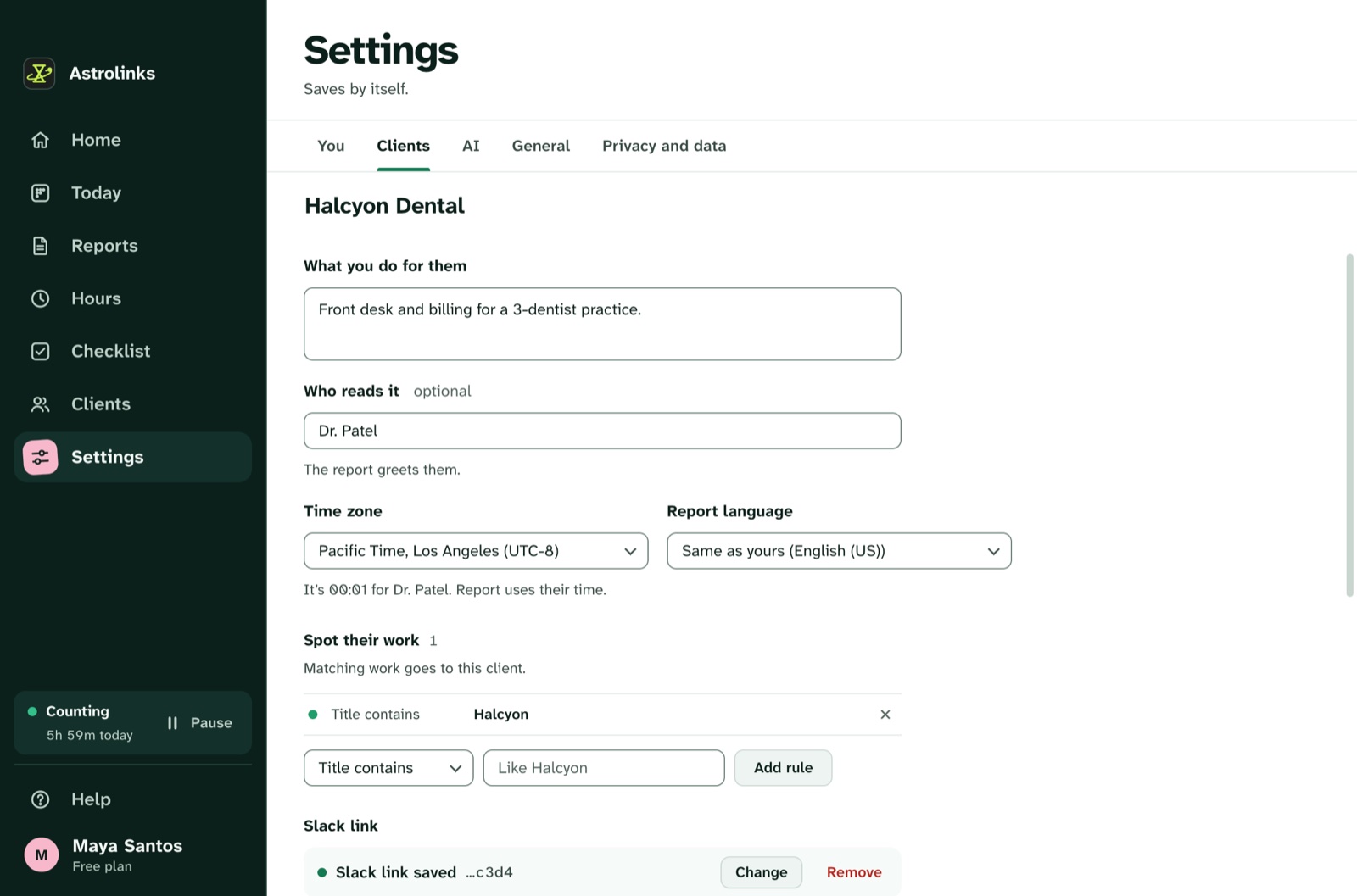
Give each client their time zone once, in Settings, Clients. After that, their report gives its times, shift and date on their clock, like "Worked 2h 14m, from 18:02 to 00:53 Pacific Time", wherever your laptop happens to be. Where their clock differs from yours, Astrolinks shows it beside your own, so you don't do the math at 1 AM.
Your own day stays on your clock, and theirs on theirs. Move from Lisbon to Mexico City and the New York client's report still says Eastern Time.
Late sessions are normal when you work for clients ten hours away. A workday starts four hours before your shift, so a late shift stays one day, even across midnight. Start at 9 PM for a client in California and finish at 2 AM, and it is still one workday and one report.
With Pro, each client's report can also be in its own language. English, Spanish, Portuguese (Brazil), Chinese (Simplified) and Filipino are written right on your computer. The languages and time zones page has the details.
Does it work on a plane or on bad cafe Wi-Fi?
Yes, for the parts that matter. The log lives on your computer, and counting and writing the report happen there too, without the internet. On a laptop running on battery, the day keeps counting, whether you are on a long flight or in a guesthouse where the router gave up.
Sending is the only step that needs a connection. If the Wi-Fi drops as you press Send to Slack, the report waits on your computer and goes by itself once you are back online. It keeps trying for up to a day, and Settings, You, Waiting to send shows what is waiting, with Try now and Don't send.
Time away from the keyboard is taken back too, so the hour you spent in a taxi with the laptop open doesn't count as work. When the lock screen or the screen saver is in front, nobody is working, and that time doesn't count either.
Is it private in cafes and coworking spaces?
A shared table means strangers can see your screen. A tracker that takes screenshots adds one more viewer, and it sends those pictures to a server you don't control. Astrolinks never takes screenshots, never records keystrokes and never reads your clipboard.
While it runs, it notes which app and window are in front every 5 seconds, plus the web address in supported browsers, without anything after "?" or "#". That is enough to say "two hours in the client's Figma file" without a picture of your screen. Private and incognito windows in Chrome, Edge, Brave, Vivaldi, Chromium and Arc are skipped. Safari private windows on a Mac are recorded like any other window, so pause Astrolinks first if you need to.
The log is a set of plain files on your laptop. We never receive it. There is no analytics in the app and no account that holds your day. Days are kept 14 days by default, and you can delete everything any time. If you cross borders with a laptop, that is one less place your work history sits. The privacy-first page lists everything Astrolinks records and everything it never does.

How do I bill clients in several currencies?
Give each client one rate in their own currency: 45 USD for the agency in New York, 30 GBP for the studio in London. Hours adds up each client's time for the dates you pick and shows what to bill. Different currencies are never added together, so you won't see a meaningless total of dollars and pounds.
On every plan, Make invoice builds one client's invoice for the dates on screen: the invoice number, the date, who it is for, every work item with its hours and amount, the total, when it is due and how they pay you. Due on receipt, or in 7, 14 or 30 days. Letter or A4, which helps when one client is in the US and another in Europe. Save it as a PDF, a CSV, or both, on your computer. Astrolinks never sends an invoice for you.
Each line's amount is its hours times the rate, and the total is the sum of the lines, to the cent. Check the numbers before you send: Hours come from your own log, and they help you bill and remember.
Keeping records of hours and income
Nomads get asked for paperwork more often than most freelancers: by a coworking space, a landlord, an accountant, or a consulate. Astrolinks doesn't replace those documents, but it makes the records behind them easy to keep.
- Save as CSV in Hours saves one row per date, client and work item, with minutes, hours, rate, currency and amount. Keep one file per month in the folder where you keep your bank statements.
- Invoices as PDF and CSV give you a numbered, matching pair for every bill. Invoice numbers move on by themselves and never go back.
- Daily reports can be saved as a PDF, a Word file or Text, so you have a record of what you sent each client.
Be clear about what these are. Hours and reports come from your own log on your computer. They are not proof of work, and a consulate or tax office will usually want contracts, invoices and bank statements. For anything official, check the rules on the government's own site and ask a professional.
An example week across three time zones
This is an illustrative example, not a real customer.
Sam is a freelance developer spending the month in Lisbon. He has three clients: a startup in New York, an agency in London and a small shop in Sydney.
On Monday he starts at 8 AM with the Sydney shop, while it is still their evening. Astrolinks files the time under the shop because their store's admin address matches his rule. At 2 PM he switches to the London agency's repository, then joins the New York standup at 3 PM. A quick note with ⌃⌥N (Ctrl+Alt+N on Windows) says "blocked: waiting on staging keys from NY".
On Wednesday he flies to Mexico City. On the plane he fixes two bugs for the New York startup with no Wi-Fi. The day keeps counting on battery. He presses Write my report before landing and Send to Slack for the London agency. The report waits on his laptop and goes once he connects at the airport.
On Friday, now six hours behind Lisbon, he opens Hours. The New York client shows dollars, the London agency shows pounds, the Sydney shop shows Australian dollars, each total on its own. He makes the London invoice as a PDF and saves the week as a CSV.
Your laptop, your log
No AI is needed. Reports are written on your computer from your own log. On Pro, the built-in AI writing helper runs on your computer too, so nothing about your day goes to an AI company. If you add your own Anthropic key, Write with AI sends Claude a masked summary of one client's day, never the log, and a client marked Private never goes to AI at all.
Astrolinks runs on Macs with Apple silicon and on Windows. One Pro license covers up to 3 computers, so a travel laptop and a desktop at home base both count.