 Astrolinks

Short answer
Astrolinks is time tracking for US freelancers and 1099 contractors that needs no timer. It keeps a private log of your workday on your computer, sorts the hours by client, and turns them into an editable invoice in USD, with a CSV of every date, client and amount to back up what you billed.
If you freelance in the US, you're a business of one. You pick your clients, set your rates, send your own invoices, and set money aside for taxes nobody withholds for you. The work itself is the part you're good at. The trouble is everything around it: remembering where the hours went, telling each client what happened, and billing them for it in a way that holds up.
Astrolinks is a desktop app for Mac and Windows that handles that part. It keeps a private log of your workday on your own computer, sorts it by client, writes each client's update, and turns the hours into an invoice you can fully edit. The Astrolinks page for freelancers covers it for any freelancer. This page is about billing US clients as an independent contractor.
How do US freelancers track billable hours?
Most start with a timer. Then they forget to start it, or forget to stop it, and Friday becomes an afternoon of guessing. Others keep a spreadsheet and fill it in from memory, which works until the week gets busy.
Astrolinks takes a different route: no timer at all. While it runs, it notes which app and window are in front every 5 seconds, and the web address in supported browsers. It never records keystrokes, screenshots or your clipboard. Give each client a rule, like a word in the window title, a website or an app, and every entry shows whose time it was. When one lands in the wrong place, click the name and fix it. Pick Always and the rule learns.
Short breaks are taken back as time away. Calls keep counting if you leave that setting on. For more ways to keep hours honest, read how to track billable hours.
Hourly billing in dollars, on US paper
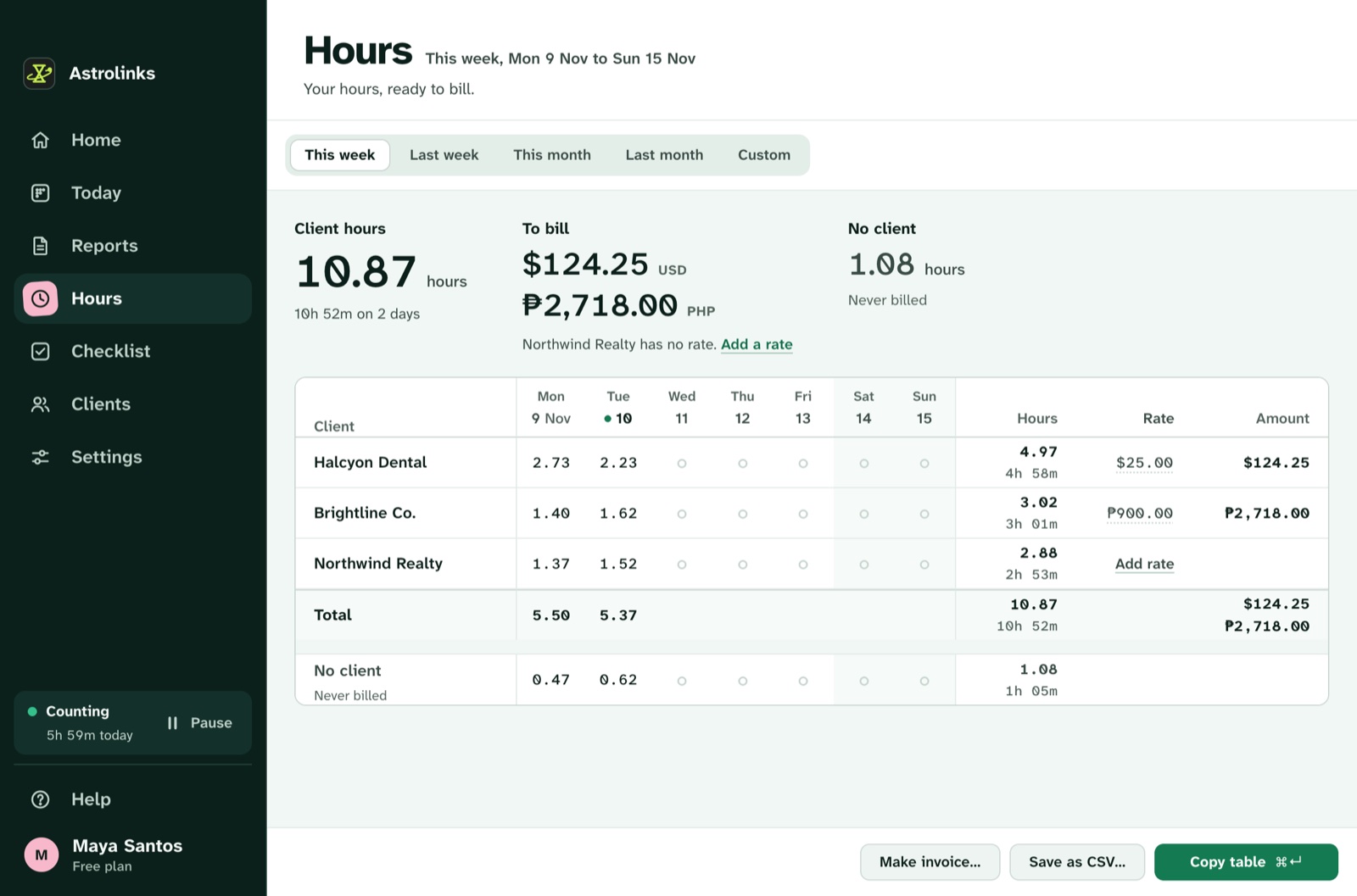
Give each client one optional hourly rate in any currency, like 85 USD. Hours shows This week on Free, and with Pro, This week, Last week, This month, Last month or any two dates. You see each client's hours in decimals, the amount to bill, and a table by day.
On every plan, Make invoice builds one client's invoice for the dates on screen:
- numbered lines with "work done" text, so the client sees what the hours bought
- their billing address and your payment details
- due on receipt, or in 7, 14 or 30 days
- Letter or A4 paper
- invoice numbers that move on by themselves and never go back
Each line's amount is its hours times the rate, and the total is the sum of the lines. Everything on it is editable. Save it as a PDF, a CSV or both, on your computer. Astrolinks never sends an invoice for you, so you send it the way you always do. The hours and invoices page shows each part.
What records back up a freelance invoice?
When a client asks "what was this 6.5 hours?", a good answer is specific: the dates, the work, and the time on each. Astrolinks keeps the pieces for that answer:
- Work done lines on the invoice, built from the lines of your daily reports.
- Copy as table, which pastes into Google Sheets or Excel with every number in its own cell.
- Save as CSV, with one row per date, client and work item, and the minutes, hours, rate, currency and amount.
- The daily or weekly reports you already sent the client, which they've seen along the way.
A word of honesty: these are your own notes of your day. They help you remember and bill fairly. They are not proof of work, and you should read them before you send an invoice. If you prefer a sheet you fill in by hand, our free timesheet template has weekly and per-client versions.
What about quarterly estimated taxes?
This is context, not tax advice. Clients don't withhold tax from what they pay a 1099 contractor, so many US freelancers pay estimated tax during the year. The IRS says you generally have to if you expect to owe at least $1,000 for the year after withholding and credits, and estimated payments usually fall due around April 15, June 15, September 15 and January 15. The rules have details and exceptions, and your state may have its own.
Astrolinks doesn't calculate tax. What it can do is give you a clean list of what you billed. At the end of a quarter, pick the dates in Hours and press Save as CSV. You get every date, client, hour and amount, ready for your spreadsheet or your accountant. Billed isn't the same as paid, so match it against what actually arrived. For what you owe and when, ask a tax professional.

An example month
This is an illustrative example, not a real customer.
Jordan is a freelance bookkeeper in Raleigh with three clients: a dental practice in Boston at 75 USD an hour, a coffee roaster in Denver at 60 USD an hour, and a startup in San Francisco on a monthly retainer.
Jordan sets one rule per client: the practice's name in QuickBooks window titles, the roaster's Xero organization, and the startup's Slack workspace. Each client has their own time zone, so the Denver report reads in Mountain Time and the San Francisco one in Pacific Time. On a Thursday, a 40-minute call with the roaster lands under No client. Jordan clicks it and moves it.
Each evening, Jordan presses Write my report and sends the startup a short Slack update. The practice gets a weekly recap by email draft on Friday. On the first of the month, Jordan opens Hours, picks Last month, and makes two invoices, net 30, on Letter paper. The retainer client gets a recap of where the hours went instead. In April, Jordan saves a CSV of January to March and sends it to the accountant with a note.
Clients in several states, and in several time zones
US freelancers often work for clients from Maine to California, and sometimes Hawaii. Each client in Astrolinks can have their own time zone, so their report says "from 09:02 to 12:40 Pacific Time" instead of making them do the math. Each can also have their own sections, tone and way of sending: Send to Slack, Email draft, Copy, or Save as PDF, Word or text. A workday starts four hours before your shift, so if you work late for a West Coast client, the day doesn't split at midnight.
Contractor, not employee: who decides how you work?
When the IRS looks at whether a worker is an employee or an independent contractor, one factor is behavioral control: whether the business has the right to direct and control how the work is done. Contractors are generally hired for a result and choose their own methods. It's one factor among several, and this isn't legal advice.
That's one more reason many freelancers push back when a client asks them to install a screenshot tracker. Astrolinks works the other way around. Your log stays on your computer, a client sees only what you send, and the update is about results: what got done, what's blocked, and what's next. See the privacy-first page for the full list of what is and isn't recorded.
Good to know before you start
- Astrolinks runs on macOS and on Windows 10 (version 2004 or later) and Windows 11.
- The free plan counts up to 4 hours a workday for up to 2 clients, with Hours for this week. Every new copy starts with a 7-day Pro trial, no card.
- No AI is needed. Reports are written on your computer. On Pro, a built-in writing helper runs on your computer too, so nothing about your day goes to an AI company.
Keep reading
- How to invoice hourly clients, step by step
- How to track time across multiple clients
- Comparing tools? Read the Harvest alternative and the Toggl Track alternative