 Astrolinks

Short answer
Astrolinks is a time tracking app for virtual assistants in the Philippines that keeps a private log on your own computer, keeps a night shift as one workday across midnight, and writes each US client's end-of-day report with times on that client's clock. It takes no screenshots, and the app speaks Filipino.
It's 9 PM in Quezon City. Dinner is done, the house is getting quiet, and your first client in New York is just opening their laptop. By the time you log off, the sun is up in Manila and your clients are wrapping up their afternoon. Then comes the part nobody pays you for: an end-of-day report for each client, written in their time, about a day that started yesterday.
Astrolinks is a small desktop app for Mac and Windows that takes that job off your plate. It keeps a private log of your shift on your own computer, sorts it by client, and writes each client's report at clock-out. You read it, fix anything, and send it. It works for any VA, and the Astrolinks page for virtual assistants covers the basics. This page is about what's different when you work from the Philippines for clients in the US.
What time is it for my US client right now?
The Philippines runs on Philippine Standard Time, UTC+8, all year. There is no daylight saving time here. Most of the US does change its clocks, from March to early November, so the gap to your clients moves twice a year even though your own clock never does.
| Your client's time zone | Gap from early November to March | Gap from March to early November |
|---|---|---|
| Eastern (New York, Miami) | Manila is 13 hours ahead | Manila is 12 hours ahead |
| Central (Chicago, Dallas) | 14 hours ahead | 13 hours ahead |
| Mountain (Denver) | 15 hours ahead | 14 hours ahead |
| Pacific (Los Angeles, Seattle) | 16 hours ahead | 15 hours ahead |
So a 9 PM start in Manila is 8 AM in New York in January, but 9 AM in New York in July. If your client keeps the same US hours all year, your shift moves by an hour in March and again in November. Hawaii and most of Arizona don't use daylight saving time, so clients there stay put.
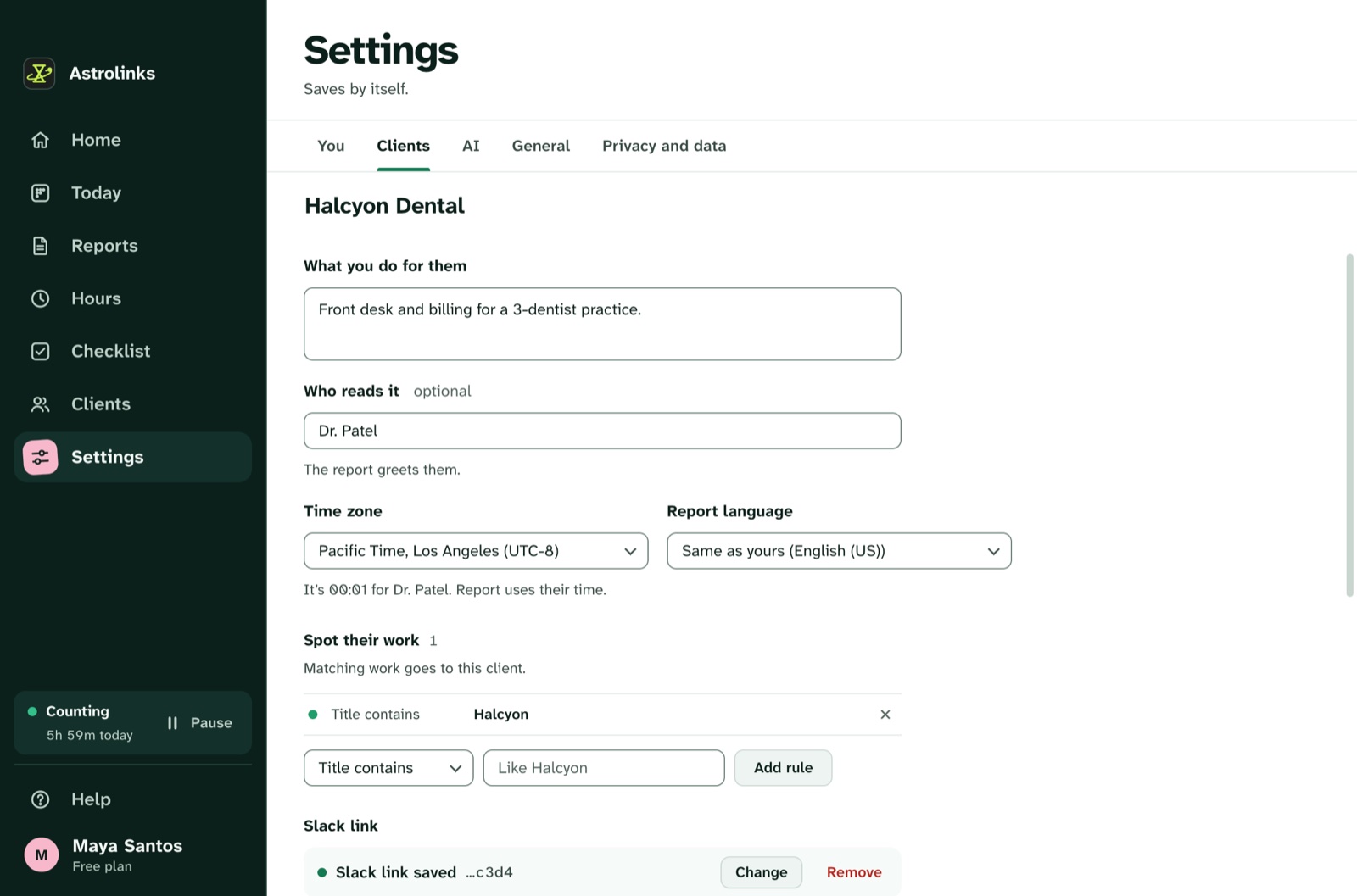
Astrolinks does this math for you. Give each client their time zone in Settings, Clients, and the app shows their clock next to yours where it differs. Their report gives its times, shift and date in their zone, like "Worked 7h 40m, from 08:02 to 16:58 Eastern Time". You never have to write "your Tuesday, my Wednesday" again.
Does a night shift count as one day or two?
One. This is the part most timers get wrong for Filipino VAs. If your shift runs from 9 PM to 6 AM, a calendar day ends halfway through it, and many tools cut your work into two short days with two half reports.
In Astrolinks a workday starts four hours before your shift. A 9 PM shift belongs to a workday that starts at 5 PM, so everything until you clock out in the morning stays one workday. Each client gets one report, for one shift, dated on their calendar.
How does Astrolinks fit a VA shift from the Philippines?
It notes your work, quietly
While Astrolinks runs, it notes which app and window are in front every 5 seconds, plus the web address in supported browsers. It doesn't record keystrokes, screenshots or your clipboard. Time away from the keyboard is taken back, so a midnight snack break doesn't count as work.
Give each client a rule or two: a word from their window titles, a website, or an app. After that, every entry in today's log shows whose time it was. If one lands in the wrong place, click the client name and pick Always, and the next ones go there by themselves. For more on juggling several clients, see how to manage multiple clients as a VA.
Notes for what the log can't see
A decision on a 2 AM call. A login that stopped working. Press ⌃⌥N (Ctrl+Alt+N on Windows) in any app, type a line, and press Return. Start it with "blocked" or "tomorrow" and it lands under Blockers or Tomorrow in that client's report.
The app in Filipino, reports in English
Astrolinks itself speaks Filipino, English, Spanish, Portuguese (Brazil) and Chinese (Simplified). By default it follows your computer's language, and you can change it in Settings, General, Language. Your clients still get their reports in English, or in another language per client with Pro, such as Spanish for a client in Miami.
Brownouts and slow internet at clock-out
Power and internet don't always cooperate at 6 AM. If the connection drops after you press Send, the report waits on your computer and goes by itself once you're back online. It keeps trying for up to a day, and Settings, You, Waiting to send shows what is still waiting. Your log is kept on your own computer, so there is no upload to finish before you can sleep.

An example night shift
This is an illustrative example, not a real customer.
Ana is a VA in Quezon City with two US clients. A property manager in New Jersey wants her from 8 AM to 1 PM Eastern. An online shop in California wants inbox and order help in its morning.
In January, Ana starts at 9 PM Manila time, which is 8 AM in New Jersey. Astrolinks files her Gmail and AppFolio windows under the property manager, because their company name is in the titles. At 1 AM she switches to the shop, which is 9 AM Pacific. Shopify and the shop's help desk land under the shop. Along the way she presses ⌃⌥N (Ctrl+Alt+N on Windows) once: "blocked: refund needs owner approval".
At 5:45 AM she presses Write my report. Two tabs. The property manager's report shows "from 08:01 to 13:04 Eastern Time" and goes by email draft. The shop's report shows its hours in Pacific Time, with the refund under Blockers, and goes to Slack. Both are dated the US day her clients just worked, not the Manila date. She's in bed by 6:15.
In March, the US moves its clocks and her New Jersey client's 8 AM becomes 8 PM in Manila. Ana moves her start time, and the reports keep showing Eastern Time without any change from her. For more shift routines, read how night-shift VAs keep US clients updated.
What if a client or agency asks for a screenshot tracker?
Many VAs here have been asked to install tools that take screenshots every few minutes. Astrolinks works the other way around. It never takes screenshots or logs keystrokes, the log stays on your computer, and a client sees only the report you send, after you've read it.
If your contract requires a specific tracker, that's between you and your client or agency. Some VAs keep Astrolinks for their own hours and reports anyway. Others show a client what a clear daily report looks like and ask whether that would do. For the trade-offs, read time tracking without screenshots. Agencies can also get every VA's report in one place with the Team inbox.
How should a VA handle client data under the Data Privacy Act?
The Philippines has the Data Privacy Act of 2012, Republic Act No. 10173, overseen by the National Privacy Commission. In plain terms, it protects personal information about people, like the names, emails and records of your client's customers or patients. When a client gives you that data to work with, you are usually handling it on their behalf, under their instructions.
A few good habits, whatever tools you use:
- Use client data only for the work they asked for.
- Keep it in the client's own systems where you can, not in personal files.
- Don't paste customer details into tools your client hasn't approved.
- Ask your client what they expect, and put it in writing.
Astrolinks helps in small ways. Your log stays on your computer, and we never receive it. The built-in AI on Pro runs on your computer, so nothing about your clients goes to an AI service when it writes. If you add your own Anthropic key, only a masked summary goes to Claude, and never a client you mark Private. Add apps or sites to Never record, choose how many days to keep, and delete a day or everything at any time. Window titles can contain a customer's name, so these settings matter. This isn't legal advice: for your own situation, ask your client or a lawyer. The privacy-first page lists exactly what is and isn't recorded.
Hours and invoices for US clients
Add each client's rate in their currency, like 8 USD an hour. Hours shows each client's time by day and what to bill. On every plan, Make invoice builds an invoice for one client and one date range, with "work done" lines, and everything on it is editable. Save it as a PDF or CSV and send it the way your client pays you. Hours are your own notes, so check them before you bill.
Where to go next
- Astrolinks for virtual assistants, the full tour
- The end-of-day reports feature page
- A ready-made EOD report template for virtual assistants