 Astrolinks


Short answer
Most small remote teams need six kinds of software: chat (Slack or Google Chat), a task manager (Asana, Trello or ClickUp), a daily written report, a time tracker if you bill hourly, shared docs (Google Workspace or Notion), and a way to pay people abroad (Wise or Deel). Screenshot monitoring is optional and often backfires. Pick one tool per job.
Astrolinks gives each person a daily report written from their own private log. No screenshots. Get it free →
Ask ten agency owners what software they use to manage remote employees and you'll get ten different lists, most of them too long. The tool you pick matters less than having one clear tool for each job, and everyone actually using it.
This guide sorts the best software for managing remote employees by the job it does: talking, tracking tasks, daily reporting, time tracking, monitoring, documents, meetings and paying people. For each job we say what to look for, name the well-known options, and say who each fits. At the end there's a lean stack for a small agency that you can copy.
We make Astrolinks, one of the tools in the daily reporting section. We've tried to be fair to the others, and we say where they're the better choice.
How do you choose software for managing remote employees?
Before comparing tools, decide what you actually need. Four questions help:
- What does your team do? A design agency, a support team and a bookkeeping firm need different things. Start from the work, not from a "top tools" list.
- How do you bill clients? If you bill hourly, time tracking is essential. If you bill by retainer or project, it's optional.
- Where do your people work? Offshore staff on their own computers need tools that run on whatever they have, use little bandwidth and work across time zones.
- What will people actually use? The best tool is the one your team opens every day without being chased. Simple usually wins.
Then pick one tool per job. Two task managers or two chat apps means things get lost between them.
Communication: chat and messages
Every remote team needs one place for day-to-day messages. (For the full set, see our guide to remote team communication tools.)
- Slack is the default for many agencies. Channels per client or project, good search, and lots of integrations. The free plan limits how far back you can see messages.
- Google Chat comes with Google Workspace, so if you already pay for Gmail and Docs, it costs nothing extra.
- Microsoft Teams makes sense if your company or your clients live in Microsoft 365.
What to look for: channels per client, threads, search, phone apps, and a way to set working hours so people aren't pinged at 3 AM.
Tip: agree on response times. For example, reply within two hours during overlap hours, by next shift otherwise. That one rule removes a lot of anxiety on both sides.
Task and project management
This is where work is assigned, tracked and handed over.
- Asana is good for agencies with many clients and repeatable projects. Templates, timelines and clear owners for every task.
- Trello is the simplest option: boards, lists and cards. Great for small teams and VAs who are new to project tools.
- ClickUp does a lot in one place, including docs, goals and time tracking. Powerful, but can feel heavy for small teams.
- Monday.com is visual and flexible, popular with marketing and operations teams.
What to look for: one owner and one due date per task, client-specific boards or projects, comments on tasks, and guest access if clients need to see progress.
Daily reports and check-ins
Tasks show what's planned. Daily reports show what actually happened. For remote teams, especially offshore teams working while you sleep, the end-of-day report is the most useful habit you can build. Our guide on how to know if remote employees are working explains why.
Your options:
- A template in a shared doc or Slack channel. Free and simple. Each person posts done, next and blocked at the end of their shift. Works well until people start skipping it because writing it is a chore.
- Check-in bots such as Geekbot or Standuply ask questions in Slack at a set time and collect the answers. Good for async standups.
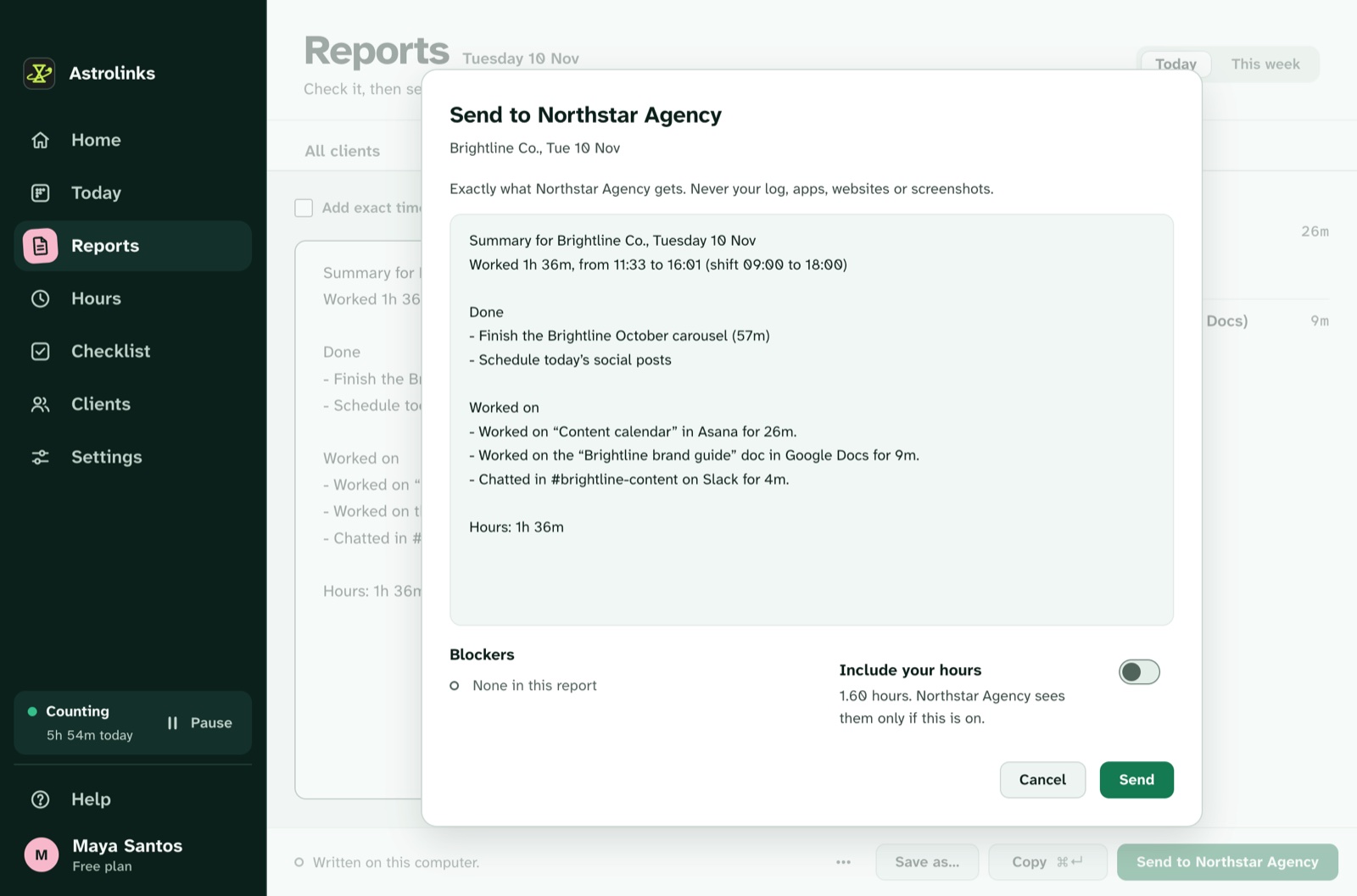
- Astrolinks drafts each person's end-of-day report from a private log of their workday on their own computer, sorted by client. They check it and send it. On the Team plan, reports land in one inbox for the manager, split by client and ready to forward. No screenshots, no keystroke logging.
What to look for: low effort for the team (or they'll stop), reports you can read in a minute, and a way to forward client-ready updates.

Time tracking
If you bill clients by the hour or pay staff hourly, you need reliable time records. Our guide on how to track remote employees' time compares the methods before you pick a tool.
- Toggl Track is simple and well-liked, with one-click timers and clean reports.
- Clockify has a free plan for up to 5 users, which makes it popular with small teams. Higher plans add screenshots and activity tracking (our comparison).
- Harvest combines time tracking with invoicing and is a long-time favorite of agencies (our comparison).
- Hubstaff and Time Doctor track time along with activity and optional screenshots. More on those below.
What to look for: tracking by client and project, easy timesheet exports, and as little manual entry as possible. Our post on how to track billable hours covers the basics.
Do you need employee monitoring software?
This is the category most owners ask about first, and the one we'd think hardest about.
- Hubstaff offers time tracking with activity levels, optional screenshots, app and URL tracking, GPS and payroll (our comparison).
- Time Doctor offers time and activity tracking, optional screenshots and screen video, and payroll, aimed at mid-sized and large companies (our comparison). If you're deciding between the two, see Hubstaff vs Time Doctor.
- ActivTrak focuses on app and website usage and productivity trends, without screenshots by default (our comparison).
- Insightful and Teramind go further into activity data and, for Teramind, insider-risk monitoring.
Monitoring tools can make sense where you pay contractors purely by the hour and need proof of time, or where security rules require it. But they measure activity, not results. Activity scores are easy to fake, and screenshots tell good people you don't trust them. We explain the trade-offs in bossware: what it is and what it sees and time tracking without screenshots.
If you do use monitoring, tell people exactly what it collects, in writing, and check the law where they live.
Documents and knowledge base
Remote teams run on written instructions. You need one place for SOPs, client briefs and logins.
- Google Workspace (Docs, Sheets, Drive) is the default for many small agencies. Easy sharing, works on any computer.
- Notion is great for wikis, SOPs and client portals in one place.
- A password manager such as 1Password or Bitwarden for shared logins. Never send passwords in chat.
What to look for: one source of truth for each client, clear sharing permissions, and an easy way to remove access when someone leaves.
Meetings and video
- Zoom and Google Meet are both fine for calls. Use whichever your clients use.
- Loom records short screen videos. Great for showing a VA how to do a task once, instead of explaining it on three calls.
Keep meetings few: a weekly one-on-one and maybe a weekly team call. Daily written updates replace most status meetings.
How do you pay remote employees abroad?
If your team is in another country, how you pay them matters as much as what you pay.
- Wise sends money abroad with clear fees and good exchange rates. Popular for paying Filipino VAs and other contractors.
- Payoneer and PayPal are widely used by freelancers, though fees can add up.
- Deel and Remote handle contracts, compliance and payroll for contractors or employees in other countries. More expensive, but they take care of paperwork.
What to look for: low fees on both sides, fast delivery, and a method your people can actually receive. Agree in writing who pays transfer fees. Our guide on how to hire a Filipino virtual assistant covers payment in more detail.
What software stack should a small agency use?
If you're running an agency with 3 to 15 remote people, here's a stack that covers everything without bloat:
| Job | Tool | Why |
|---|---|---|
| Messages | Slack (or Google Chat) | One channel per client, plus a team channel |
| Tasks | Asana or Trello | One owner and due date per task |
| Daily reports | Astrolinks (or a Slack template) | Done, next, blocked from each person, every day |
| Time | Toggl Track or Clockify, if you bill hourly | Clean timesheets per client |
| Docs | Google Workspace + a password manager | SOPs, briefs and shared logins |
| Video | Zoom or Google Meet, plus Loom | Weekly one-on-ones and how-to videos |
| Pay | Wise | Low fees for paying people abroad |
That's six or seven tools. Resist adding more until a real problem demands it.
How do you roll out a new tool to a remote team?
A tool only works if people use it. With a team spread across time zones, a short, written rollout beats a launch call:
- Say why in one sentence. For example: "From Monday, all client tasks go in Asana so nobody has to search chat for requests."
- Set it up before you announce it. Create the projects, channels or templates first, so people open a tool that's ready to use.
- Record a 3-minute walkthrough showing the two or three things each person will do every day. Skip the rest.
- Pick a switch date and stop using the old way on that day. Running two systems side by side is how things get lost.
- Check in after two weeks. Ask what's annoying. Small fixes then save a quiet return to old habits later.
Change one tool at a time. Three new tools in one month is how a team ends up using none of them properly.
Where Astrolinks fits
We make Astrolinks, so read this with that in mind. Astrolinks is a desktop app for Mac and Windows that handles the daily report part of the stack. It keeps a private log of each person's workday on their own computer, sorted by client, and drafts their end-of-day report at clock-out. They check it and send it. On the Team plan, you get one inbox of reports, split by client, ready to forward to clients. It also tracks hours, so some small teams use it instead of a separate time tracker.
It doesn't do chat, tasks or payroll, and it won't take screenshots. If you need those, use the tools above alongside it.
For agencies with remote staff, we're running free 14-day pilots for up to 5 people, no card needed. Ask for a pilot or read about Astrolinks for agencies and remote teams.
The short version
The best software for managing remote employees is a small set of tools, one per job: chat, tasks, daily reports, time (if you bill hourly), docs, video and payments. Start with free plans, add paid tools only when you hit a real limit, and think twice before adding monitoring software. Most "is my team working?" questions are better answered by clear outcomes and a short daily written update than by screenshots.