 Astrolinks


Short answer
To track billable hours, record every piece of client work with the date, client, task, start and end time, and whether it's billable. Use a timesheet, timer app, calendar blocks or an automatic activity log, track exact minutes, round only at invoice time, and review each day for missed emails, calls and chat.
Astrolinks sorts your day by client without a timer and turns the hours into client updates and invoices. Get it free →
Most billable hours aren't lost on big projects. They're lost in the small stuff. A five-minute client call. A quick reply in Slack. Ten minutes fixing a typo in a report you already sent. A timer you forgot to start, or one that ran through lunch.
Every guide on how to track billable hours says "start a timer". That works for long, focused work. It doesn't catch the small, scattered work that fills most freelance days. And the other common answer, a tracker that takes screenshots of your screen, catches more but feels like being watched. This guide covers what counts as billable, four ways to track, a billable hours tracker template, how rounding works, and a short daily review that finds the time you forgot. None of it needs a spy app.
What counts as billable hours?
Billable time is work your client has agreed to pay for. That's the whole definition. It depends on your agreement, not on a general rule, so write your policy down before work starts.
Here's how it usually splits:
| Billable | Usually billable, if agreed | Usually not billable |
|---|---|---|
| Doing the client's tasks | Travel to the client or their events | Admin for your own business |
| Calls and meetings with the client | Research for the client's project | Proposals and quotes |
| Email and chat replies to the client | Learning a tool the client asked you to use | Learning for your own skills |
| Revisions the client asked for | Waiting time the client caused | Fixing your own mistakes |
| Reports and updates for the client | Work outside agreed hours | Invoicing and chasing payment |
A short note in your agreement settles most of it. Something like: "Calls, email and revisions are billable. Travel is billed at half rate. My own admin isn't billed." The goal is no surprises for either side. If you work for several clients, our guide on tracking time across multiple clients covers keeping each one's time separate.
Track your non-billable time too. It's still work, and you'll need it later to see what you really earn per hour.
What are the best ways to track billable hours?
The four main ways to track billable hours are a manual timesheet, a timer app, calendar blocks and an automatic activity log. There's no single best one. The best one is the method you'll actually keep up on a busy day.
- Manual timesheet. You write down your tasks and times, in a notebook or a spreadsheet, during the day or at the end of it.
- Timer app. You start and stop a timer for each task, in timer apps such as Toggl Track, Clockify or Harvest.
- Calendar blocks. You plan your day in blocks per client and treat the calendar as the record.
- Automatic activity log. An app quietly notes what you work on. At the end of the day, you review the log and turn it into billable time.
| Method | Pros | Cons |
|---|---|---|
| Manual timesheet | Free, simple, fully under your control | Relies on memory; small tasks get skipped or rounded down |
| Timer app | Accurate for long tasks; totals done for you | Easy to forget to start, stop or switch; quick replies rarely get a timer |
| Calendar blocks | Already part of your day; good for calls | Shows the plan, not what happened; interruptions go missing |
| Automatic activity log | Catches small and forgotten work; nothing to remember during the day | Needs a short daily review; pick one that keeps your data private |
If you do long blocks of deep work for one client at a time, a timer is fine. If you switch between clients and inboxes all day, an automatic log with a daily review tends to miss less.
Do you need a spy app to track billable time?
No. Some time trackers take screenshots every few minutes, log keystrokes or score your activity. They were built for managers checking on staff, and some clients and freelance platforms require them. For your own billable time tracking, you don't need any of that.
What a client needs is a clear record: the date, the task, the time and a description they understand. A timesheet, a timer or a private activity log all give you that. Screenshots add risk instead, because they can capture other clients' emails, passwords on screen or personal messages, and they get stored on someone else's server.
If a client asks for proof, a short daily report with the tasks and hours usually answers it better than a folder of screenshots. Our privacy-friendly time tracking guide covers what to look for in a tracker, and what to ask before you install one a client sends you.
A billable hours tracker template
Whatever method you use, the hours should end up in one place with the same columns. A billable hours tracker in Excel or Google Sheets needs these:
- Date
- Client
- Project
- Task description (write it so the client would understand it)
- Start and End
- Minutes
- Billable (yes or no)
- Rate (per hour)
- Amount
- Invoiced (yes or no)
Here's a filled example. The clients are made up.
| Date | Client | Project | Task | Start | End | Min | Billable | Rate | Amount | Invoiced |
|---|---|---|---|---|---|---|---|---|---|---|
| Nov 10 | Halcyon Dental | Billing | Reconcile October invoices | 9:00 | 9:46 | 46 | Yes | $40 | $30.67 | No |
| Nov 10 | Brightline Co. | Social | Answer questions in Slack | 9:46 | 9:58 | 12 | Yes | $50 | $10.00 | No |
| Nov 10 | Northwind Realty | Listings | Call about a new listing | 10:30 | 10:48 | 18 | Yes | $45 | $13.50 | No |
| Nov 10 | Own business | Admin | Update my invoicing sheet | 11:00 | 11:20 | 20 | No | none | $0.00 | No |
| Nov 10 | Halcyon Dental | Billing | Revise payment report | 13:15 | 14:05 | 50 | Yes | $40 | $33.33 | No |
The formulas are simple. Minutes is the end time minus the start time, in minutes. Hours is minutes divided by 60. Amount is hours times the rate, and only for rows marked billable. At the bottom, add up the amount column for rows where Invoiced is "No". That's what you're owed and haven't billed yet.
A few habits keep the sheet useful:
- One row per task, not per hour. Short rows are fine. A 4-minute reply deserves its own line.
- Write descriptions for the client. "Revise payment report" is clear. "Stuff for Halcyon" isn't.
- Mark rows invoiced when you bill them. That stops double billing and missed billing.
Once a month, the sheet becomes your invoice. Paste the hours into the free invoice generator to get a clean PDF, or follow our guide on how to invoice hourly clients.

Should you round billable hours?
Only if your agreement says so: track exact minutes, then round once at invoice time. Many clients and industries bill in increments rather than exact minutes.
6-minute increments mean billing in tenths of an hour. Each 6 minutes is 0.1 hours. This is common in legal and consulting billing. Usually each task rounds up to the next tenth, so a 4-minute call is billed as 0.1 hours.
15-minute increments mean billing in quarter hours: 0.25, 0.5, 0.75 and 1.0. It's simpler, but rougher. A 3-minute task billed as 15 minutes is five times the real work.
Here's how minutes map to tenths of an hour when you round up:
| Minutes worked | Billed as (hours) |
|---|---|
| 1 to 6 | 0.1 |
| 7 to 12 | 0.2 |
| 13 to 18 | 0.3 |
| 19 to 24 | 0.4 |
| 25 to 30 | 0.5 |
| 31 to 36 | 0.6 |
| 37 to 42 | 0.7 |
| 43 to 48 | 0.8 |
| 49 to 54 | 0.9 |
| 55 to 60 | 1.0 |
The safest approach: track exact minutes, and round only at invoice time, using the rule in your agreement. If your agreement says exact time, bill exact time. If it says 6-minute increments, apply them once when you build the invoice. Your record stays honest, and you can always show the client the real minutes behind each line.
Watch out for rounding every tiny task up to 15 minutes. Twenty 3-minute replies are one hour of work. Rounded up one by one, they become five hours on the bill. Clients who check will notice, and they're right to.
How do you find forgotten billable time?
Run a 5-minute review at the end of each day, checking your tracker against your sent email, chat and calendar. This is where most freelancers lose money. Not on the work they track, but on the work they never wrote down.
Open your tracker and check it against four places:
- Sent email. Every reply to a client is time you worked.
- Chat. Scroll Slack, Teams or WhatsApp for threads with clients.
- Calendar. Calls and meetings, including the ones that ran long.
- Your activity log, if you use one. It shows what was on screen and when, so the gaps are easy to spot.
Add anything that's missing, with a note like "added from sent mail".
A worked example
Illustrative figures.
Sam is a freelance consultant. At 5 pm her timesheet shows 5 hours 10 minutes of billable work. Her review finds more:
| Found in | What | Client | Minutes | Rate | Amount |
|---|---|---|---|---|---|
| Sent email | Three replies about a draft | Brightline Co. | 15 | $50 | $12.50 |
| Calendar | A call that wasn't on the timer | Northwind Realty | 20 | $45 | $15.00 |
| Slack | A quick question about a report | Halcyon Dental | 7 | $40 | $4.67 |
| Total | 42 | $32.17 |
That's 42 minutes and $32.17 she would have lost on one ordinary day. If that happens most working days, it adds up to hundreds of dollars a month. Five minutes of review is a good trade.
The same review gives you what you need for each client's daily update. Paste it into the free EOD report generator, or read how to write an end-of-day report.
What is your effective hourly rate?
Your effective hourly rate is the total you billed divided by all the hours you worked, billable or not. To work it out, look at two totals once a week:
- Billable hours: time you'll invoice.
- Total hours worked: billable plus non-billable, including admin, proposals and learning.
Illustrative figures.
Say your rate is $60 an hour. This week you billed 32 hours, so you billed $1,920. You also spent 10 hours on admin, a proposal and a course. That's 42 hours worked in total.
$1,920 divided by 42 hours is about $45.71 an hour.
If that number is falling, you're either doing too much unpaid work or losing billable time. Both are fixable once you can see them, and it helps when you set your rates and goals as a freelancer.
How Astrolinks helps
Astrolinks is a desktop app for Mac and Windows that does the daily review step for you. While it runs, it keeps a private log of your workday on your own computer: which app and window title were in front, every few seconds. No screenshots, no keystroke logging, and nothing is sent anywhere. Read more about time tracking without screenshots.
You give each client a simple rule, like a word in a window title, a website or an app. The quick Slack reply and the call you forgot to time land under the right client on their own.
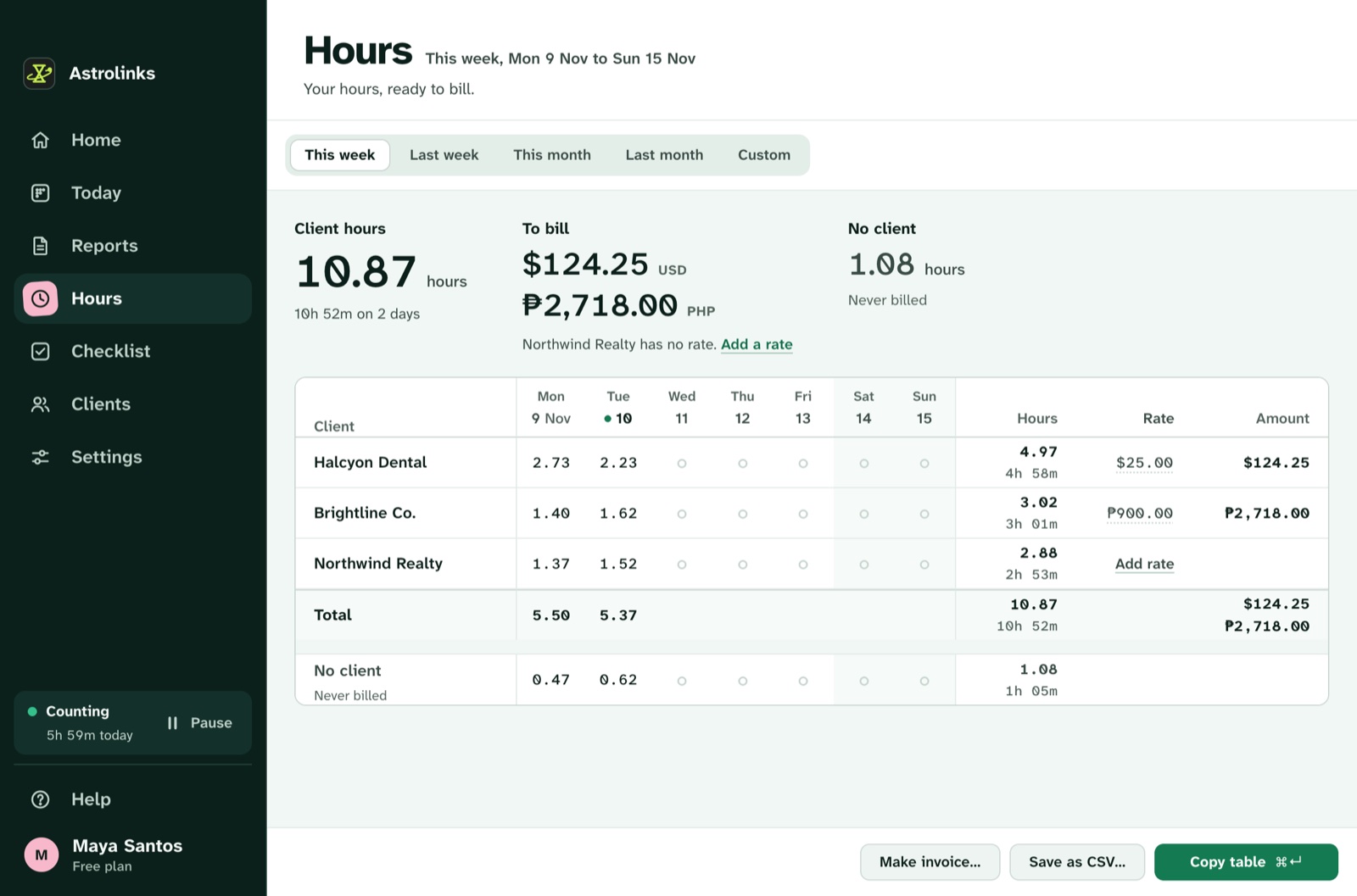
The Hours page then works as your billable hours tracker. It shows each client's hours for a week, a month or a custom range, with an hourly rate per client and the amount. Copy as table pastes it into Google Sheets or Excel. When you're ready to bill, Astrolinks makes the invoice from those hours, on every plan: edit any line, add a discount or tax, use the client's currency, and save it as a PDF or CSV.
There's a free plan, and a 7-day Pro trial. Download Astrolinks, or see the hours and invoices page for the details. If you're a VA, the Astrolinks for virtual assistants page shows a typical day, and our virtual assistant invoice template covers hourly and retainer billing.