 Astrolinks


Short answer
Bossware is a nickname for employee monitoring software that watches what workers do on their computers or phones and reports it to the employer. Depending on the product and settings, it can capture screenshots, keystrokes, websites and apps used, location and productivity scores. It is often legal on employer-owned devices, though rules vary by country and state.
Astrolinks tracks work by client with no screenshots or keystroke logging, and the log stays on your computer. Get it free →
You open your laptop, start work, and a coworker mentions that the company "can see everything." You don't know if that's true. You don't know what everything means. And now every tab you open feels a little different.
That feeling is what bossware does, even before anyone looks at a single report. This guide explains what bossware is, what it can record, how to check if it's on your computer, what the law says in broad strokes, and what honest managers can use instead. It's written for both sides of the desk: the worker who wants to know, and the manager who has to choose.
What is bossware?
Bossware is a nickname for employee monitoring software. It's the kind of tool that watches what a worker does on a computer or phone and reports it to the employer. Vendors usually call it productivity software, workforce analytics or time tracking with activity monitoring. Critics call it bossware.
Not every time tracker is bossware. A timer you start yourself, or a tool that keeps a log on your own computer and lets you decide what to send, is a different thing. The line is simple: who sees the raw data, and did you choose to share it?
Bossware apps come in a few broad types:
- Time and activity trackers that log hours alongside mouse and keyboard activity, apps and websites, and sometimes screenshots.
- Full monitoring suites that add screen recording, keystroke logging, rules that flag "risky" behavior and detailed reports per person.
- Mobile and field apps that track location for clock-ins, deliveries or site visits.
- Built-in tools in the software a company already uses, such as admin reports in email, chat or office suites.
Newer products add AI features that summarize activity or score people automatically. The data underneath is the same. The AI just turns it into a verdict faster.
What can bossware record?
Bossware can record screenshots, keystrokes, websites and apps, location and productivity scores. Every product is different, and most let the employer turn features on and off. Here is what bossware software can typically record, how common it tends to be, and what it means for you.
| What it can record | How common | What it means for you |
|---|---|---|
| Apps and websites used, with time spent | Very common, the core of most tools | Your employer can see where your time went, minute by minute |
| Mouse and keyboard activity levels | Very common in activity trackers | Reading, thinking and calls can look like idle time |
| Screenshots at intervals | Common, often an option a manager turns on | Anything on screen at that moment can be captured, including private messages |
| Productivity or activity scores | Common in monitoring suites | A single number may be used to judge your work |
| Precise location | Common in mobile and field apps | Your movements may be logged, sometimes outside work hours |
| Keystroke logging (what you type) | Less common, mostly in full monitoring suites | Typed text, including messages, could be stored |
| Screen recording | Less common, mostly in full monitoring suites | Video of your screen may be kept and replayed |
| Webcam photos or video | Rare, and widely criticized | Your face and your room could be captured |
Two things stand out. First, much of this is about activity, not results. A tool can tell your boss you moved your mouse a lot. It can't tell them whether the work was good. Second, the data doesn't always stay with your employer.
In May 2026, researchers at Northeastern University, led by David Choffnes and Alan Mislove, tested nine monitoring platforms, including Hubstaff, Time Doctor 2, Deputy and When I Work. All nine shared workers' personal data, such as name, email and employer, with third parties including Facebook, Google, Microsoft and AppLovin. All nine shared online activity with more than 145 domains. About a third could track precise location, even in the background.
So the question isn't only "what can my boss see?" It's also "who else ends up with it?"
How can you tell if your employer is monitoring your computer?
Check whether IT manages the device, look for unfamiliar apps, read your handbook, then ask HR or IT in writing. Many people only find out by accident. A UC Berkeley Labor Center report found that workers often learned about monitoring through rumors, app notifications or stumbling on a feature. You don't have to wait for that. Here is a short checklist.
Checklist: signs you may be monitored
- The computer belongs to the company. A laptop your employer issued is the most likely place for monitoring software. Assume anything on it can be seen.
- The device is managed by IT. On a Mac, look in System Settings for a Device Management or Profiles section. On Windows, check Settings, Accounts, Access work or school. A management profile doesn't prove monitoring, but it means IT can install software you didn't choose.
- You see unfamiliar apps or processes. Look through installed apps, then open Activity Monitor (Mac) or Task Manager (Windows) and look for names you don't recognize. Search any name you're unsure of.
- There's an icon in the menu bar or system tray for a tracker or agent you don't remember installing.
- Your handbook or contract mentions it. Search for words like monitoring, acceptable use, electronic communications or no expectation of privacy.
- You signed a notice when you were hired. Some places require one. Check your onboarding paperwork.
- Your web traffic goes through a company VPN or proxy. If it does, browsing can be logged even without an app on your computer.
Then do the simplest thing: ask HR or IT in writing. Ask what is installed, what it records, who can see it, how long it's kept and whether it runs outside work hours. A clear written answer is worth more than any amount of guessing.
One more point. Some people try to beat activity trackers with a mouse jiggler. That can backfire badly. Wells Fargo fired more than a dozen employees in 2024 over "simulation of keyboard activity." If tracking feels unfair, a direct conversation is the safer route.
Is it legal for my employer to monitor my computer?
The short answer: often, yes. The longer answer depends on where you live and whose device it is.
This is general information, not legal advice. Employee monitoring laws vary by country and state, and they change.
In the United States
In general, US employers have wide latitude to monitor company-owned devices and accounts. If the laptop, email account and network belong to the company, the company can usually monitor them. Personal devices are murkier, and rules vary by state.
Some states require notice. In New York, for example, Civil Rights Law § 52-c, in effect since May 7, 2022, says private employers that monitor employees' phone, email or internet use must give written notice at hiring, get an acknowledgment, and post the notice where employees can see it. It requires notice. It doesn't ban monitoring. Penalties are $500, $1,000 and $3,000 for repeat violations, enforced by the Attorney General.
In the EU and UK
Under GDPR, an employer needs a lawful basis to process workers' data and must be open about what it collects and why. Monitoring has to be fair and in proportion to the purpose. Secret, constant surveillance is much harder to justify there than in most of the US.
What this means in practice
- Treat a company device as visible to the company.
- Keep personal banking, health and private messages on your own phone or computer.
- Ask for the monitoring policy in writing.
- If you think monitoring crosses a line, talk to a local employment lawyer, a worker center or your union if you have one.

What does bossware cost a team?
Bossware often costs a team trust, useful signal, private data and good people. Managers usually buy monitoring tools for an honest reason. They want to know the work is getting done, especially with people they rarely see in person. That's fair. But the cost is often higher than the price on the invoice.
Trust drops. People who feel watched tend to protect themselves. They work to look busy. They stop mentioning small problems because a problem might look bad on a dashboard.
The signal is weak. Activity scores count clicks and keystrokes. A person reading a long contract or thinking through a hard problem looks idle. A person clicking around aimlessly looks busy. We go deeper into this in time tracking without screenshots.
Data piles up. Screenshots and logs can capture client records, passwords, health details and private messages. That data then sits on a vendor's servers, and, as the Northeastern study shows, may travel further than anyone expected.
Good people leave. The workers with the most options are the first to go somewhere they're trusted.
If you're the one choosing the software
If you manage a team or run an agency, you still need clarity. You can get it without watching screens. Here is what tends to work better.
- Decide what you actually need to know. Usually it's three things: what got done, what's stuck and whether the hours are right for billing.
- Measure outcomes. Tickets closed, clients served, deadlines met, quality of the work. Review them weekly.
- Ask for a short written daily report. Done, in progress, blocked, next. The worker writes it and sends it. It takes a few minutes and tells you more than a screenshot ever could. Our guide to remote team updates without micromanaging shows how to set this up.
- Read the reports and reply. Unblock people quickly. That's where the value is.
- Keep hours for billing, not policing. Use them for invoices and client caps, not rankings.
- If you use any tool, be open about it. Write down what it records, who sees it and how long it's kept. Tell people before they start. In some places, the law already requires this.
- Ask vendors hard questions. Does it take screenshots? Record keystrokes? Share data with third parties? Where is it stored? Our checklist for privacy-friendly time tracking has the full list.
If you're comparing tools, our alternatives to monitoring software page explains how a report-based approach differs from activity tracking.
A report-based approach in practice
Astrolinks is one example of this approach. It's a desktop app for Mac and Windows that keeps a private log of your workday on your own computer. It takes no screenshots and records no keystrokes, and nothing is sent to a manager. It sorts your hours by client, and at clock-out it drafts an end-of-day report for each client. You read it, edit it and send it yourself.
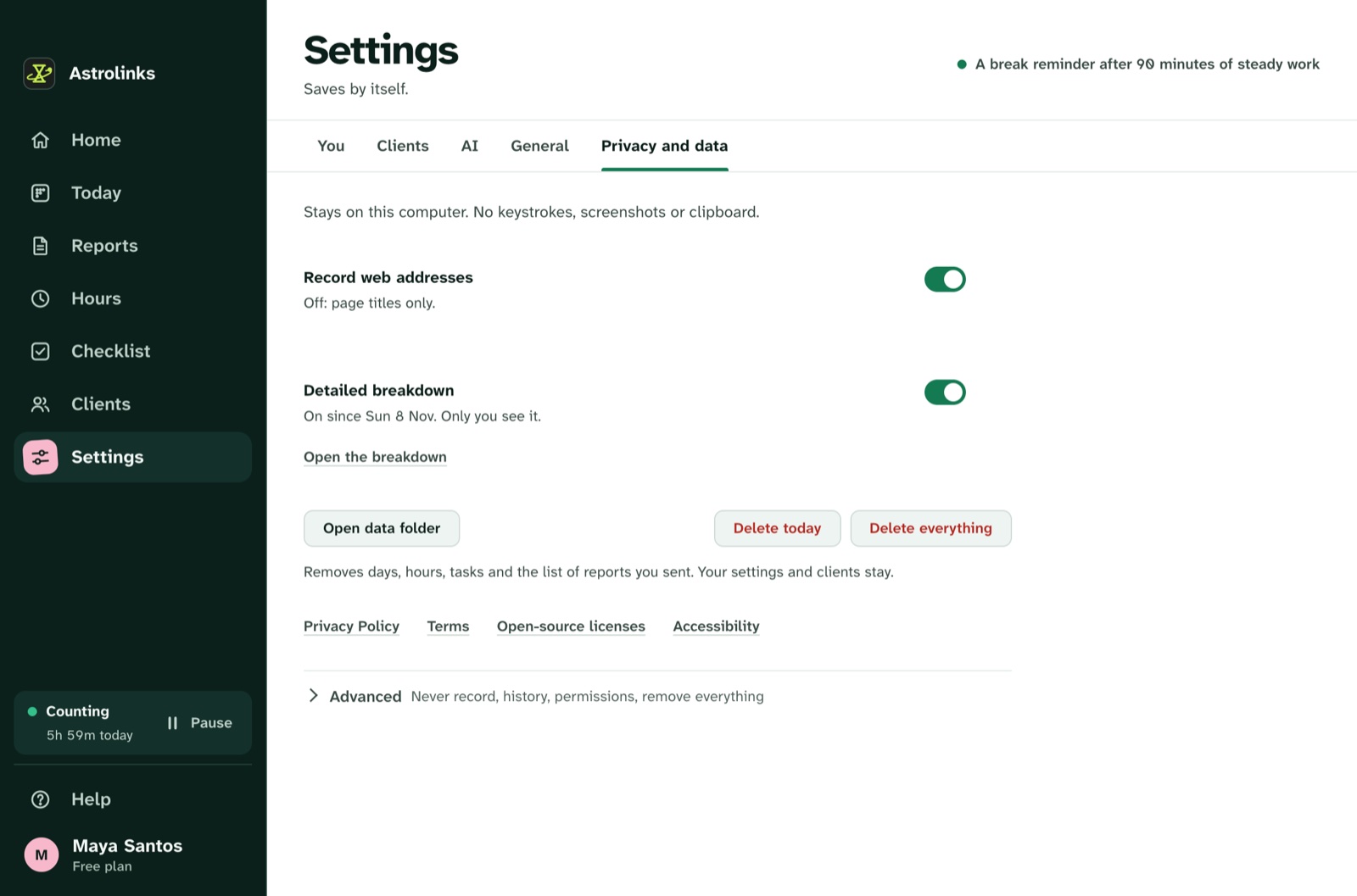
On team plans, managers get one inbox for the reports workers choose to send. They see what got done, not someone's screen. There's a free plan and a 7-day Pro trial if you'd like to see how it feels. The privacy-first page lists exactly what it records and what it doesn't, and Astrolinks for remote teams explains the team side.
The bottom line
Bossware can record a lot: apps, websites, screenshots, keystrokes, location and scores. Whether it's legal depends on where you are and whose device it is, and the answer is often yes on company equipment. If you're a worker, check your device, read your handbook and ask in writing. If you're a manager, ask yourself what you actually need to know. Usually it's what got done and what's stuck. A short report from someone you trust answers that better than a dashboard full of screenshots.