 Astrolinks


Short answer
Measure remote employees by outcomes, not activity. Agree on two or three results that matter for each role, such as tickets resolved or drafts delivered, set a quality check for each, and review them weekly alongside short written updates. Mouse movement, keystrokes and screenshots measure presence, not productivity, and people learn to game them.
Astrolinks gives each person a daily report written from their own private log. No screenshots. Get it free →
Managers who move to remote work often lose the thing they used to rely on without noticing: seeing people at their desks. It was never a good measure of productivity, but it felt like one. When it disappears, the obvious replacement is software that watches the screen, counts clicks and scores activity. That gives you a number. It does not tell you whether the work is getting done.
This guide covers how to measure the productivity of remote employees in a way that is fair to them and useful to you: what to measure, how to pick metrics for each role, a weekly scorecard you can copy, and the measures to avoid.
What does productivity mean for a remote employee?
Productivity is useful output for the time and cost it takes. For most office jobs, "useful output" is a result someone else can see: a resolved ticket, a shipped feature, a sent proposal, a closed month, a booked call. Time at the keyboard is an input. It only matters because of what comes out the other end.
That sounds obvious, but most measurement goes wrong right here. Inputs are easy to count, so they get counted. Outputs take a conversation to define, so they get skipped. A fair system starts by doing the harder part: agreeing, role by role, what a good week produces.
Why don't activity scores measure productivity?
Monitoring tools often show an activity percentage based on keyboard and mouse use, or label apps and sites as productive or unproductive. These numbers have three problems.
- They miss real work. Reading a contract, thinking through a design, a long customer call or planning on paper all score low. The people doing the hardest thinking can look the least busy.
- They are easy to game. If the number is what gets checked, people learn to raise the number. That is why mouse jigglers sell well. Our post on the mouse jiggler covers what that behaviour usually means.
- They cost trust. People who feel watched tend to share less, not more. A manager who reads activity scores often gets less honest information about blockers, because admitting to a slow day feels risky.
None of this means you can't use data. It means the data should describe results, and the person doing the work should be part of producing it.
How do you choose productivity metrics for each role?
Use this four-step method with each person or role. It takes about 30 minutes per role the first time.
- List what the role exists to produce. Not tasks, results. "Answer support emails" becomes "customers get correct answers within a day."
- Pick two or three outcome metrics. Each should be something the person can mostly control. More than three and nobody remembers them.
- Add a quality check to each. Volume alone rewards rushing. Pair "tickets resolved" with "reopened tickets", or "posts published" with "edits needed after review."
- Write down what a normal week looks like. This is the baseline. Productivity is then a comparison with the person's own normal, not with a colleague who does different work.
Example metrics by role
| Role | Outcome metrics | Quality check | What to avoid measuring |
|---|---|---|---|
| Customer support | Tickets resolved, first reply time | Reopen rate, customer rating | Time in the help desk app |
| Software developer | Pull requests merged, issues closed by priority | Bugs found after release, review comments | Lines of code, commits per day |
| Executive or virtual assistant | Requests completed, inbox at agreed level, calendar conflicts prevented | Requests that had to be redone | Minutes in email |
| Content writer | Drafts delivered on schedule | Rounds of edits needed | Words typed per hour |
| Sales development | Qualified meetings booked | Meetings that turn into opportunities | Calls dialled with no outcome |
| Bookkeeper | Accounts reconciled by the deadline | Corrections found at review | Hours in the accounting app |
The right column matters as much as the middle ones. Each of those is a measure that looks like productivity and quietly rewards the wrong behaviour.
A weekly productivity scorecard you can copy
Put this in a shared doc or sheet, one per person, and fill it in together for the first few weeks. After that, the employee fills it in and you read it.
| Week of | Outcome 1 | Outcome 2 | Outcome 3 | Quality note | Blockers this week | Next week's focus |
|---|---|---|---|---|---|---|
| Nov 16 | 41 tickets resolved | First reply under 4 hours: 92% | 2 reopened, both billing | Refund policy unclear | Write refund macro | |
| Nov 23 | 38 tickets resolved | First reply under 4 hours: 95% | 0 reopened | None | Train new hire on macros |
Three rules make the scorecard fair:
- The person fills in the numbers. If the data comes from a tool, they still see it before you do.
- Blockers sit next to the results. A low week with a clear blocker is a process problem, not a performance problem.
- Trends beat single weeks. Look at four to six weeks before drawing a conclusion about anyone.
Where do daily updates fit in?
A weekly scorecard shows results. It does not tell you on Tuesday that someone has been stuck since Monday. That is the job of a short daily written update: what got done, what is in progress, what is blocked, and what is next.
Daily updates are not a productivity measure on their own. They are the early warning system that keeps the weekly numbers from being a surprise. If you want a format, our guide to remote team updates without micromanaging has one, and async check-ins covers teams spread across time zones.

Should you track hours at all?
Track hours when they serve a clear purpose:
- You bill clients by the hour. Then hours are revenue and need to be accurate.
- You pay by the hour. Then hours are payroll.
- You are worried about overwork. Consistently long weeks predict burnout and mistakes.
- Local law requires it. Some countries require employers to record working time.
Outside those cases, hours are a cost measure, not an output measure. If two people produce the same result and one takes fewer hours, the faster one is more productive, not less committed. A system that rewards long hours trains people to work slowly and visibly.
What are the common mistakes when measuring remote productivity?
- Measuring what's easy instead of what matters. Logins, online status and app time are easy. Results take a conversation.
- Comparing people in different roles. A developer and a support agent have nothing in common on a dashboard.
- Using the numbers only for criticism. If the scorecard only comes up when something is wrong, people will start shaping it.
- Changing the metrics every month. Keep them for at least a quarter so the trend means something.
- Ignoring the blocker column. The most useful line on a scorecard is often "waiting on X since Monday."
- Secret measurement. If you track something, say what, why and who sees it. In many places that is also a legal requirement.
How do you start measuring remote productivity in two weeks?
Week 1
- Meet each person for 30 minutes. Agree two or three outcome metrics, a quality check for each, and what a normal week looks like.
- Set up one scorecard per person in a shared folder.
- Ask for a short written update at the end of each day: done, in progress, blocked, next.
Week 2
- Have each person fill in their scorecard on Friday.
- Read it, then reply in writing with one thing that went well and one question.
- Fix at least one blocker that showed up. This shows the system works for them, not just for you.
After a month, review whether the metrics still describe the job. Adjust once, then leave them alone.
Where Astrolinks fits
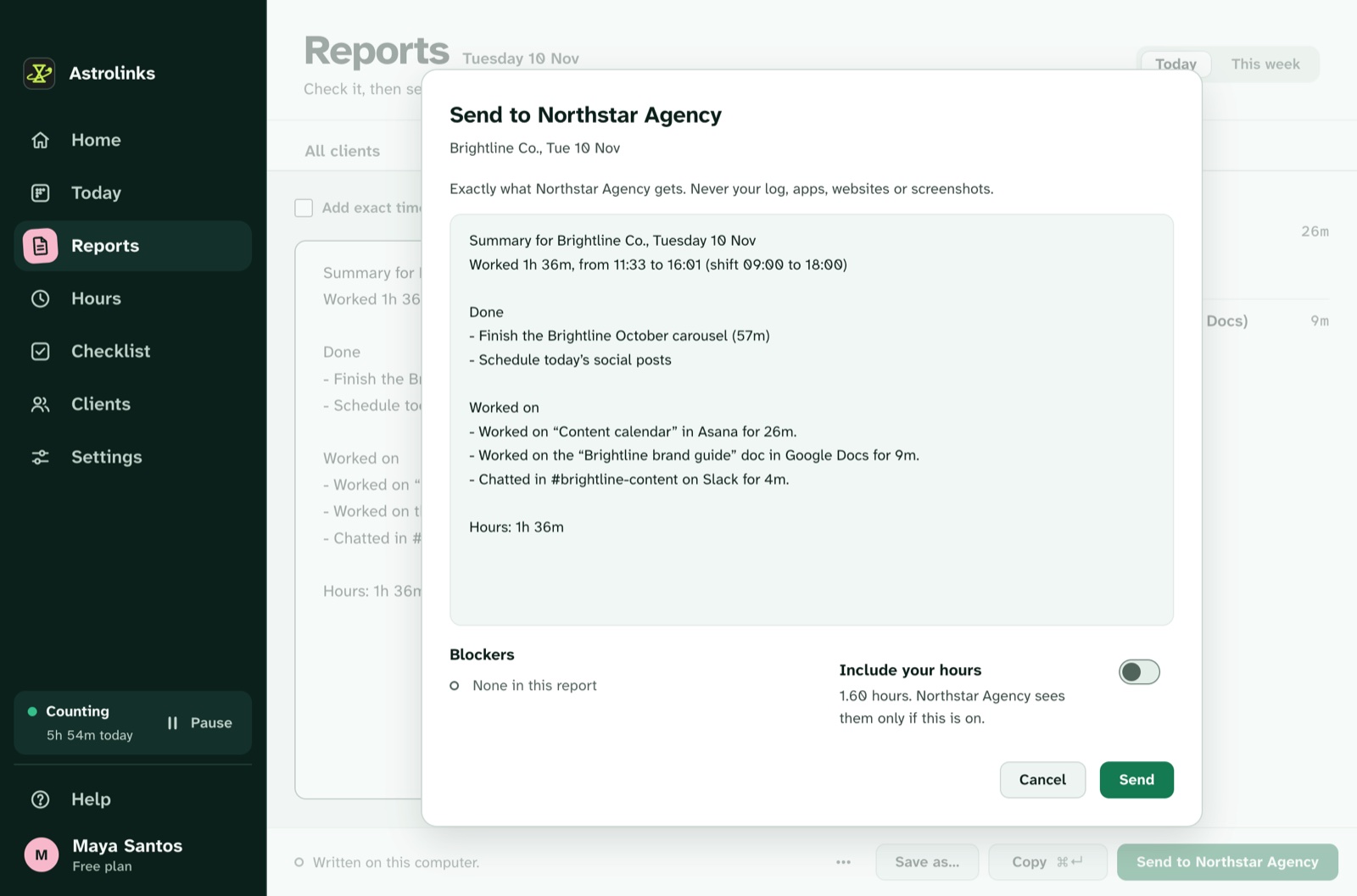
We make Astrolinks, so take this section with that in mind. Astrolinks is a desktop app for Mac and Windows that keeps a private log of each person's workday on their own computer. At clock-out it writes a daily report from that log, and a "What happened with each?" step lets the person mark items as Finished, Sent, Drafted, Replied or In progress, with an optional note in their own words. It takes no screenshots and records no keystrokes.
On the Team plan, the company gets an inbox of the reports people choose to send, never their activity. The person decides whether their hours are included. That gives managers the daily written update this guide recommends, without any of the activity scoring it warns against. See Astrolinks for remote teams or how the Team inbox works.
The short version
Agree on outcomes per role. Add a quality check. Read a short daily update for blockers and a weekly scorecard for results. Compare people with their own trend. Leave activity scores out of it, because they measure the wrong thing and cost you the honest information you actually need. If you want to understand why monitoring software backfires, our guide to bossware covers it from the employee's side.