 Astrolinks


Short answer
Good agency project management comes down to a repeatable loop: a clear intake and scope for every request, one board per client with an owner and due date on every task, a weekly planning session that matches work to capacity, a short daily update from each team member, and a regular client report. Keep one tool per job, protect scope, and watch capacity so nobody is overloaded.
Astrolinks gives each person a daily report written from their own private log. No screenshots. Get it free →
Agencies are hard to run because the work comes from many directions at once. Five clients, each with their own deadlines, a team that's partly remote, requests arriving by email, Slack and WhatsApp, and an owner who's somehow also the account manager, the strategist and the person who fixes everything at 10 PM.
Agency project management is the system that stops that from turning into chaos. It doesn't need to be complicated. This guide gives you a simple, repeatable system for a small agency: how to take in work, scope it, organize it, plan the week, keep work moving day to day, report to clients, and which tools you need.
What makes agency project management different?
Managing projects inside one company is one thing. In an agency, a few extra pressures apply:
- Many clients at once. Each has its own priorities, and each thinks theirs is the most important.
- Requests arrive everywhere. Email, Slack, calls, WhatsApp, comments on a shared doc.
- Scope creep. "Can you just quickly..." adds up to hours of unpaid work.
- Capacity is tight. The same few people serve every client. One rush job can sink everyone else's deadlines.
- Clients need visibility. They want to know what you did and what's next, without micromanaging you.
- Teams are often remote, sometimes across time zones, which makes informal check-ins harder.
A good system handles all six.
Step 1: One way in for every request
The first rule: every piece of work enters through the same door. It doesn't matter if a client sends a request by email or Slack; someone turns it into a task in your project tool before work starts.
A simple intake checklist for each request:
- Client and project
- What's needed, in one or two sentences
- Deadline, and whether it's real or flexible
- In scope or not? Check it against the retainer or project agreement.
- Owner: who's responsible
If a request isn't in the project tool, it doesn't exist. That one rule ends most "I thought you were doing that" moments.
Step 2: Scope clearly, and protect it
Most agency profit leaks out through unclear scope. For every retainer or project, write down:
- What's included, with numbers where possible: "12 social posts a month", "2 rounds of revisions", "1 monthly report"
- What's not included
- How extra work is quoted
When a request falls outside scope, say so early and kindly: "Happy to do this. It's outside this month's retainer, so it would be an extra 3 hours, or we could swap it for one of the planned blog posts. Which would you prefer?" Most clients appreciate the clarity. Our guide on how to handle scope creep has more wording you can reuse.
Step 3: One board per client, one owner per task
Organize your project tool around clients:
- One board or project per client, with lists or sections for stages such as To do, In progress, Waiting on client, Review, Done
- Every task has one owner and one due date
- Every task links to the files and brief it needs
- An account owner per client, who keeps an eye on the whole board
Add a "Waiting on client" column. It makes visible how often work stalls because a client hasn't sent feedback, which is useful in conversations about missed deadlines.
When something sits there for more than two working days, the account owner chases it with a message that ties the delay to a date:
Hi Sam, the homepage draft is ready for your review. If we get your feedback by Wednesday, we can still launch on Friday. After Wednesday, launch moves to next Tuesday.
Clear dates get faster replies than "just following up", and the deadline shift is on record before anyone asks why it slipped.
Step 4: Plan the week against real capacity
Once a week, ideally Monday, look across all clients at once and plan the week:
- List each person's available hours after meetings, admin and time off. For a full-time person that's often 28 to 32 hours of real project time, not 40.
- Estimate the tasks due this week.
- Match work to people so no one is above about 80 percent of their capacity. The buffer absorbs the inevitable urgent requests.
- Flag conflicts early. If two clients both need the same designer on Thursday, decide now, not on Thursday.
A simple capacity sheet is enough. Here is what a Monday check might look like for a three-person team:
| Person | Available hours | Planned hours | Load |
|---|---|---|---|
| Designer | 30 | 27 | 90 percent, too high |
| Writer | 32 | 24 | 75 percent |
| Developer | 28 | 20 | 71 percent |
The fix here is to move one 4-hour design task to next week, hand it to a freelancer, or ask the client whether a later date works. Decide on Monday, while there are still options.
Track actual hours by client for a few weeks. It's the only way your estimates get better, and it tells you which clients are actually profitable. Our guide on how to track time across multiple clients covers the basics.

Step 5: Keep work moving with a daily update
The project board shows what's planned. A short written update from each person at the end of their day shows what actually happened:
- Done: what they finished, by client
- Next: what's up tomorrow
- Blocked: anything waiting on someone
For agencies with remote or offshore staff, this is the most important habit of all. It replaces status meetings, surfaces blockers within hours, and gives account managers material for client updates. Read more in remote team updates without micromanaging.
How do you handle rush requests without wrecking the week?
Rush requests are where most weekly plans break. A few rules keep them under control:
- Ask what "urgent" means. "When do you need this live, and what happens if it's Friday instead of Wednesday?" The real deadline is often later than the first message suggests.
- Name the trade-off. Something already planned has to move. Tell the client which one: "We can do this today. It means the landing page copy moves from Thursday to Monday. Is that OK?"
- Price it if it's out of scope. If you charge a rush fee, put it in the agreement up front so it never feels made up on the spot.
- Warn other clients early. If another client's work slips because of the rush, tell them before their deadline, not after it.
- Count them. Log rush requests per client and look at the totals in your monthly review. A client who sends one every week has a planning problem, and that is worth a calm conversation.
Step 6: Report to clients on a fixed rhythm
Clients worry when they don't hear from you. A fixed reporting rhythm builds trust and cuts "just checking in" emails:
- Weekly: a short recap of what was done, what's next and anything you need from them
- Monthly: results against goals, with a short commentary
- Ad hoc: fast heads-ups when something's at risk
The weekly recap is easy if your team's daily updates are already split by client: you just combine them. Our weekly client recap templates and guide to agency client reporting have formats you can copy.
Step 7: Review and improve monthly
Once a month, take 30 minutes to look at:
- Deadlines missed, and why
- Hours by client versus what they pay
- Scope creep: how many out-of-scope requests came in, and how many were billed
- Team load: is anyone consistently over capacity?
Fix one thing each month. Small improvements compound.
What tools do agencies need for project management?
Keep the stack small, one tool per job:
| Job | Common choices |
|---|---|
| Tasks and boards | Asana, ClickUp, Monday.com, Trello |
| Messages | Slack or Google Chat, one channel per client |
| Docs and briefs | Google Workspace or Notion |
| Time by client | Toggl Track, Clockify, Harvest |
| Daily updates | A Slack channel, a form, or a tool that drafts them |
| Client reports | Your own template, or a dashboard tool for marketing data |
We compare these in more detail in the best software for managing remote employees.
What are the most common agency project management mistakes?
- Work that lives in inboxes. If it's not in the project tool, it gets lost.
- No capacity planning. Saying yes to everything means late work for everyone.
- Unclear scope. The biggest single cause of unprofitable clients.
- Owner as bottleneck. If every decision waits for you, nothing moves when you're busy. Give account owners real authority.
- Status meetings instead of written updates. Especially costly with remote teams across time zones.
- Reporting only when asked. By then the client is already worried.
Where Astrolinks fits
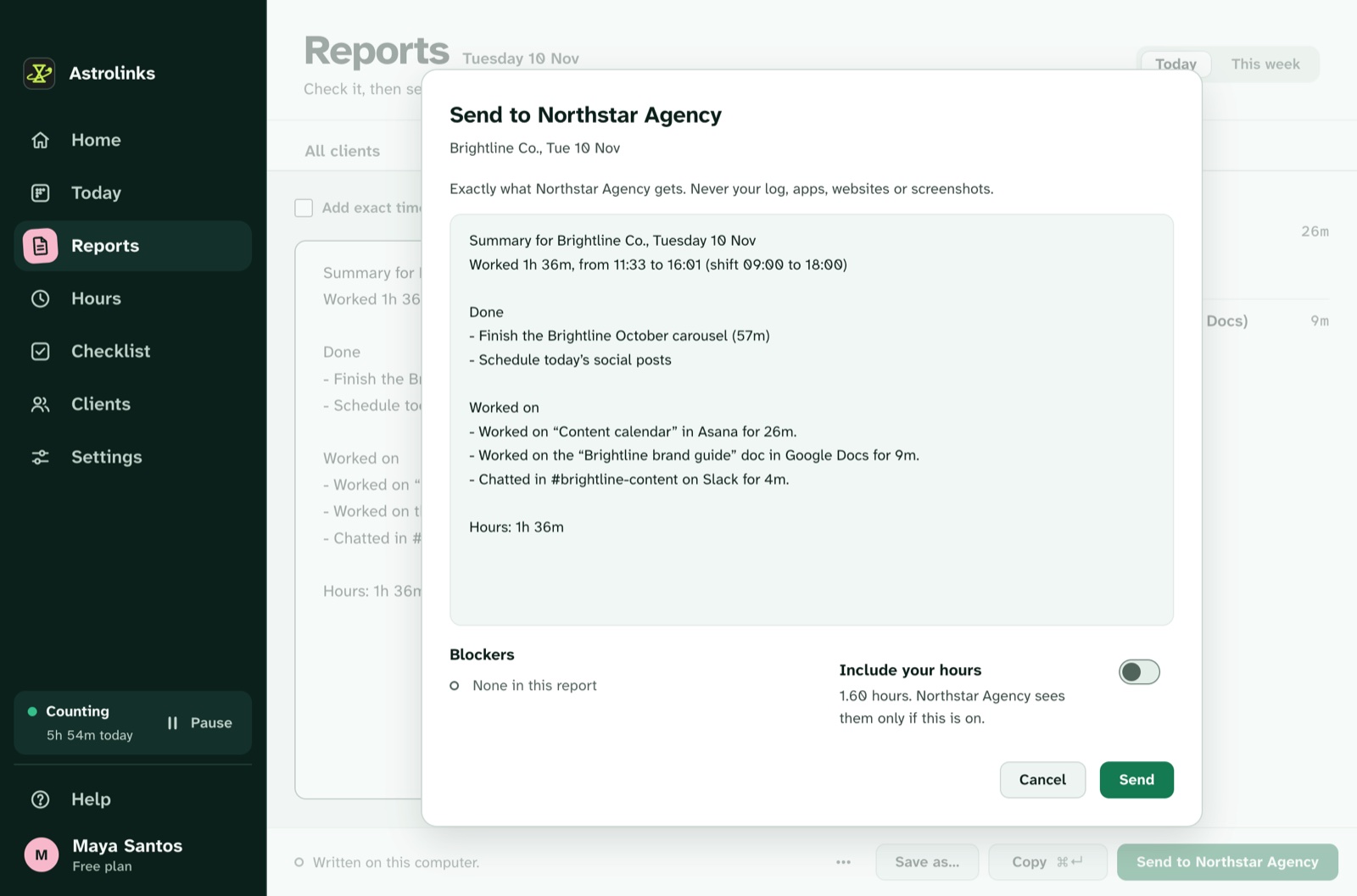
We make Astrolinks, so read this with that in mind. Astrolinks handles step 5 and makes step 6 easier. It's a desktop app for Mac and Windows that keeps a private log of each team member's workday on their own computer, sorted by client, and drafts their end-of-day report at clock-out. They check it and send it. On the Team plan, reports land in one inbox, split by client, ready to forward or combine into a client update. It also tracks hours by client. No screenshots and no keystroke logging.
It doesn't replace your project tool. It sits next to it and tells you what actually got done.
If you run an agency with remote staff, we're running free 14-day pilots for up to 5 people, no card needed. Ask for a pilot or read about Astrolinks for agencies.
The short version
Agency project management works when you run the same simple loop every week: one way in for every request, clear scope, one board per client with an owner and due date on every task, weekly planning against real capacity, a daily written update from each person, and a fixed reporting rhythm for clients. Review monthly and fix one thing at a time. Keep the tools few, and make sure everyone uses them.