Astrolinks


Short answer
To handle scope creep, compare each new request with the written scope, then reply quickly with a choice: add it for an extra fee or hours, swap it for something already planned, or move it to a later phase. Put the change in writing before you start, and keep a log of hours so the conversation rests on facts.
Astrolinks sorts your day by client without a timer and turns the hours into client updates and invoices. Get it free →
It starts with a small favour. "While you're in there, could you also..." Then another. A month later the landing page is a five page website, the deadline has moved twice, and you're working evenings on hours nobody will pay for. That's scope creep, and almost every freelancer meets it.
The fix isn't to refuse every request. Clients change their minds for good reasons, and extra work can be good business. The fix is to make every change visible, priced and agreed before you do it. This guide covers how to handle scope creep in practice: the warning signs, the words to use, a change request you can copy, and how your logged hours keep the conversation calm.
What is scope creep, and what isn't it?
Scope creep is when a project grows past what you agreed, through extra requests that aren't priced or scheduled. Each request looks small. Together they take hours and push the deadline.
It helps to separate three things:
| Situation | Is it scope creep? | What to do |
|---|---|---|
| Feedback on an agreed deliverable, within agreed rounds | No | Make the changes |
| A fourth round of revisions when you agreed two | Yes | Offer extra rounds at your rate |
| A new page, feature, report or task | Yes | Quote it as a change |
| A change of direction after approval | Yes | Quote the rework |
| A fix for your own mistake | No | Fix it, no charge |
Being fair about the "no" rows makes clients far more willing to accept the "yes" rows.
What are common scope creep examples for freelancers?
The same requests turn up across most kinds of freelance work:
- Designers: "Can you also do a version for Instagram?" after agreeing one website banner.
- Writers: "Could you add a few more sections?" on a fixed length article, or a fifth rewrite.
- Developers: "It should also work with our old system" after the build is agreed.
- Virtual assistants: a client on 10 hours a week who keeps adding inbox, calendar and social media tasks to the same hours.
- Everyone: extra calls, "quick" questions late at night, and "can you just look at this?" messages.
Watch for the phrases that usually come with it: "while you're at it", "it should only take a minute", "one more small thing" and "I assumed that was included".
Why does scope creep happen?
Usually nobody is trying to take advantage. Scope creep tends to come from:
- A vague scope. "Website design" means very different things to different people.
- No change process. If there's no agreed way to ask for more, every request arrives as a favour.
- Saying yes to keep the peace. One unpriced extra teaches the client that extras are free.
- Invisible hours. If the client never sees how long things take, they can't know that a "small" task took four hours.
The last one is the easiest to fix, and it's covered below.
How do you handle scope creep when it happens?
Respond quickly, stay friendly, and turn the request into a choice the client makes. Here's the process step by step.
Step 1: Check the request against the scope
Open your proposal or contract and find the line that covers it. If it's clearly included, do it. If it's clearly not, move to step 2. If it's unclear, say so and agree a reading together. Don't guess in your own favour or theirs.
Step 2: Don't start work yet
Even ten minutes on an unagreed task sets a precedent. Reply first.
Step 3: Reply with options, not a refusal
Give the client three choices:
- Add it for an extra fee, or extra hours at your rate.
- Swap it for something already planned that's the same size.
- Move it to a later phase or the next month.
Clients rarely mind paying for more when they feel in control of the decision.
Step 4: Put the change in writing
A short email or a change request (template below) that the client answers with "yes" is enough for most projects. Note the new scope, cost and deadline.
Step 5: Update the plan and the invoice
Add the change to your project notes and your next invoice, as its own line, so it's easy to recognise later.
Scope creep scripts you can copy
When a request is outside the scope
Hi [Name],

Happy to help with [request]. It's outside what we agreed for this
project ([what the scope includes]), so here are a few options:

1. Add it now: about [hours] hours, so [amount] extra, and the delivery
   date moves to [date].
2. Swap it for [planned item], which is about the same size.
3. Keep it for the next phase, once [current deliverable] is done.

Which works best for you?

[Your name]
When revision rounds run out
Hi [Name],

Thanks for the notes. We've used the two revision rounds included in
the project. I can do another round at [rate] an hour, which I expect
to take about [hours] hours. Shall I go ahead?
When a retainer keeps growing
Hi [Name],

Over the last [weeks] weeks, the work has grown from [original tasks]
to also include [new tasks]. That has averaged [hours] hours a week
against the [hours] we agreed.

Could we choose between increasing the plan to [hours] hours a week,
or agreeing which tasks I should drop to stay within [hours]?
A simple change request form
CHANGE REQUEST [number]
Project:        [name]
Requested by:   [name], on [date]
Change:         [what is added, removed or changed]
Reason:         [optional]
Effort:         [hours] hours, or [fixed amount]
Cost:           [amount]
New deadline:   [date]
Approved by:    [name], on [date]

How do logged hours help you handle scope creep?
Logged hours turn a feeling into a fact. "This is taking much longer than we planned" is easy to argue with. "We estimated 20 hours for the site and we're at 31, mostly on the extra pages" isn't.
A good time record helps in three ways:
- It shows the size of a request. When you've logged how long similar tasks took, your quote for a change is grounded in your own past work, not a guess.
- It shows where the hours went. Hours grouped by task or by client show the client which extras took the time.
- It catches creep early. If you compare hours to the estimate each week, you notice the drift at 25 percent over budget, not 80.
You don't need anything fancy. A spreadsheet works, and our guide on how to track billable hours has a template. What matters is that the record is kept as you work, not rebuilt at the end of the month from memory.
Sharing time as you go also prevents most disputes. A client who gets a short end-of-day update with what you did and how long it took is rarely surprised by the invoice. Weekly client recaps do the same job if daily is too often.
What if the client pushes back?
Sometimes the reply is "I thought that was included." Don't argue about who's right. Go back to the written scope together, point to the line, and offer the three options again. If the scope really was unclear, meet in the middle: do this one at no charge, say clearly that you're doing so, and agree how similar requests will be handled from now on.
If a client refuses to pay for any change at all, that tells you something useful about the next project too.
How can you prevent scope creep from the start?
Most of the work happens before the project begins:
- Write what's included, and what isn't. "Three pages: Home, About, Contact. Not included: blog, shop, copywriting."
- Set revision rounds. Two or three is common. Say what a round means.
- Describe the change process. "Changes are quoted in writing and start once approved."
- State a rate for extra work, even on fixed price projects.
- Agree how you'll communicate. Which channel, and your working hours, so late "quick questions" don't become free work.
- Ask good questions at the start. A clear brief prevents a lot of later surprises.
If you work as a virtual assistant, the virtual assistant contract template has clauses for scope, extra hours and changes.
How Astrolinks helps with scope creep
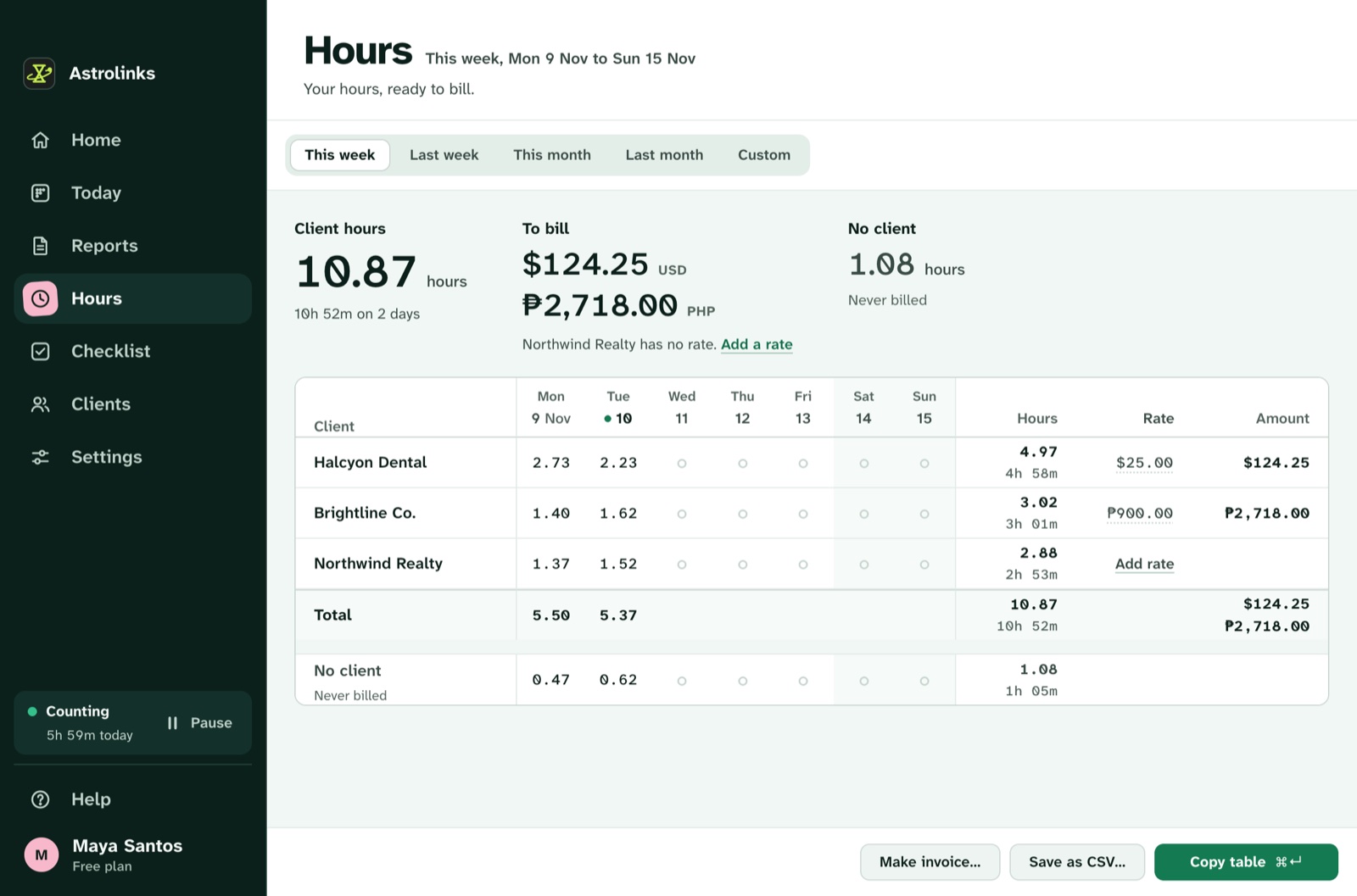
Astrolinks is a desktop app for Mac and Windows that keeps a private log of your workday on your own computer: the app in front, the window title and the web address. It sorts the time by client without timers, with no screenshots and no keystrokes, and nothing leaves your computer unless you press a button.
At clock-out it writes each client's end-of-day report for you to check and send, so the client sees the extra work while it's happening. Hours shows each client's hours and amount for any week or month, which is the number you need when a project starts running over. See hours and invoices and end-of-day reports.