 Astrolinks


Short answer
To get remote team updates without micromanaging, ask for outcomes instead of activity: a short daily written update with what got done, what's blocked and what's next. Read every update, clear blockers before the person's next shift, keep one short weekly call per person, and skip screenshots, hour comparisons and extra check-ins.
Astrolinks gives each person a daily report written from their own private log. No screenshots. Get it free →
Every remote manager hits the same tension. You need to know what's happening. You don't want to hover. Lean too far one way and you're in the dark until something breaks. Lean too far the other and your best people start looking for jobs where they're trusted. Getting remote team updates without micromanaging comes down to what you ask for, how often, and what you do with the answer.
Why does micromanaging creep in on remote teams?
It creeps in because remote work hides progress, and silence feels like risk. In an office, you see people working. You overhear progress. Remote, all of that disappears.
So managers reach for more visibility. More check-ins. More status meetings. Sometimes monitoring software with screenshots and activity scores. Each step feels reasonable on its own. Together they send one message: we don't trust you.
The irony is that activity data rarely answers the question managers actually have. A busy mouse doesn't mean the client is happy. What managers need is outcomes, problems and plans. People can tell you those directly.
Ask for outcomes, not activity
The single biggest change is what you ask for.
| Instead of asking | Ask |
|---|---|
| How many hours did you work? | What got done today? |
| What were you doing at 3 PM? | Is anything blocking you? |
| Why were you idle for 20 minutes? | What's next, and do you need anything? |
| Can you send me screenshots? | Can you link the draft so I can look? |
The questions on the right are easier to answer and far more useful. They also put the person in charge of their own story.
What should a remote team update include?
A good remote team update has three headings: Done, Blocked and Next. Keep it the same for everyone.
Done: what got finished, with links where it helps
Blocked: what's stuck, and what or who would unblock it
Next: the top one to three things for tomorrow
Optional extras, when they matter for your team:
- Hours, if you bill clients or plan capacity by time
- Wins, for something worth sharing with the wider team
- Heads-up, for risks that aren't blockers yet
A vague update and a useful one
Same day, same person, two ways to write it:
Vague: Worked on the website stuff and emails. Some issues with the form. Will continue tomorrow.
Useful:
Done: Fixed the contact form on the pricing page (tested on phone and desktop). Answered 18 support emails, 2 refunds flagged for you.
Blocked: The booking form needs the new Calendly link. Sam has it.
Next: Booking form, then the FAQ page copy.
The second one takes maybe two extra minutes to write. It saves you a follow-up message, a wait, and a guess. If you share one example like this when you introduce the format, most people match it within a week.
A weekly rhythm that doesn't feel like surveillance
Daily: written updates, no meeting
Each person sends an end-of-day update in the format above. It takes them five minutes. It takes you a minute to read.
Daily: you respond to blockers first
Read for the Blocked line before anything else. Clear what you can before the person's next shift. This is the part that makes updates feel worth writing.
Weekly: one short call per person
Fifteen to thirty minutes. Not a status update, since you already have those. Talk about priorities, problems and how they're doing. Three questions cover most calls:
- What's the most important thing for you to finish this week?
- What's slowing you down that hasn't shown up as a blocker?
- Is there anything I'm doing that makes your work harder?
Monthly: check the format still works
Ask the team. Is the update too long? Missing something? Adjust.
Across time zones: send at the end of your own day
If your team spans time zones, don't set one clock time for everyone. Ask each person to send at the end of their own shift. You read them all at the start of yours. A designer in Manila who finishes at 6 PM her time is sending while it's early morning in New York, so her blocker can be cleared before she starts again. For more on this, see our guide to async check-ins for remote teams.

How do you read ten team updates in ten minutes?
Read every Blocked line first, act on those, then skim the rest for surprises and drift. Reading updates shouldn't become your whole morning. A simple order keeps it quick:
- Scan every Blocked line first. Make a short list of what only you can unblock.
- Act on that list. Send the reply, make the decision, or tag the person who can help.
- Skim Done for surprises. Something finished early, or something missing that was due.
- Skim Next for drift. Is anyone heading toward work that isn't a priority this week?
- Reply to each person in one line, even if it's just "Thanks, all clear."
Anything that needs a conversation goes on the agenda for your weekly call, not into a long thread.
What good replies look like
The way you answer an update shapes the next one. Short, useful replies teach people that writing well pays off:
- "Thanks. I've asked Jen for the rates; you'll have them by 10 AM."
- "Nice work on the refund fix. Can you show the team on Thursday?"
- "Let's drop the newsletter this week. The launch matters more."
Notice what's missing: no "why did this take so long?" and no request for more detail unless it's needed to act.
Which habits turn remote team updates into micromanaging?
The main ones are follow-up questions, too many check-ins, comparing hours and adding monitoring tools. Watch out for these, even with good intentions:
- Replying to every update with more questions. Ask only when you need to act.
- Asking for updates more than once a day. Unless something's on fire, daily is plenty.
- Comparing hours between people. Different work takes different time.
- Adding a monitoring tool "just in case". It tells people the updates aren't trusted.
- Using updates in performance reviews without saying so. Be clear about how they're used.
- Asking for hours from people who aren't billed hourly. If you don't need the number, it only signals doubt.
Signs it's working, and signs it isn't
| Working | Not working |
|---|---|
| Blockers show up early, while they're small | Problems surface only when a deadline is missed |
| Updates are short and specific | Updates grow long and defensive |
| People ask for help in the update | People only report good news |
| You rarely send "how's it going?" messages | You still check in on top of the updates |
If you see the right column, the fix is usually on the manager's side: fewer questions, faster help, and no surprises in reviews.
What should you do when a team update goes missing?
Stay light: one missed day needs a gentle note at most, never a public call-out. Sooner or later, someone skips a day. How you react decides whether the habit survives.
- One missed day: say nothing, or send a light note. "No update yesterday, all good? Anything stuck?"
- A few missed days: ask in your weekly call, privately. Often the update feels pointless because nobody answered the last blocker. Sometimes the person is overloaded.
- A pattern: agree on what's realistic. Maybe a shorter update, or one every other day for slow project work.
What not to do: call it out in a team channel, or add a tracker to "fill the gap". Both turn a writing habit into a compliance check, and the good updates stop with it.
Rolling this out in one week
If your team currently has no update habit, or one that feels like surveillance, here's a gentle way to change it:
- Monday: explain the why in a short message. You want to clear blockers faster and stop asking "how's it going?" in DMs.
- Tuesday: share the three-heading format and one good example.
- Wednesday to Friday: everyone sends an update at the end of their day. You reply to each blocker within their next shift.
- Friday: ask what felt useful and what felt like a chore. Change one thing.
Here is a Monday message you can adapt:
Hi team. Starting this week, I'd like a short written update from each of you at the end of your day, with three headings: Done, Blocked, Next. It should take about five minutes. My side of the deal: I'll read every one and answer any blocker before your next shift starts. I won't ask for screenshots or minute-by-minute detail, and these updates won't be used to compare people. On Friday I'll ask how it's going, and we'll change what doesn't work.
Expect the first week's updates to be uneven. That's normal. They get better once people see their blockers being cleared.
Be clear about what you can see
If you use any tool for team updates, tell your team exactly what it shares with you. Write it down. In many places, monitoring employees requires notice (in the US, New York, Connecticut and Delaware all have notice laws), and clear notice is good practice everywhere. People relax when they know the boundaries. If you're weighing a monitoring tool, read our guide to time tracking without screenshots first.
How Astrolinks supports this approach
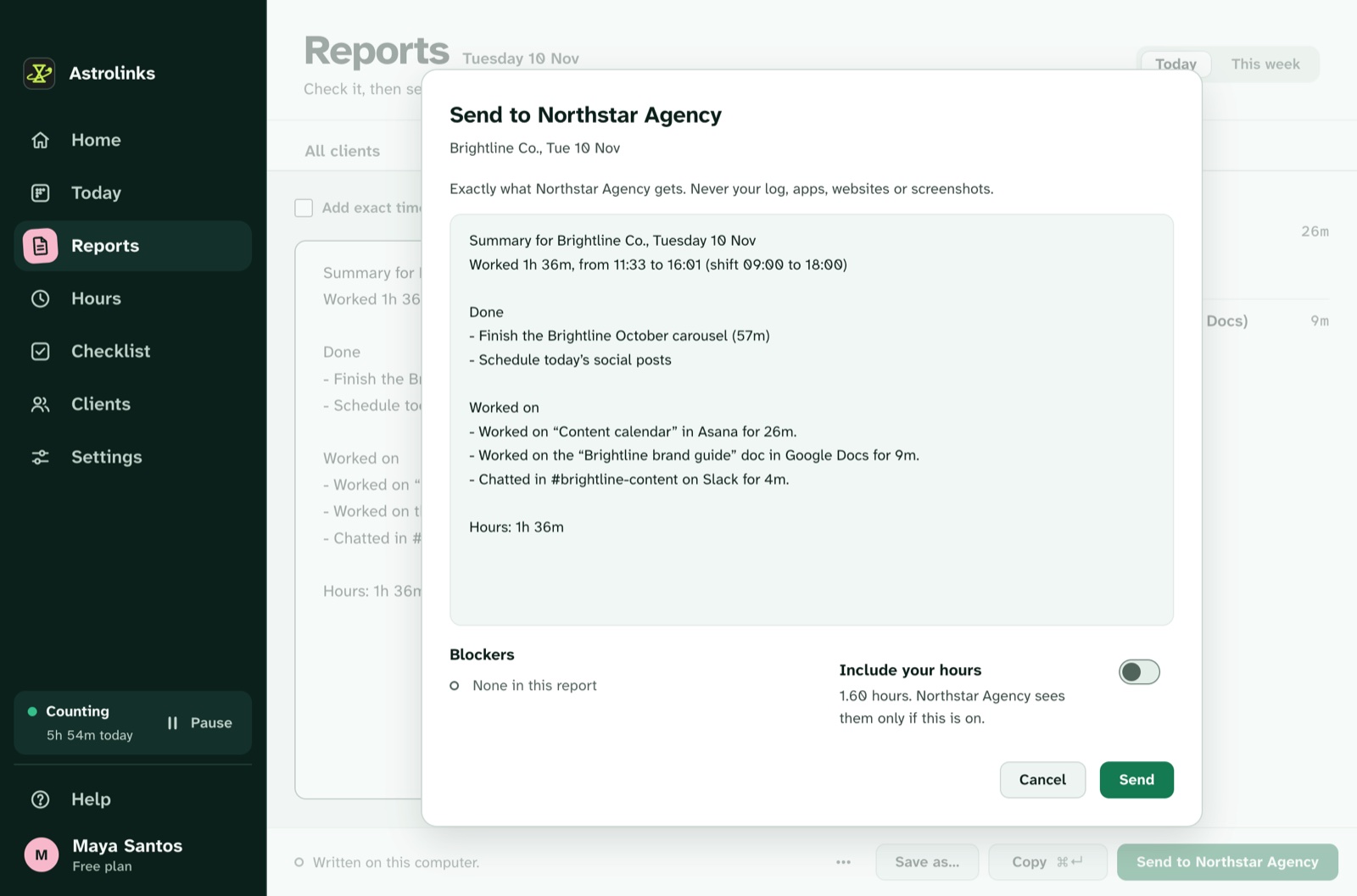
Astrolinks was built around this idea: clarity, not surveillance. Each person runs it on their own computer. It keeps a private log of their day on their computer, and at the end of the shift drafts their update with Done, Blockers and Tomorrow. They read it, fix it and send it.
With the Team plan, a person can send their report to the company's Team inbox. They see exactly what goes first. The company gets the report's text, the client's name, the blockers, and the person's hours only if they switch them on. Never their log, apps, websites or screenshots. A person can take a report back. Managers start from an Overview of who has sent and what's blocked, built only from what people sent.
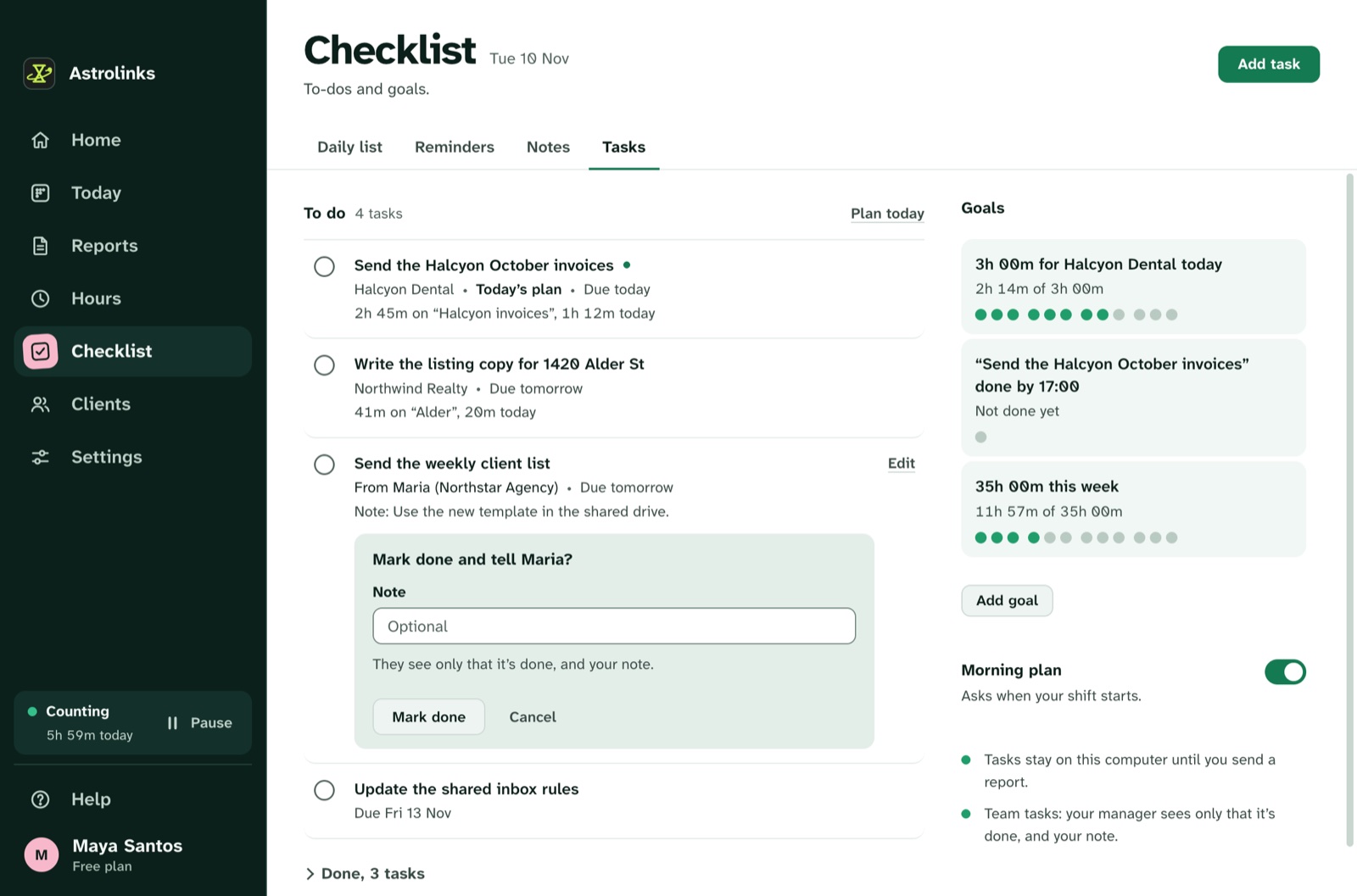
Managers can also give tasks and goals. When someone marks a task done, the manager sees that and their note, not how long it took.
See the team inbox page for details, or read about Astrolinks for remote teams and for companies.