 Astrolinks


Short answer
To invoice hourly clients, agree your rate, billing period, payment terms and rounding rule in writing before work starts. Then send a numbered invoice that lists the billing period, each work item with decimal hours and amount, your hourly rate, the total, the due date and how to pay. Follow up politely if it's late.
Astrolinks sorts your day by client without a timer and turns the hours into client updates and invoices. Get it free →
Hourly work is simple to price and surprisingly fiddly to bill. You need the right hours, the right rate, a clear invoice, and a way to follow up without feeling awkward. This guide on how to invoice hourly clients walks through what to agree first, what to put on the invoice, how to handle rounding, and a monthly routine that keeps cash coming in. There are templates you can copy at every step.
What should you agree before invoicing hourly clients?
Before you invoice hourly clients, agree the rate, billing period, payment terms, rounding and what counts as billable, in writing. Most invoice trouble starts before any work is done. Here's the full list to agree with every hourly client:
- Rate and currency. "25 USD an hour" or "18.50 EUR an hour".
- Billing period. Weekly, every two weeks, or monthly.
- Payment terms. Due on receipt, 7, 14 or 30 days.
- How you'll be paid. Bank transfer, PayPal, Wise, or another method.
- Rounding. Exact minutes, or rounded up to some step. Say which.
- What counts as billable. Calls? Admin? Travel? Decide now.
- Late payments. What happens if an invoice is late. Even a polite "work pauses after 14 days overdue" is better than nothing.
A short email confirming these saves a lot of back-and-forth later. You can send it as is:
Hi Jen,

Before we start, here's how billing will work:

- Rate: 25 USD per hour, tracked to the minute
- Invoices: monthly, sent on the 1st for the month before
- Payment: due within 14 days, by bank transfer or PayPal
- Billable: all work for you, including calls and email.
  Not billable: my own admin and invoicing.
- Hours cap: 20 per week unless you OK more in writing

Reply "OK" and we're set. Thanks!
Maya
If your client is a US business and you are a US freelancer, they will usually ask you for a Form W-9 before the first payment. Have it ready. For anything about your own taxes, ask an accountant.
What should an hourly invoice include?
An hourly invoice should include your details, the client's details, an invoice number, dates, the billing period, work items with hours, your rate, the total and how to pay. A good invoice answers every question a client's bookkeeper might have.
- Your name or business, address and contact details
- The client's billing name and address
- Invoice number, unique and in order
- Invoice date and due date
- Billing period, such as October 1 to 31
- Work items, each with hours and amount
- Hourly rate and currency
- Total
- How to pay you
Number your invoices simply
Pick one format and never break it. "INV-0013" works. So does "2026-013" if you like the year in front. The rules are short: each number is used once, numbers go up, and you never reuse a number, even for an invoice you cancelled. If you need to fix a sent invoice, issue a new one with a new number and a line saying which invoice it replaces.
A sample hourly invoice
Illustrative figures.
| Work item | Hours | Amount |
|---|---|---|
| October invoices (Google Sheets) | 7.23 | $180.75 |
| Reconciling (QuickBooks) | 2.65 | $66.25 |
| Patient scheduling (Calendly) | 1.42 | $35.50 |
| Slack | 1.42 | $35.50 |
| 0.82 | $20.50 | |
| Total at $25.00 an hour | 13.54 | $338.50 |
Notice the hours are in decimals. 7.23 hours is 7 hours and about 14 minutes. Clients and accountants find decimals easier to check against a rate.
A plain-text invoice you can copy
If you don't use invoicing software yet, a clean document with these lines does the job. Save it as a PDF before you send it. Or type the lines into our free invoice generator, which adds up the hours and saves the PDF for you.
INVOICE INV-0013

From:  Maya Reyes, Reyes Admin Services
       [your email]
To:    Halcyon Dental LLC, 120 Harbor Drive, San Diego, CA

Invoice date:   November 1, 2026
Due date:       November 15, 2026 (Net 14)
Period:         October 1 to 31, 2026
Rate:           25.00 USD per hour

Work item                          Hours    Amount
October invoices (Google Sheets)    7.23    180.75
Reconciling (QuickBooks)            2.65     66.25
Patient scheduling (Calendly)       1.42     35.50
Slack                               1.42     35.50
Email                               0.82     20.50
TOTAL                              13.54    338.50 USD

Pay by bank transfer or PayPal ([your PayPal email]).
Thank you!
How do you turn minutes into decimal hours?
Divide the minutes by 60, so 45 minutes is 0.75 hours. You'll do this every month, so keep a cheat sheet.
| Minutes | Decimal hours |
|---|---|
| 6 | 0.10 |
| 10 | 0.17 |
| 15 | 0.25 |
| 20 | 0.33 |
| 30 | 0.50 |
| 40 | 0.67 |
| 45 | 0.75 |
| 50 | 0.83 |
Add up minutes first, then convert once. Converting each small task and adding the decimals gives tiny rounding errors that make totals look wrong.
How should you round hours on an invoice?
Round once on the total, not per task, and use the same rule every month. Rounding causes more invoice disputes than almost any other detail. Some simple rules:
- Round once, not per task. Rounding every five-minute task up to fifteen minutes adds up fast, and clients notice.
- Make lines add up. Each line's amount should be its hours times the rate, and the total should be the sum of the lines. If those don't match by a cent, someone will ask.
- Be consistent. Same rule every month.
Here is why per-task rounding hurts. Say you answered 20 quick emails in a month, five minutes each. That's 100 minutes, or 1.67 hours. Round each one up to a quarter hour and you bill 5 hours. At 25 USD an hour, that's about 83 USD more than the work took, and any client who checks will spot it.
Common choices, from fairest to roughest:
| Method | What it means | Good for |
|---|---|---|
| Exact minutes | Bill the real time, to two decimals | Most VAs and freelancers |
| Nearest 6 minutes | Each block rounds to 0.1 hours | Clients used to legal or accounting bills |
| Monthly total up to 15 minutes | Round the client's total once | Simple, small rounding |

A monthly invoicing routine
Last working day of the month
- Review each client's hours for the month.
- Check them against your daily reports. Anything missing? Anything that shouldn't be there?
- Move non-billable time (personal calls, admin for your own business) out.
First working day of the new month
- Make each client's invoice for the previous month.
- Save it as a PDF, and keep a CSV copy for your own books.
- Send it with a short, friendly email.
On the due date
- Check what's been paid.
- Send a polite reminder for anything that hasn't.
If you work for several clients, put all of this on one recurring calendar event so nothing slips. Our guide on how to manage multiple clients as a virtual assistant covers keeping hours per client from day one.
An email to send with the invoice
Keep the sending email short. Put the key facts in the email itself, so the client doesn't have to open the PDF to know what they owe.
Subject: Invoice INV-0013, October hours (338.50 USD)

Hi Jen,

Attached is my invoice for October: 13.54 hours at 25 USD,
338.50 USD in total, due November 15.

The work matches the daily reports you received in October.
Let me know if anything looks off.

Thanks,
Maya
A follow-up email that doesn't feel awkward
Hi Jen,
A quick reminder that invoice INV-0013 for October ($338.50) was due on November 15. I've attached it again in case it got buried.
Thanks, Maya
Short, specific, no apology. Late payments are often just forgotten emails. If there's still nothing a week later, send a second note and ask a direct question: "Can you tell me when this will be paid?" If you agreed a pause on overdue work, now is the time to say so, calmly.
What should you do when a client questions the hours?
Stay calm and stay factual: thank them, show the breakdown, and fix any real mistake quickly. It happens to everyone.
- Thank them for checking. It's their money, and asking is fair.
- Show the breakdown. Work items with their hours, and the daily or weekly reports they already received.
- Explain anything unusual. A long revision round, an urgent fix at night, a call that ran over.
- Agree a fix if you were wrong. Mistakes happen. Correct the invoice quickly and send a new one with a new number.
- Agree how to avoid it next time. Perhaps a weekly recap with hours, or an alert when a task goes past an estimate.
Hourly, retainer or both?
Some clients prefer a fixed monthly retainer with a set number of hours. If you go that way, invoice the retainer at the start of the month, track hours anyway, and agree what happens to hours over or under the limit. A short line on each invoice, like "18 of 20 retainer hours used", keeps everyone clear.
Keep your daily reports and invoices in sync
The best defense against a disputed invoice is a steady record. If your client has been getting daily updates with times, the invoice holds no surprises. They've already seen the work. Our guide on how to write an end-of-day report shows how to add hours to each day's update, and weekly client recaps are another good way to show hours before the bill arrives.
How Astrolinks makes invoicing quicker
Astrolinks is a desktop app for Mac and Windows that keeps a private log of your workday and sorts it by client. Add an optional rate per client in any currency (45 USD, 60 CAD, 30 GBP). Hours then shows This week, Last week, This month, Last month, or any two dates, with each client's hours, rate and amount. Different currencies are never added together.
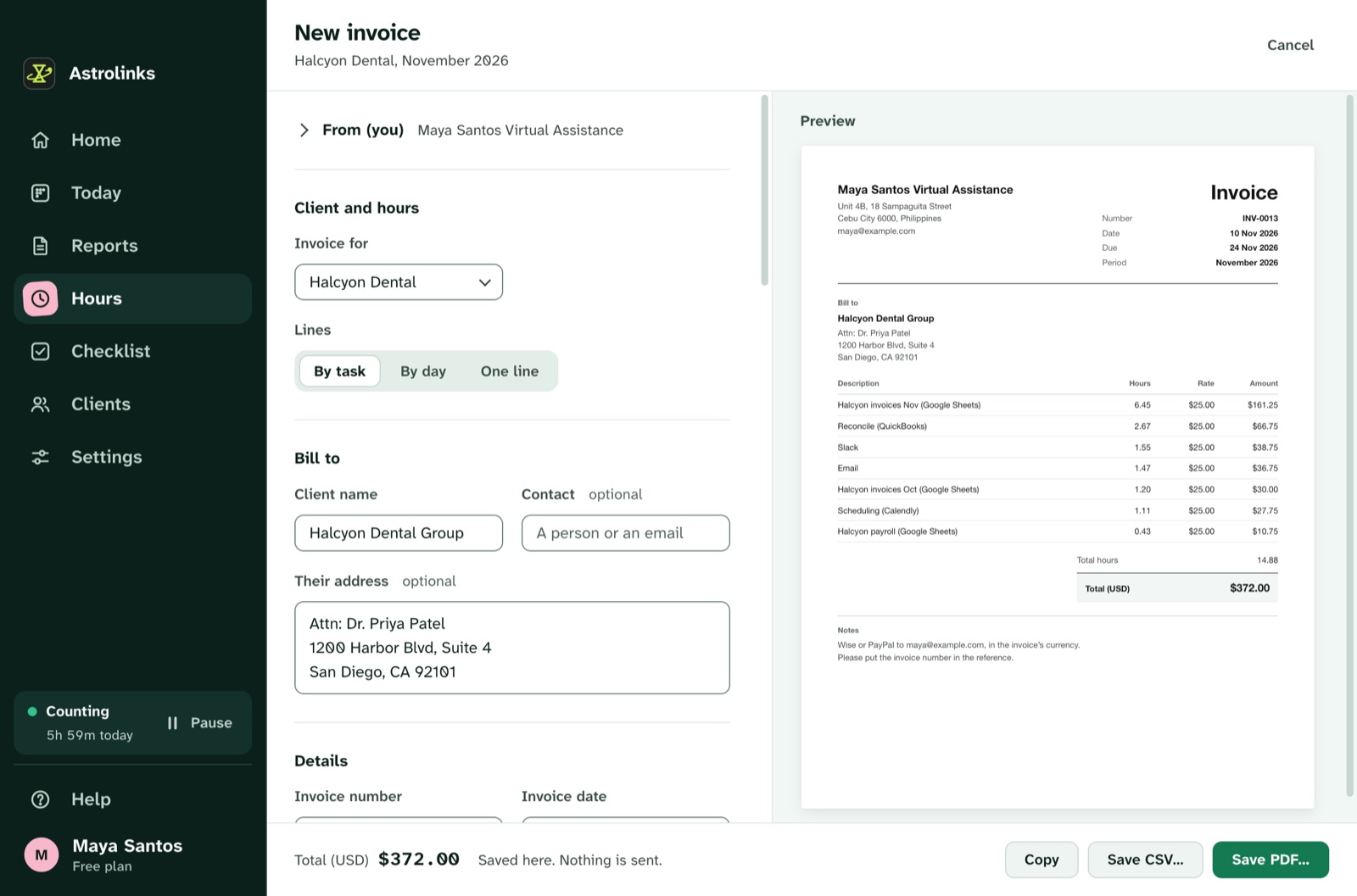
Make invoice turns one client's hours into an invoice with your details, their billing name and address, a running invoice number, every work item with its hours and amount, a due date, and how you get paid. Save it as a PDF or a CSV. It's saved on your computer, and nothing is sent anywhere. The numbers add up to the cent: each line is its hours times the rate, and the total is the sum of the lines.
Read the details on the hours and invoices page, or see a freelancer's month on the Astrolinks for freelancers page. As with any tool, read the invoice before you send it.