 Astrolinks


Short answer
The best Mac productivity apps cover one job each. Freedom blocks distractions. Things or Todoist hold your tasks. Bear or Obsidian keep notes. Fantastical runs your calendar. Timing or Astrolinks track your hours, FreshBooks sends invoices, Raycast or Alfred launch everything, and iA Writer or Ulysses handle writing.
Astrolinks sorts your day by client without a timer and turns the hours into client updates and invoices. Get it free →
Most lists of the best Mac productivity apps throw forty tools at you with no word on what each one costs or what it is bad at. This guide picks 13 Mac apps for freelancers and remote workers, one job each, with the catch you should know before you pay.
Every fact comes from the app's own website, listed in Sources at the end. We make Astrolinks, which appears once, so weigh that entry accordingly. Prices are as of November 2026 and some vary by country.
How we picked these apps
We kept to apps that run on a Mac (FreshBooks is the only browser-based pick), do one job clearly, publish their price model, and suit one person or a small team. Each entry ends with one honest downside.
The best Mac productivity apps at a glance
| Job | App | Price model (as of November 2026) | Also on Windows? |
|---|---|---|---|
| Focus | Freedom | Free; Premium monthly, yearly or lifetime | Yes |
| Tasks | Things | One-time purchase per platform | No |
| Tasks | Todoist | Free; Pro from $5 a month, yearly | Yes |
| Notes | Bear | Free; Pro $2.99 a month or $29.99 a year | No |
| Notes | Obsidian | Free; paid Sync and Publish add-ons | Yes |
| Calendar | Fantastical | Free; Flexibits Premium subscription | Yes |
| Time tracking | Timing | Paid plans; 30-day trial, no free plan | Windows beta (Windows 11) |
| Time and client reports | Astrolinks | Free plan; Pro; 7-day Pro trial, no card | Yes |
| Invoicing | FreshBooks | From $23 a month (Lite, regular price) | Web browser |
| Launcher and clipboard | Raycast | Free; Pro $10 a month or $96 a year | Yes |
| Launcher and clipboard | Alfred | Free; Powerpack from £40 | No |
| Writing | iA Writer | $49.99 one-time for Mac | Yes |
| Writing | Ulysses | $5.99 a month or $39.99 a year | No |
Focus
Freedom: block distracting sites and apps
Freedom blocks websites, apps or the whole internet for a session you set, synced across Mac, Windows, iPhone, Android and Chromebook.
- Who it's for: anyone who opens a news site or chat app every time a task gets hard
- Price model: a Free plan; Premium at $8.99 a month, $3.33 a month on the yearly plan, or a one-time lifetime option ($99.50 on sale, normally $199). The yearly plan has a 7-day free trial
- Honest downside: scheduling and Locked Mode, which stops you switching the block off, are Premium only
Tasks
Things: a calm, Apple-only task manager
Things is a personal task manager for Mac, iPhone, iPad, Apple Watch and Vision Pro, with free sync through Things Cloud.
- Who it's for: solo freelancers fully on Apple devices who want a tidy daily list without a subscription
- Price model: a one-time purchase for each platform, sold through Apple's App Store. The Mac version has a 15-day free trial
- Honest downside: Mac, iPhone and iPad are separate purchases, and there is no Windows, Android or web version, so it's a poor fit if a client needs to share your list
Todoist: a task list that works everywhere
Todoist keeps tasks and projects in one list, with apps for Mac, Windows, Linux, iPhone, iPad and Android, and team workspaces on Business plans.
- Who it's for: freelancers who switch between a Mac and other devices, or who share projects with clients
- Price model: a free Beginner plan; Pro at $7 a month, or $5 a month billed yearly ($60); Business at $10 per user a month, or $8 billed yearly
- Honest downside: the free plan stops at 5 personal projects and leaves out reminders and deadlines, so most working freelancers end up on Pro
Notes
Bear: Markdown notes for Apple devices
Bear is a Markdown note taking app. The free version keeps your notes on your device, with document scanning and export.
- Who it's for: people who want quick, good-looking notes on a Mac and iPhone
- Price model: free to use; Bear Pro at $2.99 a month or $29.99 a year, with a 7-day free trial. Pro adds iCloud sync, more themes and full export
- Honest downside: sync between your Mac and phone is a Pro feature, and there is no Windows, Android or web version
Obsidian: free notes kept as files on your Mac
Obsidian stores your notes locally, on Mac, Windows, Linux, iPhone, iPad and Android.
- Who it's for: freelancers who want their notes as plain files they own, linked together
- Price model: free with no limits and no sign-up, including for work. Sync is $4 a month billed yearly or $5 monthly; Publish is $8 a month billed yearly or $10 monthly
- Honest downside: syncing through Obsidian's own service costs extra, and a new vault starts empty, so expect some setting up
Calendar
Fantastical: one calendar for all your accounts
Fantastical puts iCloud, Google, Exchange and other calendar accounts in one view, on Mac, iPhone, iPad and Windows.
- Who it's for: remote workers juggling their own calendar and one or two client accounts
- Price model: a free version with basic features; Flexibits Premium for individuals and families, billed monthly or yearly, with a 14-day free trial
- Honest downside: scheduling, travel time and push sync are Premium only, and the price only shows when you go to pay
Time tracking and client reports
If you bill by the hour, this group pays for itself. Our guide to the best time tracking apps for Mac compares nine trackers. Here are two automatic ones.
Timing: detailed automatic tracking for Mac
Timing records the apps, websites and documents you use on your Mac and sorts the time into projects by rules. Its site says tracked times stay on your Mac unless you opt into sync. Reports export as PDF, XLSX, CSV or HTML.
- Who it's for: Mac users who want a detailed picture of where every hour went
- Price model: three paid plans (Professional, Expert and Connect), with a 30-day free trial and no credit card needed
- Honest downside: there is no free plan, so once the trial ends you pay or stop
See how it compares with our app in our Timing comparison.
Astrolinks: a private log that writes each client's report
Astrolinks is our app. It sits in the menu bar and keeps a private log of which app and window you're in, on your own computer, sorts that time by client, and writes each client's end-of-day report when you clock out. It never takes screenshots or logs keystrokes. The Mac app is universal (Apple silicon and Intel, macOS 13 or later), and there is a Windows version.
- Who it's for: freelancers and remote workers with several clients who send a daily or weekly update
- Price model: a Free plan that counts up to 4 hours a day for up to 2 clients, a Pro plan, and Team and Business plans for companies, with a 7-day Pro trial and no card. See our pricing
- Honest downside: there is no iPhone app, so time away from your computer has to be added by hand
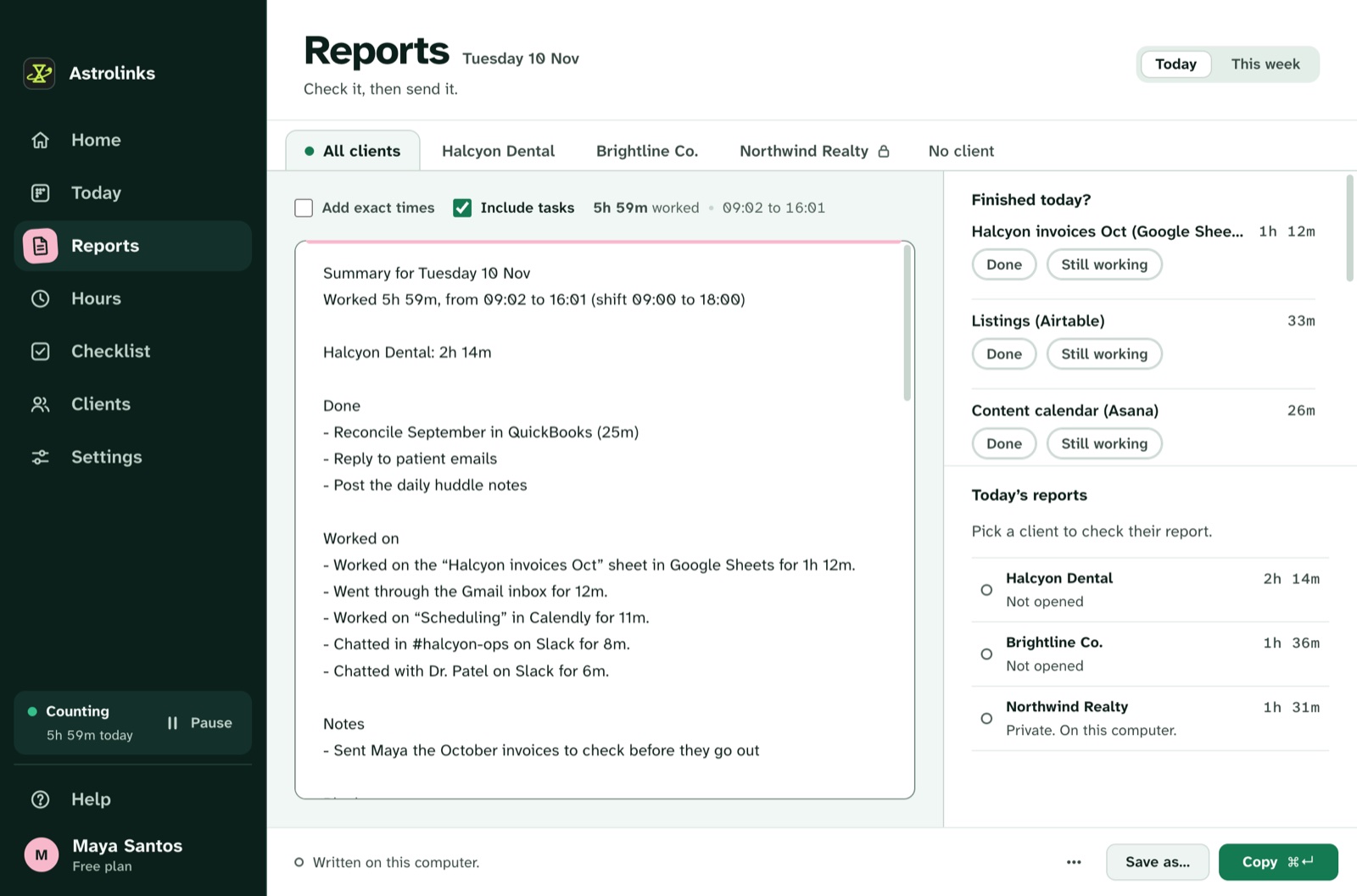
More on the Mac version on Astrolinks for Mac.
Invoicing
FreshBooks: invoices, payments and time in one place
FreshBooks sends invoices, takes payments and tracks time that you can add to an invoice. It runs in a web browser, with phone apps.
- Who it's for: freelancers who want invoicing, expenses and bookkeeping in one account
- Price model: Lite at $23 a month for 5 billable clients, Plus at $43 for 50, Premium at $70 for unlimited clients, at regular monthly prices. There is a 30-day free trial with no card
- Honest downside: the regular price is high for a freelancer with only a few clients
If you'd rather invoice from the app that tracks your time, see how to invoice hourly clients.
Launcher and clipboard
Raycast: launcher, clipboard history and window management
Raycast is a launcher with clipboard history, snippets and window management, plus thousands of extensions. There is also a free Raycast for Windows.
- Who it's for: keyboard-first Mac users who want one tool to open apps, paste old clipboard items and snap windows into place
- Price model: free for the core features, with clipboard history kept for 3 months. Pro is $10 a month or $96 a year and adds Raycast AI, cloud sync and unlimited clipboard history
- Honest downside: cloud sync between Macs is a paid feature
Alfred: a Mac launcher you can pay for once
Alfred is a free Mac launcher. The paid Powerpack adds clipboard history, snippets and Workflows for automations without code.
- Who it's for: Mac users who would rather buy a license than subscribe
- Price model: the core app is free; the Powerpack is £40 for a single license (Alfred 6) or £70 for a Mega Supporter license with free lifetime upgrades
- Honest downside: clipboard history and Workflows, the parts most people want, are behind the Powerpack, and it is Mac only
Writing
iA Writer: focused writing in plain text
iA Writer is a distraction-free writing app. Focus Mode fades everything but the sentence you're on, and you export to PDF or Word. It runs on Mac, iPhone, iPad and Windows.
- Who it's for: freelance writers and anyone who drafts proposals and wants portable files
- Price model: a one-time payment per platform: $49.99 for Mac and $39.99 for Windows, with a free trial where possible
- Honest downside: using it on a Mac and a Windows PC means paying twice
Ulysses: a writing library for long projects
Ulysses is a writing app for Mac, iPad and iPhone with one synced library for all your texts. It publishes straight to WordPress, Ghost and Medium, or exports to PDF, Word and ebooks.
- Who it's for: writers who publish often or keep many long pieces on the go
- Price model: $5.99 a month or $39.99 a year in the US, covering Mac, iPad and iPhone, with a free trial
- Honest downside: it is subscription only, and there is no Windows or Android version
How do you choose the right set of apps?
Start from the problem you have this week, not from the list.

- You lose hours to tabs and chat. Freedom, plus a time-blocked calendar. See time blocking for freelancers.
- You forget tasks. Things if you live on Apple devices; Todoist if you also use Windows or Android or share projects.
- Your notes are everywhere. Bear on Apple devices; Obsidian if you want files you own on any system.
- You don't know where the hours went. Timing, or Astrolinks if you also send clients a daily update.
- You send invoices late. FreshBooks, or a tracker that makes invoices from your hours.
- You repeat the same keystrokes all day. Raycast or Alfred.
Try one app per job for a week before adding another. An app you never open is a cost, not a tool.
Do you need all of these?
No. Many freelancers get by with three: a task list, a calendar and a way to track hours. Add the rest only when you feel a specific gap, and check where each app keeps your data: Obsidian, Timing and Astrolinks keep it on your computer, while Todoist and FreshBooks hold it on their servers, which makes sharing easier.
Which are the best Mac productivity apps overall?
There isn't one winner, because each app does a different job. If you only pick three, start with a task manager (Things or Todoist), a calendar (Fantastical) and a time tracker (Timing or Astrolinks), then fill gaps from the table above.
Sources
Each app's own pages, read on November 22, 2026. Prices and plans change, so check each pricing page before you decide.
- Freedom: pricing
- Things: Things, buying Things, trying the app
- Todoist: pricing, downloads
- Bear: bear.app
- Obsidian: pricing, download
- Fantastical: Flexibits pricing
- Timing: timingapp.com, pricing
- Astrolinks: features, pricing
- FreshBooks: pricing, time tracking
- Raycast: pricing, Raycast for Windows
- Alfred: alfredapp.com, Powerpack, shop
- iA Writer: iA Writer, pricing
- Ulysses: ulysses.app, pricing
All product names are trademarks of their owners, used here only to name the products we compare.