 Astrolinks


Short answer
A daily status report template is a fixed format for a short daily update on where a project stands. It usually covers the date and project, an overall green, amber or red status, a one-line headline, what was completed, what's planned next, blockers and risks, progress toward the next milestone, and what you need from the reader.
Want your EOD report written for you? Astrolinks writes it from your actual workday when you clock out. Get it free →
A daily status report answers one question for the people who depend on a project: are we on track? It isn't a list of everything you touched today. It's the state of the work, what changed, and what could go wrong. Below you'll find a template to copy right away, the standard format, six formats for email, chat, client projects, QA testing, several projects and spreadsheets, four filled-in examples for different roles, and the habits that keep the whole thing to about five minutes.
Daily status report template (copy and paste)
Fill in the brackets and delete what doesn't apply. It works in an email, Slack or Teams.
Daily status report, [date], [project or client]

Status: [Green / Amber / Red]. [One sentence on why.]

Completed today
- [Outcome, with a number if you can]

Planned next
- [Task]

Blockers and risks
- [What, and what you're doing about it, or "None"]

Progress: [X of Y done, or next milestone and date]
Need from you: [Decision or input, by when, or "Nothing today"]
Want it formatted for you? Paste your notes into our free EOD report generator and add the status line on top.
What is a daily status report?
A daily status report is a short, regular update on a project, a workstream or a set of client tasks. Managers, clients, project leads and teammates read it to decide whether they need to step in.
An EOD report says "here's what I did today." A status report says "here's where the project stands." For the personal version, see our EOD report template.
If your team also runs a morning standup, our comparison of daily standups and EOD reports helps you decide which to keep.
What should a daily status report include?
A daily status report should include eight parts: date and project, overall status, headline, completed, planned next, blockers and risks, progress, and needs. Keep the order the same every day, so readers learn where to look.
- Date and project. Which work this is about, and when.
- Overall status. Green (on track), amber (at risk) or red (off track). This is the RAG status, and it goes near the top.
- Headline. One sentence that explains the colour.
- Completed. What moved forward since the last report, as outcomes.
- Planned next. What happens before the next report.
- Blockers and risks. What's stopping work now, and what might stop it later.
- Progress. A percentage, a count, or the next milestone and its date.
- Needs. Decisions or input you need, from whom, by when.
You don't always need all eight. A small task might only need status, done, next and needs. But if you drop the status colour or the risks, you've written an activity log instead of a status report.
Template 1: Daily status report email
Email suits clients and stakeholders outside your chat tools. The subject line does half the work, because many readers decide from the inbox whether to open it.
Subject line examples:
[Project name] status, [date]: Green, on track for [milestone]Daily status: [Project name], [date] (Amber, waiting on approval)[Client] daily status report, [date]
Hi [Name],
Status: [Green / Amber / Red]. [One sentence explaining why.]
Completed today
- [Outcome]
- [Outcome]
Planned for tomorrow
- [Task, with owner if not you]
Risks and blockers
- [Risk or blocker, and what you're doing about it]
Progress: [X of Y done / milestone and date]
Need from you: [Decision or input, by when, or "Nothing today"]
Thanks, [Your name]
Send it from the same thread each day, or with the same subject format, so it's easy to search later.
Template 2: Slack or Teams status message
Chat updates should fit on a phone screen without scrolling. Drop the greeting and keep one line per item.
Status [date]: [Project] [Green/Amber/Red]
Done: [outcome]; [outcome]
Next: [task]; [task]
Risk: [risk, or "none"]
Need: [ask + @name + by when, or "nothing"]
Post it in the same channel at the same time. If something needs a reply, tag the person in the "Need" line, not the whole channel.
Template 3: Client project status report with RAG
This one works for agencies, consultants and freelancers on a fixed project. It splits status by workstream, so a client can see that design is green even if development is amber.
[Project name] daily status, [date]
Overall: [Green / Amber / Red]
Workstream Status Note [Workstream 1] [G/A/R] [One line] [Workstream 2] [G/A/R] [One line] [Workstream 3] [G/A/R] [One line] Next milestone: [Name], due [date], [on track / at risk]
Completed: [outcomes]
Risks: [risk, impact, what we're doing]
Decisions needed: [question, by when]
Only mark something red if you'd want a call about it. Overusing red makes it meaningless.
Template 4: Software testing / QA daily status report
Testers and QA leads get asked for a daily status report in testing more than almost anyone. The reader wants numbers they can compare day to day, plus the defects that matter.
QA daily status report, [date]
Build / release: [version or build number] Test cycle: [name], day [X] of [Y] Overall: [Green / Amber / Red]
Test execution
- Planned: [number]
- Run today: [number]
- Passed: [number]
- Failed: [number]
- Blocked: [number] ([reason])
- Not run yet: [number]
Defects
- Opened today: [number] ([critical / major / minor])
- Closed today: [number]
- Open total: [number]
- Top issue: [ID and one-line description]
Blockers: [environment down, missing test data, waiting on fix]
Plan for tomorrow: [areas or test suites]
Release risk: [one line]
Keep the counts in the same order every day. Readers compare yesterday's numbers with today's, and moving lines around makes that harder.
Template 5: Multi-project or multi-client status report
Use this if you report to one person about several projects, such as an operations lead or an agency account manager. If you report to several different clients, send each one a separate report with only their work in it. The EOD report template for virtual assistants covers that per-client style.
Daily status, all projects, [date]
Project Status Today Next Risk / need [Project 1] [G/A/R] [outcome] [task] [risk or "none"] [Project 2] [G/A/R] [outcome] [task] [risk or "none"] [Project 3] [G/A/R] [outcome] [task] [risk or "none"] Needs your decision: [project, question, by when]
Put red and amber projects at the top of the table. Readers will scan the first rows and may stop there.
Template 6: Spreadsheet layout for Excel or Google Sheets
Some teams want a daily status report template in Excel or Google Sheets so the history builds up in one place. You don't need a download. Make a sheet with these columns, one row per project per day:
| Column | What goes in it | Example |
|---|---|---|
| Date | The report date | 11 Nov |
| Project | Project or client name | Website relaunch |
| Owner | Who reports on it | Dana |
| Status | Green, Amber or Red | Amber |
| Completed | Outcomes since last report | Checkout page built |
| Planned next | Next tasks | Payment testing |
| Blockers / risks | What could slip | Payment test keys not received |
| Progress | % or count | 6 of 9 pages |
| Next milestone | Name and date | Launch, 2 Dec |
| Needs | Ask, who, by when | Keys from client, Thu |
Add conditional formatting to colour the Status cell, and freeze the header row. Filter by project to see its history, or by date to see the whole portfolio for one day. When someone asks for a weekly status report, you can sort the week's rows and write the summary from them.

Daily status report examples by role
These are made-up examples, but each one follows the template above. Use the one closest to your job as a starting point.
Example 1: freelance developer, client project
Maya is a freelance developer building an online booking system for a small physiotherapy clinic run by Tom.
Subject: Booking system status, Wed 11 Nov: Amber, launch date at risk
Hi Tom,
Status: Amber. The build is on schedule, but we still need the payment account details to test online payments before launch.
Completed today
- Appointment calendar now shows real availability for all three therapists
- Confirmation emails tested and working
- Fixed the double-booking bug from Monday's testing
Planned for tomorrow
- Cancellation and rescheduling flow
- Mobile layout checks
Risks and blockers
- Without payment details by Friday, payment testing moves to next week and launch could slip from 2 Dec to 5 Dec.
Progress: 6 of 9 screens done. Next milestone: test version for your staff on 25 Nov.
Need from you: Payment account login details for the test mode, by Friday. Please send them through your password manager, not by email.
Thanks, Maya
The colour is explained in one sentence, the risk has a consequence and a date, and the ask names a deadline. Tom knows what to do in thirty seconds.
Example 2: admin virtual assistant
Status, Tue 17 Nov, Halcyon Dental admin: Green
Completed: sent November invoices to 14 insurers; rescheduled 6 appointments after Dr. Lee's day off.
Next: payroll sheet, then the December newsletter draft.
Risks: payroll needs the new hourly rates by Thursday noon, or it goes out on the old ones.
Need from you: the new rates, by Thursday noon.
Example 3: social media virtual assistant
Status, Tue 17 Nov, Brightline launch content: Amber
Why amber: the launch video is two days late from the editor, so the Friday reel may move to Monday.
Completed: 9 of 12 launch posts scheduled; replied to 27 DMs, 3 passed to Jen.
Next: Stories for launch week; chase the editor at 9 AM.
Need from you: OK to post the backup carousel Friday if the video isn't in by Thursday.
Example 4: customer support agent
Support status, Tue 17 Nov: Green
Completed: closed 38 tickets, queue down from 61 to 23; escalated 2 billing errors to finance.
Risks: 5 shipping complaints waiting on the carrier; could reopen tomorrow.
Progress: first-reply time under 4 hours all day.
Need from you: a yes or no on refunding order 7740 (outside policy) by noon.
What are common daily status report mistakes?
The most common mistakes are hiding risks until it's late, listing activity instead of status, and burying the ask.
- Green every day, then red on Friday. If a risk exists, say amber early. Surprises cost more trust than bad news.
- Activity instead of status. "Had three meetings" tells the reader nothing about the project. Say what the meetings decided.
- No ask. If you need something, make it its own line with a name and a date. Asks buried in a paragraph get missed.
- Too much detail. Link to the ticket, the test run or the document. The report is the summary.
- Vague progress. "Almost done" means different things to different people. Use a count or a milestone.
- Sending it late or at random times. A report at the same time each day becomes something people rely on.
How do you write a daily status report in five minutes?
Log what happens as you go and keep a saved template. The slow part is remembering; the writing is quick once you have the facts.
Log as you go. Add a line to a running note when something finishes or gets stuck. At the end of the day, you're editing, not recalling.
Decide the colour first. Ask yourself one question: would I bet on the next milestone landing on time? Yes is green, maybe is amber, no is red. The rest of the report explains that answer.
Let a tool draft the facts. Astrolinks is one way to skip the remembering step. It's a desktop app for Mac and Windows that keeps a private log of your workday on your own computer, with no screenshots, and sorts your hours by client. When you clock out, it drafts an end-of-day report for each client and asks what happened with each item: Finished, Sent, Drafted, Replied or In progress, with an optional note. You add the status colour and risks, edit anything, and send it yourself.
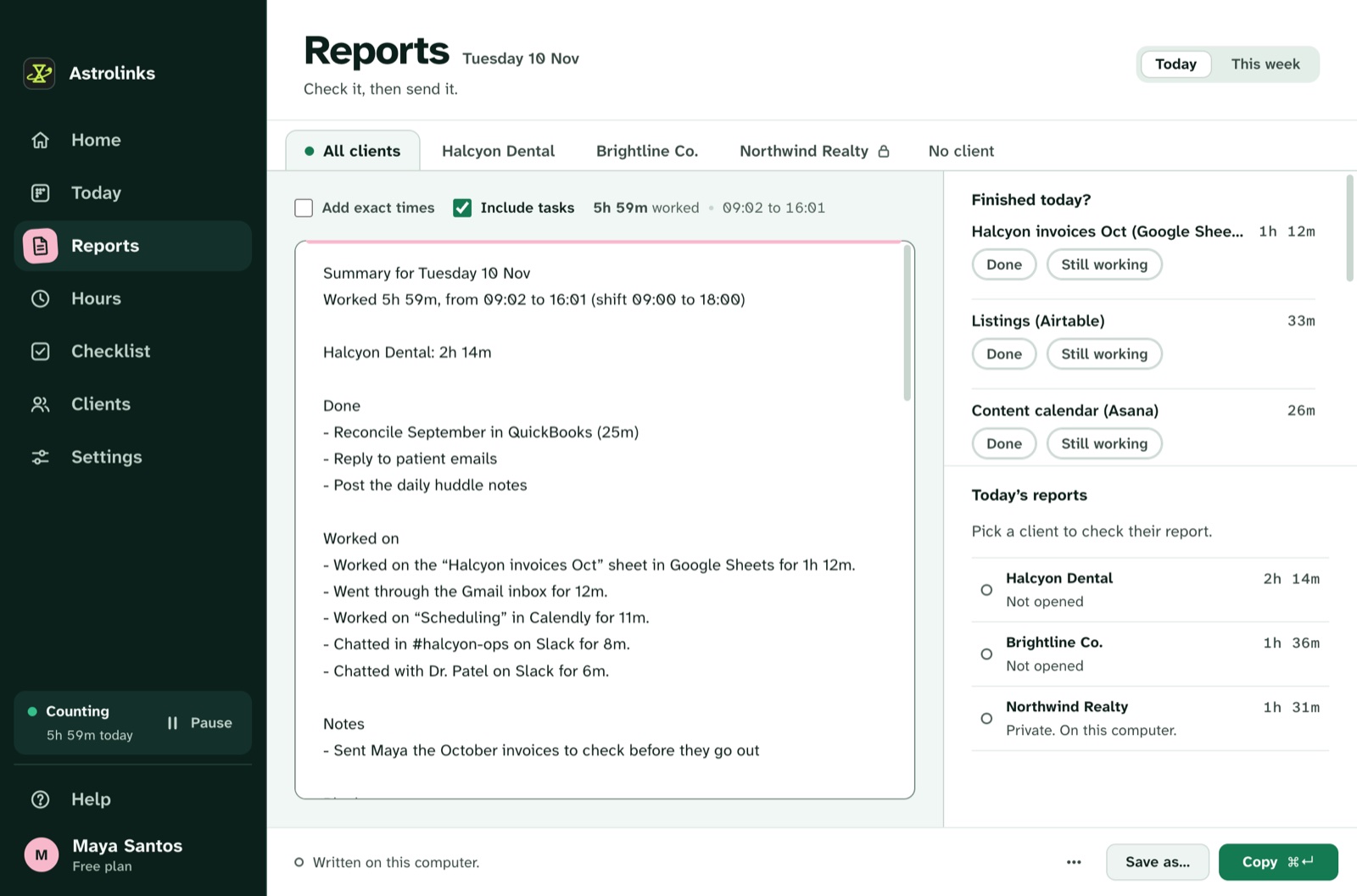
There's a free plan and a 7-day Pro trial. See how the end-of-day reports feature works.
Whatever you use, the habit matters more than the tool: same format, same time, honest colour, clear asks.
Related guides
- How to write an end-of-day report for the personal daily recap
- Weekly client recap templates for Friday summaries
- Daily standup vs. EOD report: which one your team needs
- An EOD report template for virtual assistants with one report per client