 Astrolinks


Short answer
A mouse jiggler is a small USB device or background app that moves your cursor on its own, so your computer doesn't lock or sleep and status apps like Teams or Slack don't switch you to away. Employers can often detect one, and using it on a work computer can break company policy.
Astrolinks gives each person a daily report written from their own private log. No screenshots. Get it free →
Somewhere right now, a cursor is drifting a few pixels left, then a few pixels right, on a desk with nobody at it. A small gadget or a background app is doing the moving. The person who owns it might be on a long client call, reading a contract, at the school gate, or asleep.
Mouse jigglers are cheap, easy to find and suddenly everywhere. Most articles about them are written by monitoring companies, for bosses, under titles like "how to catch them". This one is for both sides. What a mouse jiggler is, why people buy one, what the risks are, and why the real fix is to stop measuring motion in the first place.
What is a mouse jiggler?
A mouse jiggler moves your cursor so your computer thinks someone is using it. That's the whole idea.
They come in two kinds:
- A device. A small USB stick that tells the computer it's a mouse and sends tiny movements, or a little platform your real mouse sits on that nudges it.
- Software. A mouse jiggler app that runs in the background and moves the pointer, or simply keeps the computer awake.
Either way, the result is the same. The screen doesn't lock. The computer doesn't sleep. And status apps like Microsoft Teams or Slack don't flip your dot from green to "away". Some are sold for under $20, which is part of why they spread so fast.
Why do people use mouse jigglers?
Most people use a mouse jiggler because their work is judged by activity scores and status dots that miss reading, thinking and calls. It's easy to assume everyone with a jiggler is slacking off. Some are. Be fair about that. But most of the reasons are more ordinary, and they say something about how work is being measured.
Activity scores punish real work. Many tracking tools count keyboard and mouse input and turn it into a percentage. Reading a long brief, thinking through a problem, sketching on paper or taking a phone call all look like nothing happening. Someone who spends an hour thinking before writing a great proposal can score lower than someone clicking around aimlessly.
The "away" dot sends a message. On a chat app, a yellow or grey dot after a few minutes of no input can look like you've wandered off. If your manager watches the dots, you feel watched, even if nobody says a word.
Long tasks happen away from the keyboard. Waiting for a big file to render, reviewing printed pages, a site visit, a call on your phone. The work is real. The computer can't see it.
Fear of looking idle. In a team where people are judged by how busy they appear, looking busy becomes part of the job. A jiggler is a cheap way to buy that look.
And yes, avoiding work. Some people use a jiggler to appear online while they're not working at all. That happens too, and it's a real problem for the people around them who are.
Notice that every reason except the last one comes from the same place: a metric that counts motion and calls it work.
Can employers detect a mouse jiggler?
Often, yes. If you're thinking about using one on an employer's computer, assume it can be found.
Monitoring vendors describe several ways they spot jigglers. Vendors such as Time Doctor say they look for things like:
- Input patterns that are too regular, with little variation, or a mouse moving for hours with no keyboard use at all
- Known jiggler apps running on the computer
- USB device logs that show a new "mouse" being plugged in
- Activity compared with output, such as a full day of activity and nothing delivered
These are vendor claims, and vendors have a product to sell. But a work computer is usually managed by the company, and company IT can often see what's installed and plugged in. The output check needs no special software at all. If the work isn't there, a green dot won't cover for it for long.
There are real consequences too. In 2024, Wells Fargo fired more than a dozen employees in its wealth and investment management unit after a review found "simulation of keyboard activity" creating the impression of active work, according to disclosures to FINRA reported by Bloomberg and covered by ABC7.
We won't go into how to avoid detection. That's not the useful question. The useful question is why the metric invites this at all.
Is using one "time theft"?
You'll see the phrase "time theft" in a lot of articles about mouse jigglers. It means being paid for time you didn't work. Whether a jiggler counts depends on the situation.
If you use one to look online while you're not working, and you're paid for those hours, your employer may well see it as time theft or misconduct. Many employment contracts and IT policies forbid installing unapproved software or devices, or misrepresenting your activity. Breaking those rules can lead to discipline or dismissal, whatever you were actually doing.
If you use one to stop your screen locking while you read a long document at your desk, it's a different story morally. But it may still break the same policy. The device doesn't know why you plugged it in, and neither does the log.
So the honest answer is: it depends on your employer's policy and your contract, and on whether you were working. This isn't legal advice. If you're unsure, read your company's IT policy, or ask.

What does a mouse jiggler tell a manager?
It tells a manager that people feel judged on motion, not on the work they finish. If you manage a team and find out people are using mouse jigglers, the easy reaction is to tighten up. More tracking. Detection rules. A warning email.
Pause first. A jiggler is a symptom. It tells you that people believe they're being judged on motion, and that motion doesn't match how they actually work. When a $20 device can satisfy your metric, the metric was never measuring work. An independent piece on HackerNoon makes the same point: activity-based tracking is easy to fool because it measures the wrong thing.
Tighter tracking also has costs of its own. It tells your team you don't trust them. It pushes good people to look for other jobs. And it can create privacy problems you didn't plan for: a Northeastern University study published in May 2026 found that all nine monitoring platforms it tested shared workers' personal data with third parties. For more on that side of things, see our piece on bossware and employee monitoring.
Meanwhile, the people who were slacking off are still slacking off. They just find the next workaround. The question you actually care about, "is the work getting done?", was never answered by mouse movement.
What should managers measure instead of activity?
Measure outcomes instead of motion: agree what each person should deliver, then ask them to tell you what they delivered. It's simple to say and takes a little effort to do.
| Motion metric | Outcome metric |
|---|---|
| Active minutes | Tasks finished and sent in a daily report |
| Activity percentage | Deliverables agreed for the week, and whether they shipped |
| Green status dot | A reply to messages within an agreed time |
| Keystrokes and clicks | Work you can open and look at: the draft, the fix, the closed ticket |
| Screenshots every few minutes | A short note on what's blocked and what's next |
| Hours logged on screen | Hours per client, when billing needs them |
The right column is harder to fake, because it is the work. Nobody can jiggle a finished report into existence.
In practice, three habits cover most teams:
- Clear outputs. Each person knows what "done" looks like this week. Write it down.
- A daily written report. At the end of each shift, a few lines: Done, Blocked, Next. Our guide to remote team updates without micromanaging has a format and a sample message to start with.
- Async check-ins. Fewer status meetings, more written updates people send when their day ends. See async check-ins for remote teams for a rhythm that works across time zones.
When people know they're judged on what they finish, the green dot stops mattering. Nobody needs a gadget to look busy.
What should workers do instead of using a mouse jiggler?
Talk to your manager about how you're measured, and offer a short daily report instead. If you've been tempted by a mouse jiggler, it's usually because something about how you're measured feels unfair. That's worth fixing directly, not around.
Don't use a jiggler on an employer's computer. Even if your reasons are good, it can be treated as misconduct, and you'd be the one taking the risk.
Talk to your manager. Be specific. "My activity score drops when I'm on client calls or reading briefs, and I'm worried it looks like I'm not working." Most managers would rather hear that than find a USB device in a log.
Offer something better. Propose a short daily report at the end of your shift. It gives your manager what they really want, a clear picture of what got done, and it gives you credit for the work a mouse can't see. If you've never written one, start with our guide on how to write an end-of-day report.
Keep your own record. Notes on what you worked on, for which client, and for how long make that report quick to write. They also help if anyone ever questions your hours.
If you're a freelancer or VA, you're in a stronger position. You can ask a client to judge you on deliverables and a daily report rather than a tracker, and many will say yes. Our guide to time tracking without screenshots covers how to prove your hours another way.
This is where a tool like Astrolinks fits. It keeps a private log of your workday on your own computer, with no screenshots, no keystroke logging and no activity score, and sorts your hours by client. At clock-out it drafts an end-of-day report for each client. You read it, edit it and send it yourself. Nothing goes to a manager unless you send it.
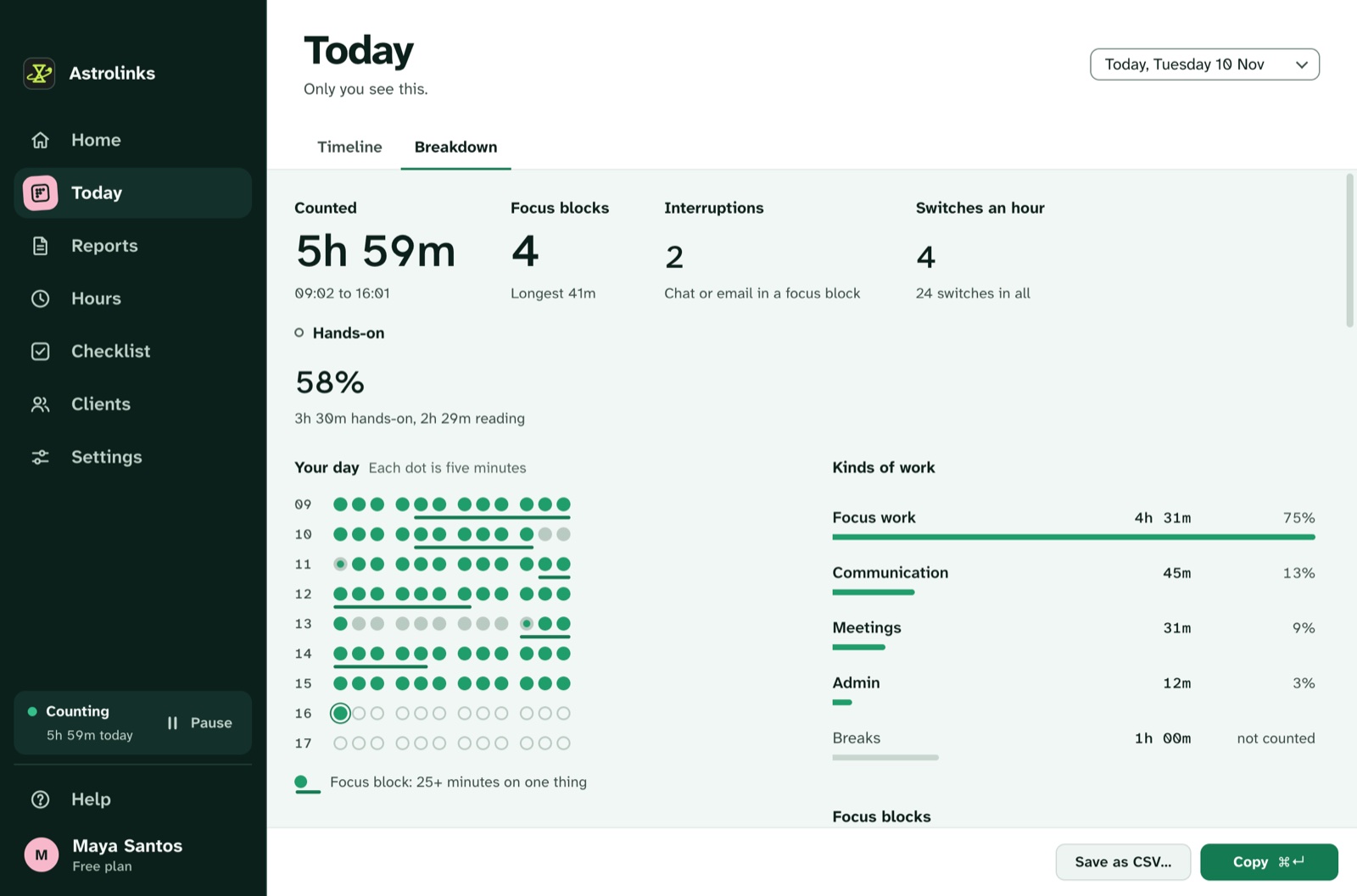
On a Team plan, managers get one inbox for the reports people choose to send. They see the work, not the motion. You can see how it works for remote teams, or compare it with other trackers.
The short version
A mouse jiggler is a cheap way to fake a signal that was never worth much. For workers, using one on a work computer is a real risk, and employers can often find it. For managers, a team buying jigglers is a sign the metric is broken, not just the people.
Measure what gets done. Ask for a short daily report. Trust people to tell you about their work, and read what they send. Nobody needs to jiggle anything then.