 Astrolinks


Short answer
A good EOD report example is short, specific and written for its reader. It opens with the day's main result, lists finished and in-progress work with a status, names any blocker and who can clear it, and says what comes first tomorrow. Most strong examples run five to twelve lines.
Want your EOD report written for you? Astrolinks writes it from your actual workday when you clock out. Get it free →
A template tells you which boxes to fill. An example shows you what a good answer in each box looks like. This page is all examples: ten end-of-day reports written for real kinds of work, each followed by a short note on why it works. Copy the one closest to your job and change the details.
If you want the blank format first, start with our EOD report template and how-to. If you send a project status rather than a personal update, the daily status report template is a better fit.
What makes a good EOD report example?
Every example below follows the same five rules:
- The headline comes first. One line with the most important result of the day.
- Each item has a status. Finished, sent, drafted, replied or in progress. The reader never has to guess.
- Numbers are real and useful. "14 tickets closed" helps. "Very productive day" doesn't.
- Blockers name a person. "Waiting on the logo files from Dana" gets solved. "Waiting on assets" sits there.
- Tomorrow has one first task. It shows you have a plan and tells the reader what to expect.
Keep these in mind as you read. They matter more than the exact layout.
Virtual assistant EOD report examples
Example 1: Executive assistant VA
EOD, Tue Nov 24 (ET)
Headline: Board meeting is set for Fri 10:00 ET, all five members confirmed.
Finished
- Board meeting: room, Zoom link and agenda sent to all five members
- Travel for Dec 8 Chicago trip: flights and hotel booked, itinerary in your inbox
- Inbox: 41 emails sorted, 9 replied, 3 flagged for you
In progress
- Q4 expense report: 60% done, finishing tomorrow
Needs you: The Amex statement for October. I can't finish the expense report without it.
Tomorrow first: Expense report, then thank-you notes to the two new partners.
Why it works: The executive can read the headline and the "Needs you" line in ten seconds and stop there. Everything else is backup.
Example 2: Ecommerce support VA
Daily update, Nov 24
- Replied to 37 customer emails, average first reply under 2 hours
- Processed 6 refunds, all under the $50 limit you set
- 2 orders stuck in "unfulfilled": messaged the warehouse, waiting on tracking numbers
- Drafted 4 product descriptions for the winter range (in the shared doc, ready for review)
One question: A customer wants a refund on a sale item, which is outside the policy. Approve or decline?
Tomorrow: post the 4 descriptions once you approve them.
Why it works: It shows the VA stayed inside the limits the owner set, and it turns the one judgment call into a yes-or-no question.
Example 3: Bookkeeping VA, hourly client
EOD report, Nov 24, 3.5 hours
- Bank reconciliation for October: finished, 2 unmatched items listed in the sheet
- Sent 8 invoices for November work, total in the sheet
- Chased 3 overdue invoices from September (replied: 1 paid today, 2 promised this week)
- Receipts folder: sorted and named, 46 receipts
Open: The 2 unmatched October items look like personal card charges. Can you confirm?
Why it works: Hourly clients want to see where the hours went. The total time sits in the title, and each line is a result they would pay for. For more VA formats, see our EOD report template for virtual assistants.
Developer EOD report examples
Example 4: Developer on a normal day
EOD, Nov 24
Done
- Fixed the checkout rounding bug (PR #482, merged, deployed to staging)
- Reviewed 2 PRs from Sam, both approved with small comments
In progress
- Saved-cart feature: API done, front end about half done
Blocked: None.
Tomorrow: Finish saved-cart front end, then hand to QA.
Why it works: Links and PR numbers let a lead check details without asking. "Blocked: None" is worth writing, because it answers the question before anyone asks it.
Example 5: Developer on a day when nothing shipped
EOD, Nov 24
Spent the day on the payment timeout. Not fixed yet, but I found the cause: the provider's sandbox is slower than production, so our 5-second timeout fails in testing only.
- Wrote up the finding in ticket PAY-219
- Tried a 15-second timeout in staging: tests now pass
Decision needed: Do we raise the timeout in staging only, or everywhere? I'd go with staging only.
Tomorrow: Apply whichever we choose and close PAY-219.
Why it works: A day without a merge still has a result: the cause was found. The report says so plainly, and it gives a recommendation instead of only a problem. Freelance developers who write these for clients may like our page on Astrolinks for developers.
Support EOD report examples
Example 6: Support agent
Shift summary, Nov 24, 09:00 to 17:00
- Closed 28 tickets, 4 still open (all waiting on the customer)
- 1 escalation: customer charged twice, sent to billing with screenshots
- Spotted 5 tickets about the same login error after today's update. Logged as bug SUP-77.
Note for the team: If you get the login error, the workaround is clearing the app cache. It works every time so far.
Why it works: The pattern (five tickets, one cause) is the most valuable line in the report. A good support EOD report notices trends, not just counts.
Example 7: Support team lead
Team EOD, Nov 24
- 142 tickets closed across the team, backlog down from 61 to 38
- First reply time back under 4 hours after Monday's spike
- Login bug (SUP-77) is with engineering, fix expected Thursday
- Maya is out tomorrow; Leo covers the billing queue
Risk: If the fix slips past Thursday, the backlog will grow again over the weekend.
Why it works: A lead's report is about the queue and the people, not individual tickets. It ends with the one risk a manager should watch.
Sales EOD report examples
Example 8: Sales development rep
EOD, Nov 24
- 62 calls, 14 conversations, 3 meetings booked (Northline, Bay Dental, Corva)
- 40 follow-up emails sent to last week's webinar list, 6 replied
- Updated all activity in the CRM
Best lead: Bay Dental has 4 locations and a budget this quarter. Meeting Thu 2:00 with their ops manager.
Tomorrow: Call block 9 to 11, then prep notes for Bay Dental.
Why it works: Activity counts are normal in sales, but this report also says which result matters most and why. That's what a manager reads twice.
Example 9: Account executive
EOD, Nov 24
- Northline: sent the proposal, they review it with finance Friday
- Corva: demo done, they asked for a 2-week trial. Set it up, trial ends Dec 8.
- Pipeline: 2 deals moved to "proposal", 1 lost (budget frozen until Q2)
Need from you: Approval for a 10% discount on Northline if finance pushes back. Their deadline is Friday.
Why it works: Each line is a deal, a step and a date. The approval request has a deadline, so the manager knows how fast to answer.

Designer EOD report example
Example 10: Freelance designer, client project
Hi Priya, here's today's update on the rebrand:
- Logo: sent 3 refined directions (link to the board). I'd lean toward B.
- Color palette: drafted, waiting until you pick a logo
- Business cards: not started, planned for Thursday
What I need: Your pick of A, B or C by Wednesday, so I can keep Friday's deadline for the full kit.
Time today: 4 hours.
Why it works: Designers often wait on feedback, so the report makes the next decision and its deadline the main point. It also gives an opinion, which clients usually want. More on this kind of work on our designers page.
How do you send an EOD report by email?
The examples above work in chat as they are. For email, add a subject line and a one-line greeting. Here is a sample EOD report email:
Subject: EOD Nov 24: board meeting set, 1 item needs you
Hi Laura,
Quick wrap-up for today.
Done: Board meeting set for Fri 10:00 ET (all five confirmed). Chicago trip booked. 41 emails sorted. In progress: Q4 expense report, 60%. Needs you: October Amex statement, so I can finish the expense report. Tomorrow first: Expense report.
Thanks, Ana
Put the headline and the "needs you" count in the subject line. Many people decide from the subject alone whether to open the email now or later.
What do these examples have in common?
Look across all ten and the pattern is clear:
| Part | Where it goes | Example line |
|---|---|---|
| Headline | First line | "Board meeting set, all five confirmed" |
| Finished work | Short list | "Fixed checkout rounding bug (PR #482)" |
| In progress | With a percent or next step | "Saved-cart: API done, front end half done" |
| Blocker or question | Near the top, with a name | "Need the Amex statement from you" |
| Tomorrow | Last line | "Expense report first" |
None of them describe how busy the person was. They describe what changed.
How do you write an EOD report faster?
The slow part of an EOD report is remembering the day, not writing it. A few habits help:
- Keep a running list. Add one line each time you finish something. At 5 p.m. the report is mostly written.
- Save your best report as a model. Copy its layout every day so you only change the details.
- Write the blocker the moment it happens. You'll remember the exact detail and the name.
- Use the same status words every day. Finished, sent, drafted, replied, in progress.
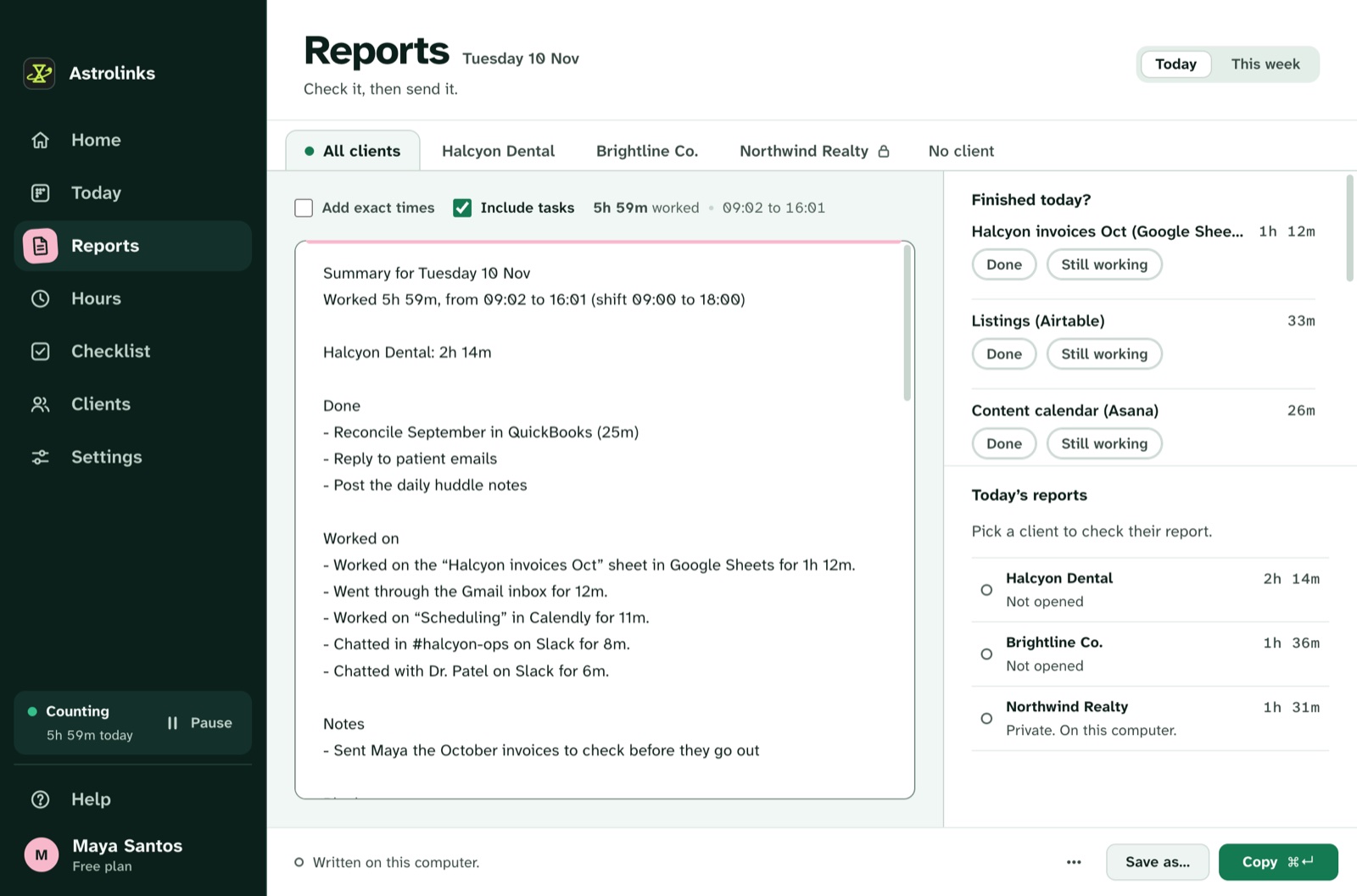
This is the part we built Astrolinks for. It's a desktop app for Mac and Windows that keeps a private log of your day on your own computer: which app is in front, the window title and the web address. No screenshots and no keystrokes. When you clock out, it writes each client's end-of-day report from that log. You mark each item as Finished, Sent, Drafted, Replied or In progress, check the wording, then copy it or send it to Slack. Nothing leaves your computer until you press that button.
What are the most common EOD report mistakes?
- Listing activity instead of results. "Worked on emails" tells the reader nothing. "Replied to 37 customers" does.
- Hiding the question at the bottom. If you need a decision, put it near the top.
- Mixing clients. Each client should see only their own work.
- Skipping the hard days. A report that says "no progress, here's why" builds more trust than a missing one.
- Writing too much. If it takes two minutes to read, move the detail to a linked doc.
The short version
A good EOD report is a headline, a short list with statuses, one clear blocker or question, and tomorrow's first task. Pick the example above that matches your role, keep the structure, and change the details. After a week of sending the same shape every day, it takes five minutes.