 Astrolinks


Short answer
Independent contractor time tracking means keeping your own record of the hours you work for each client: the date, client, task, start and end time, and total. Use a free template, a timer or an automatic log on your own computer, check it each day, and send clients a summary or an invoice, not your screen.
Astrolinks sorts your day by client without a timer and turns the hours into client updates and invoices. Get it free →
You work for yourself. Nobody hands you a timesheet on Monday or checks it on Friday. That freedom is the point of being an independent contractor, but it also means the record of your hours is your job. If you bill by the hour, it decides what you get paid. If you work on a fixed price, it tells you whether the price was any good.
This guide covers independent contractor time tracking from the ground up: what to record, a copy-paste template, how to log hours per client, how to pick a tool, and what to do when a client asks you to install monitoring software. It's written for contractors anywhere, whether you're a 1099 contractor in Ohio or a developer in Manila, Pune or Medellín working for clients in the US.
Why do independent contractors track time?
Because the hours are your evidence, your pay and your pricing data, all at once. Employees get a payslip that someone else worked out. Contractors work it out themselves.
A good record does four jobs:
- Billing. Hourly clients pay for the hours you can show. Lose 20 minutes a day and you lose more than a week of pay over a year.
- Answering questions. When a client asks "what was this 6.5 hours?", you can give dates and tasks instead of a shrug.
- Pricing. On fixed-price work, your hours show the real hourly rate. If a project paid 1,200 USD and took 60 hours, you earned 20 an hour, not the 40 you hoped for.
- Your own records. Tax offices care more about invoices and payments than hours, but a clean log makes those easy to explain.
None of this needs a client watching you. It needs a habit.
What should an independent contractor timesheet include?
An independent contractor timesheet needs the date, client, task, start time, end time, unpaid break, total hours and whether the time is billable. That's enough for any invoice, and short enough to keep up.
- Date, in a format your client reads the same way you do. 2026-12-07 avoids the 12/07 versus 07/12 mix-up.
- Client. One name per client, spelled the same every time, so totals add up.
- Task. A few words a client would recognize: "Fixed checkout bug", not "dev stuff".
- Start and end. Your local time, or the client's, but pick one and stick to it.
- Break in minutes, for anything you don't bill.
- Hours as a decimal, like 2.75, because invoices use decimals.
- Billable, yes or no.
Independent contractor time tracking template
Copy this into Excel, Google Sheets or a notes app. The rows are an illustrative example of one day.
| Date | Client | Task | Start | End | Break (min) | Hours | Billable |
|---|---|---|---|---|---|---|---|
| 2026-12-07 | Brightline Co. | Landing page edits | 08:30 | 10:45 | 0 | 2.25 | Yes |
| 2026-12-07 | Northwind Realty | Weekly call and notes | 11:00 | 11:40 | 0 | 0.67 | Yes |
| 2026-12-07 | Brightline Co. | Email replies about launch | 11:40 | 12:00 | 0 | 0.33 | Yes |
| 2026-12-07 | Own business | Invoices and admin | 13:00 | 13:30 | 0 | 0.50 | No |
| 2026-12-07 | Northwind Realty | Listing photos resized | 13:30 | 16:15 | 15 | 2.50 | Yes |
That day has 5.75 billable hours: 2.25 + 0.67 + 0.33 + 2.50. Brightline gets 2.58 of them and Northwind 3.17.
To make the sheet do the math, put this in the Hours column, with Start in D, End in E and Break in F:
=MOD(E2-D2,1)*24-F2/60
MOD keeps the result right when work runs past midnight. Our guide on how to calculate hours worked explains every part of that formula, with a minutes-to-decimal table. For weekly and biweekly layouts, see the free timesheet template.
How do you log hours per client?
Log each block of work the moment it ends, under one client, and check the whole day before you stop. The steps below work with paper, a spreadsheet or an app.
- Give every client a fixed name. "Northwind" and "Northwind Realty" become two clients in a total.
- Write the line when you switch. Switching clients is the moment time goes missing. One line per switch, even for a 7-minute reply.
- Keep your own business separate. Proposals, invoicing and learning go under your own name, marked not billable.
- Review at the end of the day. Open your sent email, chat and calendar and look for client work you didn't write down. A call that ran long, a quick Slack answer, a file you fixed after dinner.
- Total each client once a week. Add the Hours column per client. If one client's total looks wrong, it usually is, and Friday is a better time to find out than invoice day.
If you have three or more clients, the guide to tracking time across multiple clients has a fuller routine.

Which independent contractor time tracking app should you use?
The best independent contractor time tracking app is one you control, that sorts time by client, and that turns hours into an invoice without retyping. Whether it's free matters less than whether you keep using it.
There are three kinds:
- Spreadsheets. Free and flexible. They depend entirely on your memory and discipline.
- Timer apps. You start and stop a timer per task. Many have free plans. They're accurate when you remember, and wrong when you don't.
- Automatic logs. The app notes what you work on and you sort it into clients afterwards. Nothing to forget, but check where that log is stored.
Questions worth asking before you install anything:
- Who owns the data? As a contractor, the record is yours. Prefer a tool where it stays on your computer or in your own account, not on a client's dashboard.
- Does it take screenshots or count keystrokes? You don't need either to bill accurately. Read our piece on time tracking without screenshots if a tool's settings aren't clear.
- Can it handle your currencies? Contractors abroad often bill in USD and pay rent in pesos or rupees.
- Are invoices included, or a paid extra?
If you're after independent contractor time tracking free of charge, a spreadsheet plus a 5-minute daily review beats a paid app you ignore.
Can a client make an independent contractor use monitoring software?
A client can ask, and you can agree, refuse or negotiate. But in the US, the more a business controls how you do your work, the more you can look like an employee instead of a contractor. That's worth knowing before you say yes.
This is general information, not legal or tax advice.
The IRS uses what's often called the common-law control test. Its page on independent contractor or employee groups the evidence into three areas: behavioral control, financial control, and the relationship of the parties. Under behavioral control, the question is whether the business has the right to direct and control how the work is done, through instructions, training or evaluation of the methods. A contractor is generally paid for a result and chooses their own methods.
The US Department of Labor has its own test for wage law, which looks at the whole working relationship, including how much control the business has. Its misclassification page explains why the label matters: employees have rights to minimum wage and overtime that contractors don't.
No single factor decides it, and a screenshot tracker on its own doesn't turn anyone into an employee. Plenty of marketplaces require trackers for their own payment protection. But a client who sets your hours, watches your screen, scores your activity and tells you how to do each step is acting less like a customer and more like an employer.
If you live outside the US, these US tests mostly matter to your client, not to you. Your own country's rules decide your tax and worker status, so check with a local accountant.
What to say instead
Most clients who ask for monitoring want one thing: confidence that the hours are real. You can give them that without handing over your screen. Something like:
Happy to keep you updated. Instead of a screen tracker,
I'll send a short report at the end of each day: what I
finished, what's in progress and the hours, plus a weekly
total with the invoice. If anything looks off, ask and
I'll walk you through it.
A daily written update is easier for a busy client to read than a gallery of screenshots, and it keeps you in charge of how you work.
What records should 1099 contractors keep?
Time tracking for 1099 contractors is mostly about backing up what you bill. In the US, clients don't withhold tax from your pay, and the IRS says to keep records that support the income and expenses on your return, such as invoices, bank deposits and receipts. Its recordkeeping page lists what counts.
A practical set:
- Your timesheets or activity log, per client
- Every invoice you send, with a number in order
- Proof of each payment, like bank or PayPal records
- Your agreement with each client, including the rate
US clients usually ask for a Form W-9 before the first payment. If you're a contractor outside the US, they usually ask for a Form W-8BEN instead. For what you owe and when, ask a tax professional where you live.
How Astrolinks helps
Astrolinks is a desktop app for Mac and Windows that keeps the record for you. While it runs, it keeps a private log of your workday on your own computer: which app and window title were in front, and the web address in supported browsers. No screenshots, no keystroke logging, and private windows in Chrome, Edge, Brave and Firefox are skipped. Nothing leaves your computer unless you send it.
You give each client a simple rule, like a word in a window title, a website or an app, and the day sorts itself. At clock-out, Astrolinks writes each client's end-of-day report from your log. You read it, fix anything, and send it. The client gets a report, never your screen.
Hours shows each client's time in decimals, with an hourly rate in any currency. Make invoice turns those hours into an invoice with your logo, tax, a Pay now link, and PDF or CSV, free on every plan.
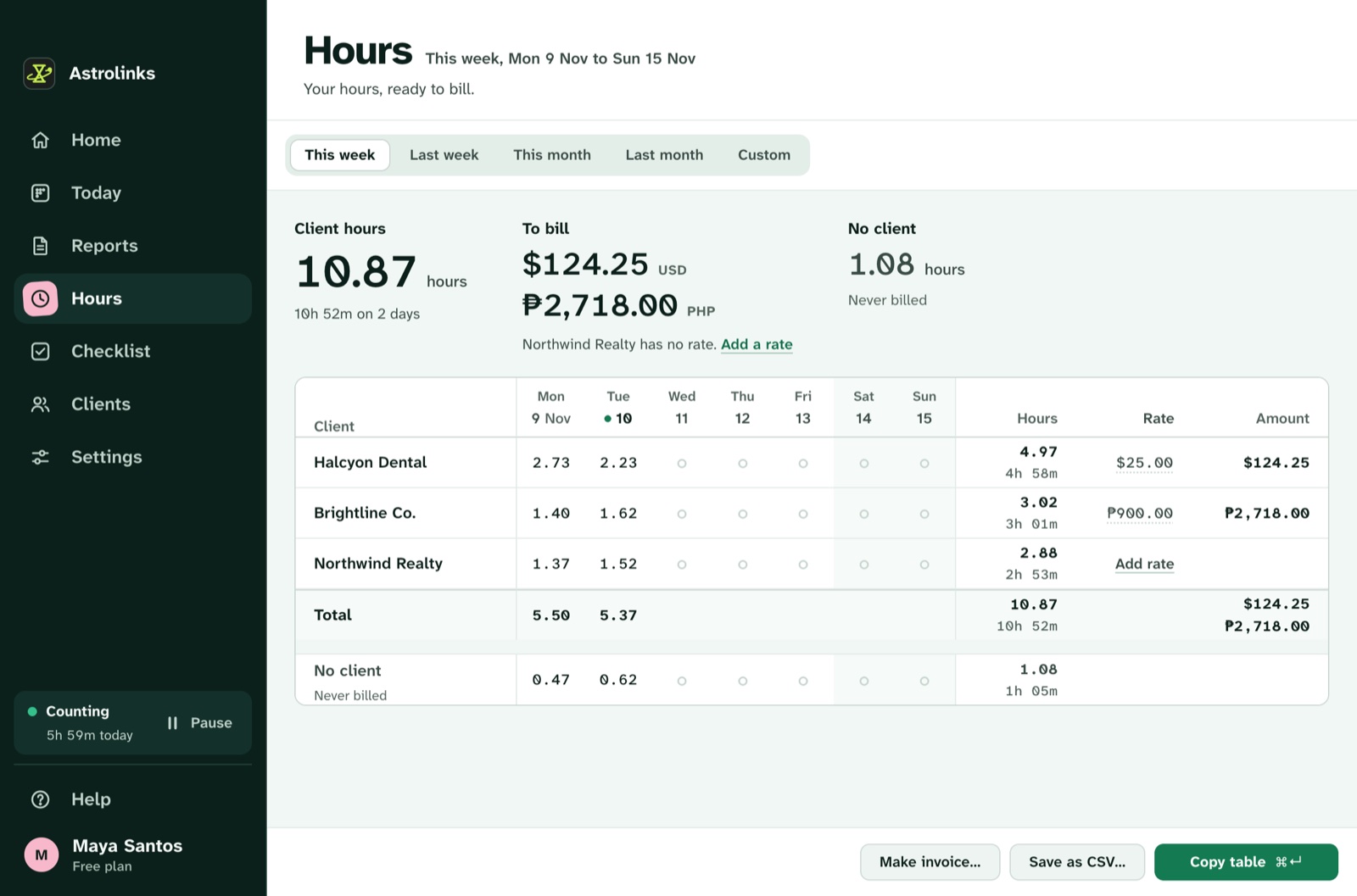
The free plan counts up to 4 hours a day for 2 clients, and every new copy starts with 7 days of Pro, no card. See the Astrolinks page for independent contractors, or download Astrolinks.
Sources
- IRS, Independent contractor (self-employed) or employee?
- IRS, Behavioral control
- IRS, Recordkeeping
- US Department of Labor, Misclassification of employees as independent contractors under the FLSA