 Astrolinks


Short answer
Good remote team collaboration comes from a few shared rules more than from tools: one place for each kind of information, written updates by default, one owner and due date per task, agreed response times, clean handoffs between time zones, and a few well-run meetings. Tools like Slack and Asana help once everyone agrees how to use them.
Astrolinks gives each person a daily report written from their own private log. No screenshots. Get it free →
When a remote team struggles, it's rarely because people don't want to work together. It's because they can't find things, don't know who owns what, wait hours for answers, or lose context every time work moves from one time zone to the next.
Good remote team collaboration is mostly a few shared rules, written down and followed. Tools help, but only once everyone agrees how to use them. This guide covers the ground rules, async habits, handoffs across time zones, the tools you need and the mistakes to avoid. It's written for small teams and agencies with remote or offshore staff.
What makes remote collaboration hard?
In an office, a lot of collaboration happens by accident: you overhear a problem, catch someone in the kitchen, see a colleague is stuck. Remote teams lose all of that. Common results:
- Information scattered everywhere. A brief in email, feedback in Slack, the file in Drive, the decision in someone's head.
- No clear owner. Three people think someone else is handling the client request.
- Slow answers. A question asked at the end of your day reaches someone at the start of theirs, or not at all.
- Lost context at handoffs. The next person doesn't know what was tried, what the client said, or what's urgent.
- Too many meetings. Teams try to replace hallway chats with calls, and the calendar fills up.
- Quiet voices get lost. People who don't like to interrupt, or who work in a second language, rarely speak up on group calls.
Each of these has a simple fix.
Rule 1: One place for each kind of information
Decide, and write down, where each thing lives:
| Information | Where it goes |
|---|---|
| Quick questions and chat | Team chat (one channel per client or project) |
| Tasks, owners and due dates | Task manager |
| Briefs, SOPs, decisions | Shared docs or a wiki |
| Files and designs | Shared drive, organized by client |
| Daily progress | End-of-day update, same format for everyone |
| Logins | Password manager, never chat |
If a decision is made on a call or in chat, someone writes it in the doc or task. "If it isn't written down, it didn't happen" is a good team motto. Our guide to remote team communication tools suggests a tool for each row.
Rule 2: Every task has one owner and one due date
"Can someone look at this?" is how tasks get dropped. Every task needs exactly one person responsible and a date. Others can help, but one name is on it.
When you assign work, include what done looks like, where the files are, and who to ask. Thirty extra seconds of clarity saves a round of questions across time zones.
Rule 3: Write first, meet second
Async, written communication is the backbone of remote collaboration. It lets people work in their own hours, gives quieter team members a voice, and leaves a record you can search later.
- Write complete messages. Context, the question, and what you need by when, in one message, instead of "hey, got a minute?"
Here's the difference in practice. Instead of:
hey, got a minute about Brightline?
write:
Brightline: the client wants the homepage banner changed before
Thursday's launch. New copy is in the brief (link). Can you swap it
in and send me the preview by Wednesday noon your time? If the
image size is a problem, use the old one and tell me.
The second one can be answered while you're asleep.
- Use threads so conversations stay together.
- Share short screen recordings (Loom or similar) for anything easier to show than describe.
- Save meetings for decisions that need discussion, sensitive topics and building relationships.
Our guide to async check-ins for remote teams goes deeper on making async work.
Rule 4: Agree on response times
Uncertainty about when someone will reply causes a lot of stress. Agree on simple expectations, for example:
- Chat during overlap hours: reply within 2 hours
- Chat outside overlap hours: reply at the start of your next shift
- Urgent issues: a phone call or a dedicated channel, used rarely
- Comments on docs and tasks: within one working day
Write these down and let people mute notifications outside their working hours without guilt.

Rule 5: Clean handoffs across time zones
For teams spread across time zones, such as an agency in the US with staff in the Philippines, handoffs are where collaboration breaks or flows. A good handoff at the end of each shift answers:
- Done: what's finished, with links
- In progress: what's half done and where it's at
- Next: what should happen next, and by whom
- Blocked: anything waiting on someone
- Heads-up: client mood, deadlines, anything surprising
A real one is short:
Handoff, Tue 6 PM ET (Sam to Joy)
Done: Lumen ad set A/B test live (link). Client approved new budget.
In progress: Fernway monthly report, charts done, summary not started.
Next: Joy to finish Fernway summary and send to me for review.
Blocked: Lumen landing page waiting on dev fix, ticket #482.
Heads-up: Fernway's owner is unhappy about October leads. Keep it factual.
It takes five minutes and saves hours of confusion. Our handover note template is ready to copy, and time zone etiquette for remote freelancers covers the scheduling side.
Rule 6: A few meetings, run well
Most small remote teams need only:
- A weekly team call (30 minutes): priorities, wins, problems. Recorded, with notes, for anyone who can't attend.
- A weekly one-on-one with each person (15 minutes).
- Ad-hoc calls for tricky problems, booked with an agenda.
Rotate the team call time if some people always get stuck with the late slot. And if a meeting regularly ends without a decision or action, cut it or change it.
What tools do remote teams need to collaborate?
Tools matter less than rules, but you do need a few. A typical small-team setup:
- Chat: Slack, Google Chat or Microsoft Teams
- Tasks: Asana, Trello, ClickUp or Monday.com
- Docs and files: Google Workspace or Notion, plus a password manager
- Video: Zoom or Google Meet, and Loom for recorded walkthroughs
- Daily updates: a Slack channel, a form, or a tool that drafts them for you
Pick one tool per job and resist adding more. We compare options for each job, with a lean stack for small agencies, in the best software for managing remote employees.
What are the most common remote collaboration mistakes?
- Too many tools. Two chat apps or two task managers means things fall between them.
- Decisions only in calls. If nobody writes it down, half the team won't know.
- Vague requests. "Can you take a look?" with no context, deadline or owner.
- Waiting for replies instead of moving on. Give people a fallback task list so being blocked doesn't mean being idle.
- Status meetings instead of written updates. A daily written update replaces most of them.
- Forgetting the human side. Collaboration is easier between people who know each other a little. A non-work channel and an occasional social call help.
A one-page team agreement you can copy
Paste this into a doc, adjust it, and share it with your team:
Where things go: Chat for quick questions (one channel per client). Tasks in [Asana]. Briefs and SOPs in [Google Drive > Clients]. Logins in [1Password].
Tasks: Every task has one owner and a due date.
Response times: Chat within 2 hours during overlap hours ([9 to 11 AM ET]). Otherwise, by the start of your next shift. Urgent: call [name].
Daily update: At the end of each shift, post done, next and blocked in [#daily-updates].
Meetings: Team call [Mondays 9 AM ET], recorded. One-on-ones weekly, 15 minutes.
Handoffs: Before you log off, leave a handoff note on anything someone else will pick up.
How do you get the team to actually follow the rules?
A team agreement only works if people use it. You don't need a big launch meeting. A two-week rollout is enough:
- Draft it yourself first. Fill in the template above with how you think things should work.
- Ask for edits in writing. Share the doc and give everyone three days to comment. People follow rules they helped shape.
- Start with one habit. The daily written update is usually the best first step, because it makes everything else visible.
- Model it. If the owner still sends tasks by voice note at 11 PM, nobody else will take the rules seriously.
- Redirect gently. When something lands in the wrong place, move it and say so once: "Moving this to Asana so it has an owner."
- Review after two weeks. Ask one question in the team call: "Which rule isn't working?" Change it, and update the doc.
Where Astrolinks fits
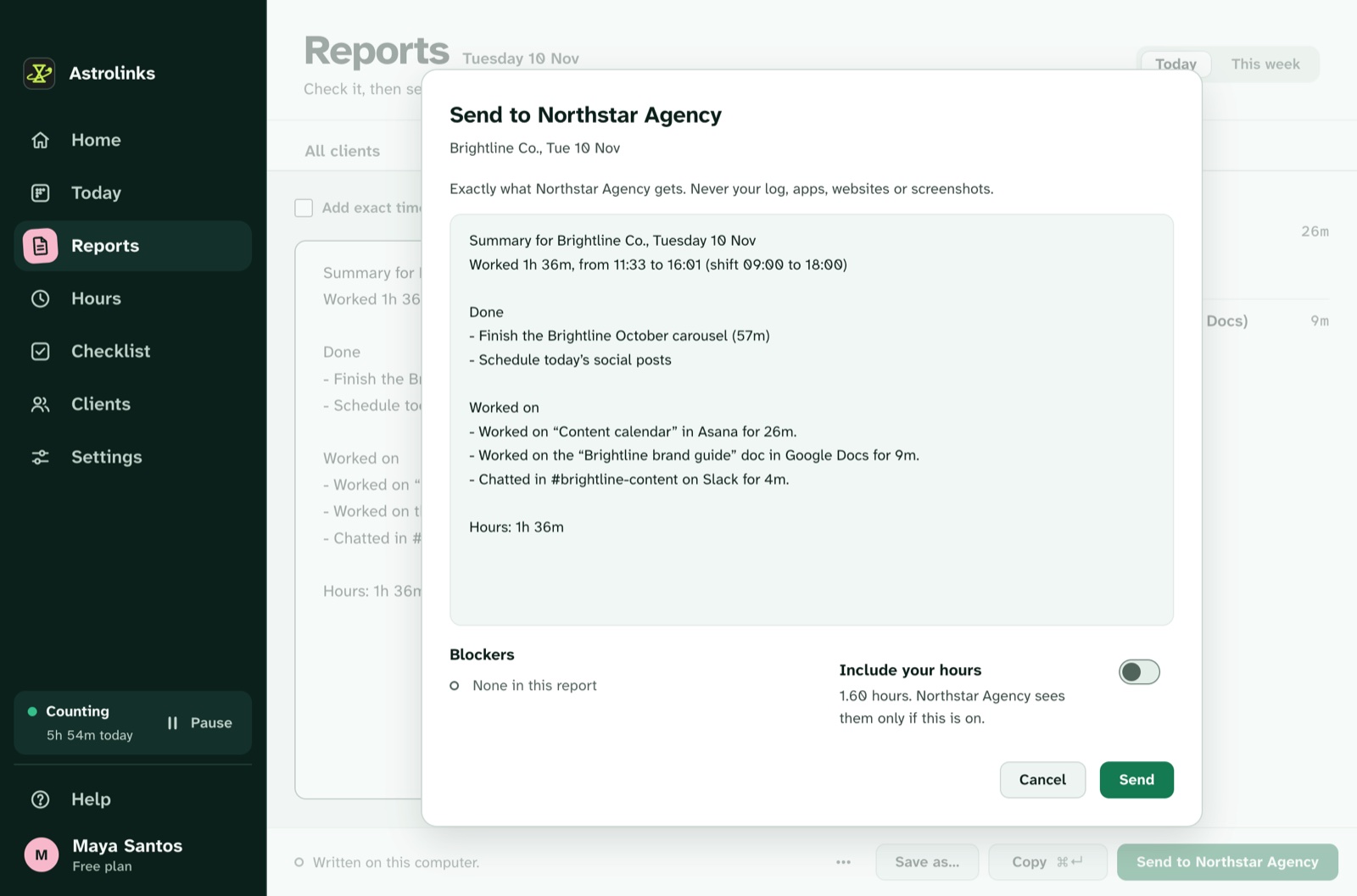
We make Astrolinks, so read this with that in mind. Astrolinks is a desktop app for Mac and Windows that takes care of the daily update and handoff part. It keeps a private log of each person's workday on their own computer, sorted by client, and drafts their end-of-day report at clock-out: done, next, blocked. They check it and send it. On the Team plan, every report lands in one inbox, split by client, so the next shift and the manager know exactly where things stand. No screenshots and no keystroke logging.
If you run an agency with remote staff, we're running free 14-day pilots for up to 5 people, no card needed. Ask for a pilot or read about Astrolinks for agencies.
The short version
Remote team collaboration works when everyone follows a few simple rules: one place for each kind of information, one owner per task, writing before meeting, agreed response times, clean handoffs at the end of every shift, and a small number of well-run meetings. Pick one tool per job, write a one-page team agreement, and start a daily written update. Most teams feel the difference within two weeks.