 Astrolinks


Short answer
The best privacy-first time trackers take no screenshots and log no keystrokes. ActivityWatch is free, open source and local. Memtime keeps an automatic timeline offline on your computer. TickTappy is a private manual timer. Timely and Toggl Track avoid surveillance but run in the cloud. Astrolinks keeps the log local and writes each client's end-of-day report.
Astrolinks tracks work by client with no screenshots or keystroke logging, and the log stays on your computer. Get it free →
Search for a privacy-first time tracker and you get lists that mix two very different kinds of tool: apps that keep your day to yourself, and apps that simply promise not to spy while sending everything to their servers. Both can be fine. They are not the same thing.
This guide compares six tools people name when they ask for private time tracking: ActivityWatch, Memtime, TickTappy, Timely, Toggl Track and Astrolinks. Every fact about the other five comes from their own websites, checked in November 2026. We make Astrolinks, so read that entry knowing that. We have tried to describe the others the way we would want to be described.
What makes a time tracker privacy-first?
Five things, and a tool should meet most of them before it gets the label.
- No screenshots, no keystrokes, no webcam. This is the floor. Monitoring tools sell screenshots as proof of work; a privacy-first tool does not have the feature at all, so nobody can switch it on later.
- Your data stays with you. The strongest version keeps the log on your own computer. A weaker version stores it in the vendor's cloud but keeps it private to you.
- You choose what anyone else sees. If a client or manager sees anything, it should be something you reviewed and sent, not a live feed.
- It records only what it needs. App names and window titles are usually enough to sort time. Full web addresses with search terms and tokens are not.
- You can pause and delete. A private tracker has a pause button and a delete button that really deletes.
Keep those five in mind as you read the list.
The six tools at a glance
| Tool | How it tracks | Where your data lives | Screenshots | Best for |
|---|---|---|---|---|
| ActivityWatch | Automatic | Your computer | No | A free, technical, local log |
| Memtime | Automatic | Your computer (offline) | No | Filling timesheets in other tools |
| TickTappy | Manual timer | Your device, sync optional | No | A simple private timer on Apple devices |
| Timely | Automatic, AI timesheets | Timely's online service | No | Agencies and consultancies |
| Toggl Track | Manual timer, optional Timeline | Toggl's cloud | No | Teams that like timers |
| Astrolinks | Automatic, sorted by client | Your computer | No | Freelancers and VAs who report to clients |
1. ActivityWatch: free, open source and local
ActivityWatch is free, open source software that records the app in front, its window title and, with its browser extensions, the active tab. Its site says your data is stored locally and never leaves your device, and there is no sign-up. It runs on Windows, macOS, Linux and Android.
The trade is that it is a raw tracker. You get charts and a timeline, and what you do with them is up to you. There are no clients, invoices or reports.
- Best for: people who want a free, private log and don't mind some setup
- Price: free, with optional donations
2. Memtime: an offline timeline for your timesheets
Memtime records your computer activity automatically and builds a timeline of your day. Its privacy page says the data is kept 100% offline, in a single copy on your device, and that the timeline is never uploaded. It runs on Mac, Windows and Linux.
Memtime's strength is getting that time into other systems: it lists more than 100 integrations with project and accounting tools, and data goes to one only when you connect it. You still turn the timeline into time entries yourself, which suits people who already live in a timesheet tool.
- Best for: people who must log time in a company system and want a private record to fill it from
- Price: a 14-day free trial; see their pricing page for plans
3. TickTappy: a private manual timer
TickTappy is a timer you start and stop yourself, on iPhone, iPad, Mac, Apple Watch, the web and a Chrome extension. It needs no account, has no activity monitoring, and keeps entries on your device unless you turn on sync.
Because it records only what you tap, it is about as private as tracking gets. It also means time you forget to start is time you don't have.
- Best for: people on Apple devices who want a simple, private timer
- Price: free; optional sync is $9.99 a year or $29.99 once

4. Timely: private timelines for agencies
Timely tracks work across apps automatically and uses AI to draft timesheets, which people approve with a click. Its site says it does not log keystrokes or take screenshots, and that only entries a person approves are shared with the team.
Timely is a business tool sold to agencies, consultancies and larger companies, with integrations for tools like Jira, Asana and QuickBooks. Your approved time lives in your Timely account online rather than only on your computer.
- Best for: agencies and consultancies that want automatic timesheets without surveillance
- Price: a 14-day free trial; plans on request or on their pricing page
5. Toggl Track: the friendly cloud timer
Toggl Track is one of the best-known timers, on Mac, Windows, the web, iPhone and Android. Toggl publishes an anti-surveillance statement saying it does not monitor screens, keystrokes or webcams. Its optional Timeline records your activity privately so you can turn it into entries.
Time entries live in Toggl's cloud, which is what makes the team reports work. If "privacy-first" means "no spying", Toggl qualifies. If it means "nothing leaves my computer", it doesn't.
- Best for: people and teams who are happy to start a timer
- Price: a free plan for small teams; paid plans per user a month
6. Astrolinks: local log, written client reports
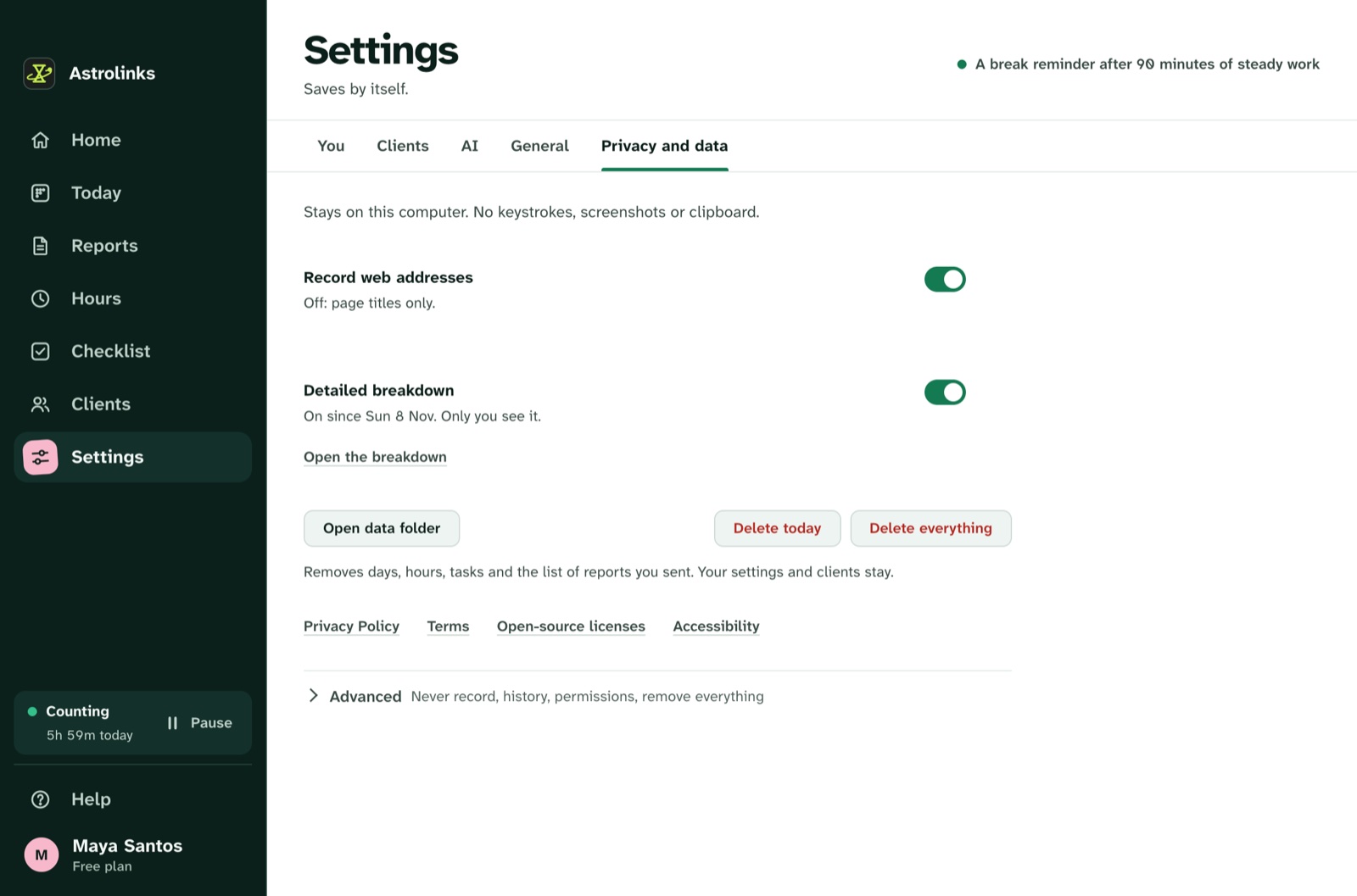
Astrolinks is a desktop app for Mac and Windows. Every 5 seconds it notes the app in front, its window title and the web address without anything after "?" or "#". It never takes screenshots or reads keystrokes, and it skips private browser windows. The log stays on your computer, and nothing is sent anywhere unless you press a button.
Where it differs from the rest of this list is what it does with that log. Astrolinks sorts your time by client with simple rules, then writes each client's end-of-day report when you clock out: what you worked on, for how long, blockers and plans for tomorrow. You read it, edit it, then Copy it, send it to Slack, or save it as a PDF. The same hours feed invoices.
On the Team plan, a company gets an inbox for the reports people choose to send, never their activity. That makes it a privacy-first answer to tools like Time Doctor and Hubstaff.
- Best for: freelancers, virtual assistants and remote workers who report to clients every day
- Price: a free plan (4 counted hours a workday, 2 clients) and a 7-day Pro trial with no card; Pro from $9 a month
Which privacy-first time tracker should you choose?
Start with where you need your time to end up.
- Just for yourself, free: ActivityWatch.
- Into a company timesheet system: Memtime, because of its integrations.
- A plain timer you trust: TickTappy, or Toggl Track if you also want team reports and don't mind the cloud.
- An agency moving off monitoring software: Timely, or Astrolinks Team if you want daily reports rather than timesheets.
- A daily report your client actually reads: Astrolinks. It is the only tool here that writes the report for you.
If two tools fit, try both for a week. A tracker only works if you keep using it, and the one that matches how you already work will win.
How do privacy-first trackers differ from employee monitoring software?
Monitoring tools like Time Doctor, Hubstaff and ActivTrak are built for a manager who wants to watch. Depending on the plan and settings, they can take screenshots, score activity from keyboard and mouse use, and show live status. The person being tracked often cannot see or edit what the employer sees.
Privacy-first tools reverse that. The person doing the work keeps the record and decides what to share. Managers still get information, but as reports and approved entries instead of a feed. Many remote workers prefer it, and it avoids the trust problem that comes with screenshots. Our guide to time tracking without screenshots goes deeper.
Can a cloud time tracker still be private?
Yes, within limits. A cloud tool that takes no screenshots and lets you approve entries before anyone sees them protects you from your manager. It does not protect your data from the vendor, from a breach, or from a legal request to the vendor. Those risks are usually small, but they exist only when your data is on someone else's server.
If you work with health, legal or financial clients, or simply want the shortest possible list of people with access, a local tool is the safer choice. If team visibility and mobile apps matter more, a well-run cloud tool like Toggl Track or Timely is reasonable.
Questions to ask before you install any tracker
Before you trust a tracker with your workday, check these on the vendor's own site:
- Does it take screenshots, now or on any plan?
- Does it record keystrokes or score your activity?
- Where is the data stored, and can you delete all of it?
- Does it record full web addresses, or only the site?
- Can you pause it, and does it skip private browser windows?
- Who else can see your data, and when?
A tool that answers all six clearly, in plain words, is usually one you can trust. Our checklist on privacy-friendly time tracking has the longer version.
Astrolinks is one answer to those questions. If you want to see what it records before you decide, the privacy page lists every field.